
31.4.2.1 I2C Bus State Logic
The bus state logic includes several logic blocks that continuously monitor activity on the I2C bus lines in all sleep modes in which the GCLK_SERCOM_x clocks are running. The start and stop detectors and the bit counter are all essential for determining the current bus state. The bus state is determined according to the following figure. Software can obtain the current bus state by reading the Host Bus State bits in the STATUS register (STATUS.BUSSTATE). The value of STATUS.BUSSTATE shown in the figure is binary.
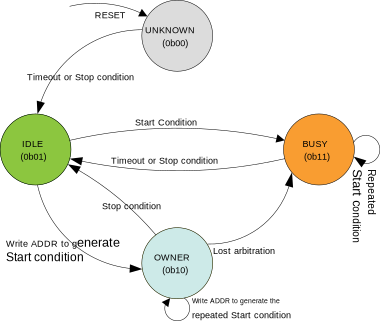
The bus state machine is active when the I2C host is enabled.
0b00). From
the UNKNOWN state, the bus transitions to IDLE (0b01) by either:- Writing
0b01to STATUS.BUSSTATE - A Stop condition being detected on the bus
- If the inactive bus time-out is configured for SMBus compatibility (CTRLA.INACTOUT) and a time-out occurs
When the bus is IDLE, it is ready for a new transaction. If a Start condition is issued on the
bus by another I2C host in a multi-host setup, the bus becomes BUSY
(0b11). The bus returns to IDLE either when a Stop condition is detected or
when a timeout occurs, provided that the inactive bus timeout is configured.
If a Start condition is generated internally by writing the Address bit group in the Address
register (ADDR.ADDR) while the bus is IDLE, the OWNER state (0b10) is
entered. If the complete transaction is performed without interference—that is, arbitration is
not lost—the I2C host can issue a Stop condition, returning the bus state to
IDLE.
However, if a packet collision is detected while in the OWNER state, arbitration is assumed to be lost and the bus state becomes BUSY until a Stop condition is detected. A repeated start condition changes the bus state only if arbitration is lost while issuing the repeated Start.
1).