
1 MCC Melody Core
MPLAB® Code Configurator (MCC) Melody provides Libraries, Drivers, Peripheral Libraries (PLIB) and Hardware Initializers (HWI), for the development of embedded software for Microchip PIC® and AVR® Microcontrollers (MCUs) and dsPIC® Digital Signal Controllers (DSCs). These components are customized via a graphical configuration tool, which generates highly efficient C code. For more details refer to MCC Melody Technical Reference Manual.
1.1 What's New?
The following enhancements are now available in MCC Melody Core v2.10.1:
- Added support of Hex Components in the GUI, currently being used for 16 bit A Core content.
- Added support of cacheData in the Framework, currently being used for CLB module to exchange Pins information.
- General bug fixes and stability updates.
1.2 Repairs and Enhancements
| Type | ID | Description |
|---|---|---|
| New Features | MELODYINFRA-557 | Add the support of Hex Components, currently being used for 16 bit content in Melody. |
| MELODYINFRA-571 | Add the support of cacheData in the Framework, currently being used for CLB module to exchange Pins information. | |
| Bug Fixes | MELODYINFRA-602 | CLB synthesizer takes incorrect instances. |
| MELODYINFRA-494 | Register view does not update for range string fields after value change. |
| Type | ID | Description |
|---|---|---|
| Improvements | MELODYINFRA-476 | Designed an in-memory Hardware data cache for the Melody Server to enhance system performance. |
| MELODYINFRA-469 | Improved the Melody performance by using in-memory Hardware data cache. | |
| MELODYINFRA-485 | Rectified the processing bottlenecks in Melody Framework. | |
| MELODYINFRA-447 | Auto-module feature to filter import options for Dependency selection. | |
| Bug Fix | MELODYINFRA-512 | Application builder - Add Dependency node click does not open parent configuration view. |
1.3 Known Issues
None.
1.4 Installation
MCC Melody is pre-installed on both MPLAB® X IDE and MPLAB® Xpress Cloud-based IDE.
1.4.1 Operating Environment
MPLAB® X IDE
| # | Environments | Operating System |
|---|---|---|
| 1 | MPLAB® X IDE v6.15 or later | Windows OS |
| 2 | MCC Plugin v5.4.1 or later | Linux OS |
| 3 | MCC Core 5.6.1 or later | MAC OS |
MPLAB® Xpress Cloud-based IDE Operating Environments
| # | Browsers |
|---|---|
| 1 | Google Chrome |
| 2 | Mozilla Firefox |
| 3 | Internet Explorer |
| 4 | Safari |
1.4.2 How to install MCC Melody Core in MPLAB® X
Create New Project (Steps to verify latest MCC Melody Core).
- Launch MCC → Click on MCC Icon.
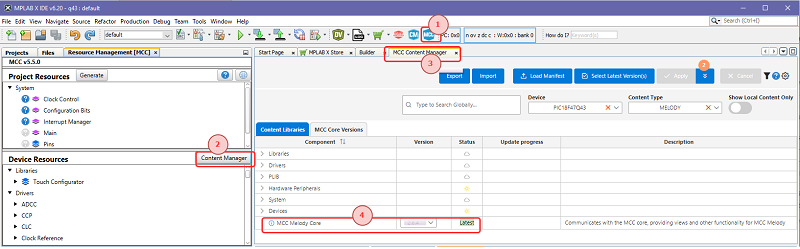
- Open Content Manager -> Click on Content Manager from Device Resources area. for further reference MCC Content Manager.
- Navigate to MCC Content Manager tab and verify latest MCC Melody Core version.
- MCC will restart and the new MCC Melody Core will be active.
Open Existing Project (Steps to verify latest MCC Melody Core).
- Open existing project and click on MCC Icon.
- MCC Core Update -> select "yes".
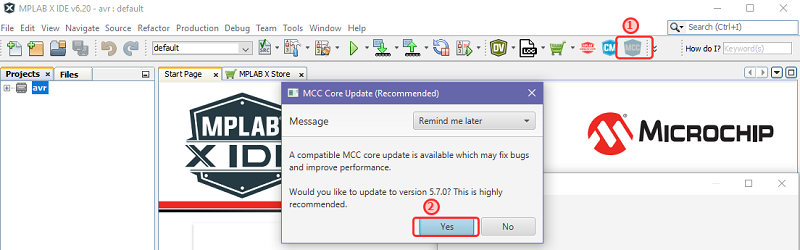
- Wait for MCC and Content Manager to load.
- Open Content Manager -> Click on Content Manager from Device resources area.
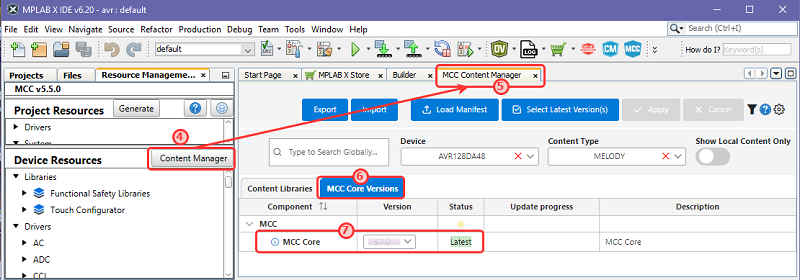
- Navigate to MCC Content Manager tab and verify latest released version.
- MCC Melody Core Versions.
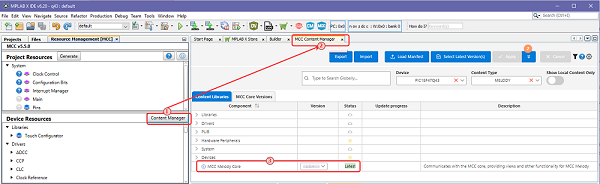
- Verify MCC Core as mentioned in
MPLAB X Operating Environment section.
How to install and use MCC Melody Core in MPLAB® Xpress
No additional installations needed for MPLAB® Xpress IDE Environment.
1.5 Documentation Support
- MCC Melody Technical Reference.
- MCC Content Manager Help - Provides information about MCC Content Manager.
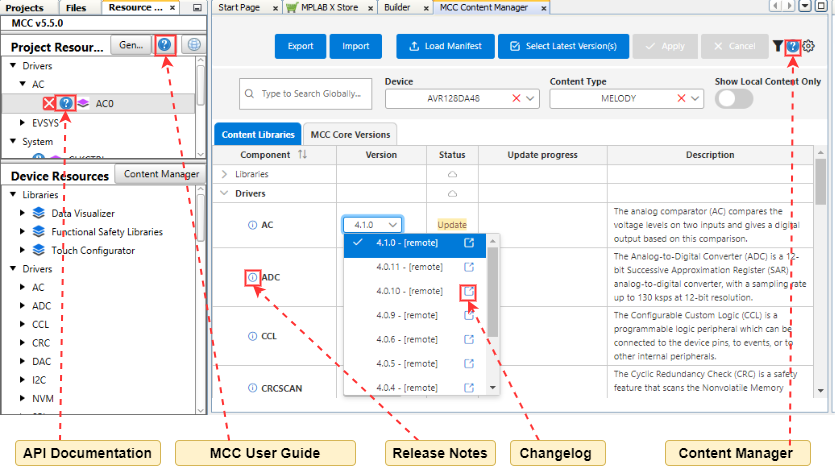
- Release notes are available for each component(s) in MCC Content Manager.
- Additional information is available for each version of the component in the MCC Content Manager in the Version selection dropdown. Example: OPAMP Driver Change Log.
- API Documentation is available for each component through the Resource Management View.
1.6 Supported Devices and Families
For supported devices and modules, please refer to the following release notes: