1.4.3 CAN Bootloader Configurations
Bootloader Specific User Configurations
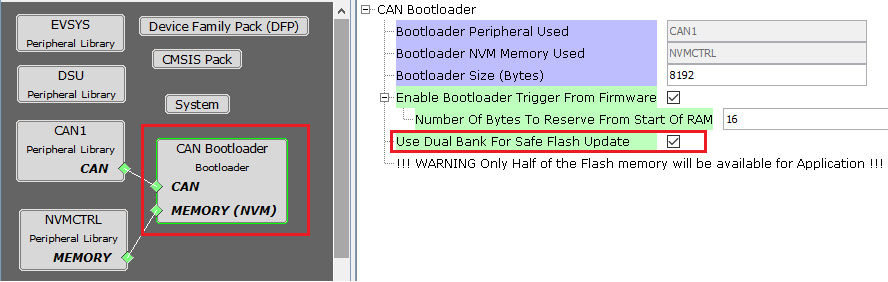
For devices with Dual Bank support and No Data Cache.
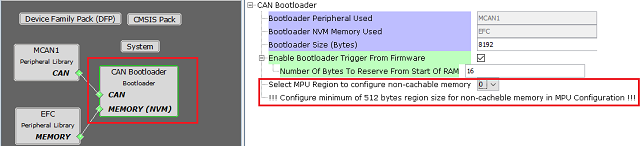
For devices with No Dual Bank support and Data Cache.
Bootloader Peripheral Used:
- Specifies the communication peripheral used by bootloader to receive the application
- The name of the peripheral will vary from device to device
Bootloader NVM Memory Used:
- Specifies the memory peripheral used by bootloader to perform Flash operations
- The name of the peripheral will vary from device to device
Bootloader Size (Bytes):
- Specifies the maximum size of Flash required by the bootloader
- This size is calculated based on Bootloader type and Memory used
- This size will vary from device to device and should always be aligned to device erase unit size
Enable Bootloader Trigger From Firmware:
This Option can be used to Force Trigger bootloader from application firmware after a soft reset. It does so by reserving the specified number of bytes in SRAM from the start of the RAM. The reserved memory is updated by the application with a pre-defined pattern. The bootloader firmware in the bootloader_Trigger() routine, can check the reserved memory for the pre-defined pattern and enter bootloader mode if the pattern matches.
Number of Bytes to Reserve From Start of RAM:
- This option adds the provided offset to RAM Start address in bootloader linker script
- Application firmware can store some pattern in the reserved bytes region from RAM start for bootloader to check at reset in bootloader_Trigger() function
Use Dual Bank for Safe Flash Update:
- Used to configure bootloader to use Dual banks of device to upload the application
- This option is visible only for devices supporting Dual Flash banks
Select MPU Region to Configure Non-cacheable Memory:
Used to select the MPU region for which he SRAM has been configured as non-cahceable space
Configure the region selected above in MPU settings of MCC as shown in Bootloader MPU Configurations
A seperate section will be created for this region in the custom linker script generated for bootloader
This option is visible only for devices which have Data cache
Bootloader Memory Protection Unit (MPU) Configurations
Open MPU settings from MCC->Tools option. Select Enable MPU
Configure the region selected in Bootloader component as ram_nocache with other parameters as shown:

Bootloader Linker code for ram_nochache.
- For CAN bootloader below xxx_message_ram section will be added to the custom linker file generated:
- Note: xxx should be replaced with the CAN PLIB being used.
- Example: MCAN1
MEMORY
{
  rom (rx) : ORIGIN = ROM_START, LENGTH = ROM_SIZE
  ram (rwx) : ORIGIN = RAM_START, LENGTH = RAM_SIZE

  /* The address mentioned here should match with address mentioned in MPU settings */
  ram_nocache (RWX) : ORIGIN = 0x2045f000, LENGTH = (1 << (11 + 1))

}

...
...

.mcan1_message_ram (NOLOAD):
{
    . = ALIGN(4);
    _s_mcan1_message_ram = .;
    *(.mcan1_message_ram)
    . = ALIGN(4);
    _e_mcan1_message_ram = .;
} > ram_nocache

...
- CAN Bootloader will use this section to to allocate MCAN Message RAM configuration in contiguous non-cacheable buffer
static uint8_t CACHE_ALIGN __attribute__((space(data), section (".mcan1_message_ram"))) mcan1MessageRAM[MCAN1_MESSAGE_RAM_CONFIG_SIZE];

/* Set MCAN1 Message RAM Configuration */
MCAN1_MessageRAMConfigSet(mcan1MessageRAM);
Bootloader System Configurations
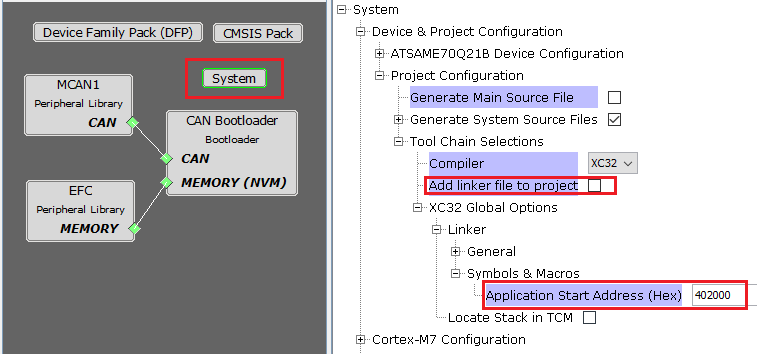
- Application Start Address (Hex):
- Start address of the application which will programmed by bootloader
- This value is filled by bootloader when its loaded which is equal to the bootloader size. It can be modified as per user need
- This value will be used by bootloader to Jump to application at device reset
Note:
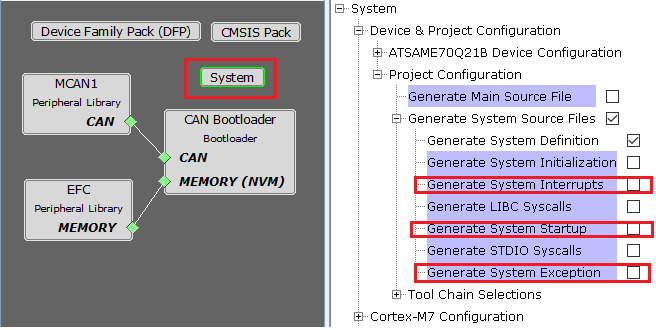
For optimizing the code Bootloader component disables generation of default interrupt and exception files as shown below
Enabling these interrupts explicitly may still not work as bootloader uses custom startup file which has its own Interrupt table populating only the reset handler
For MPUs (Microprocessors)
Bootloader Specific User Configurations
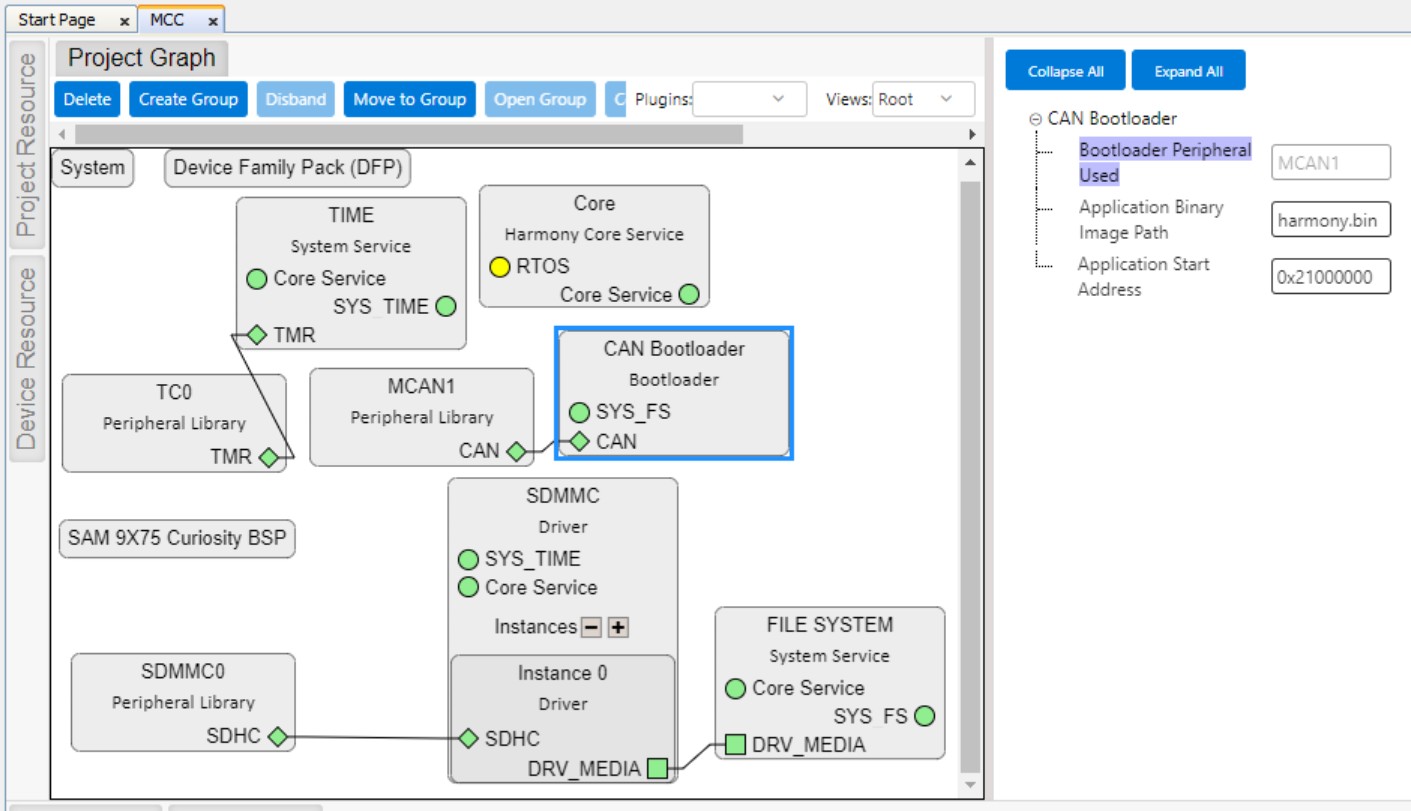
Bootloader with SD/eMMC media
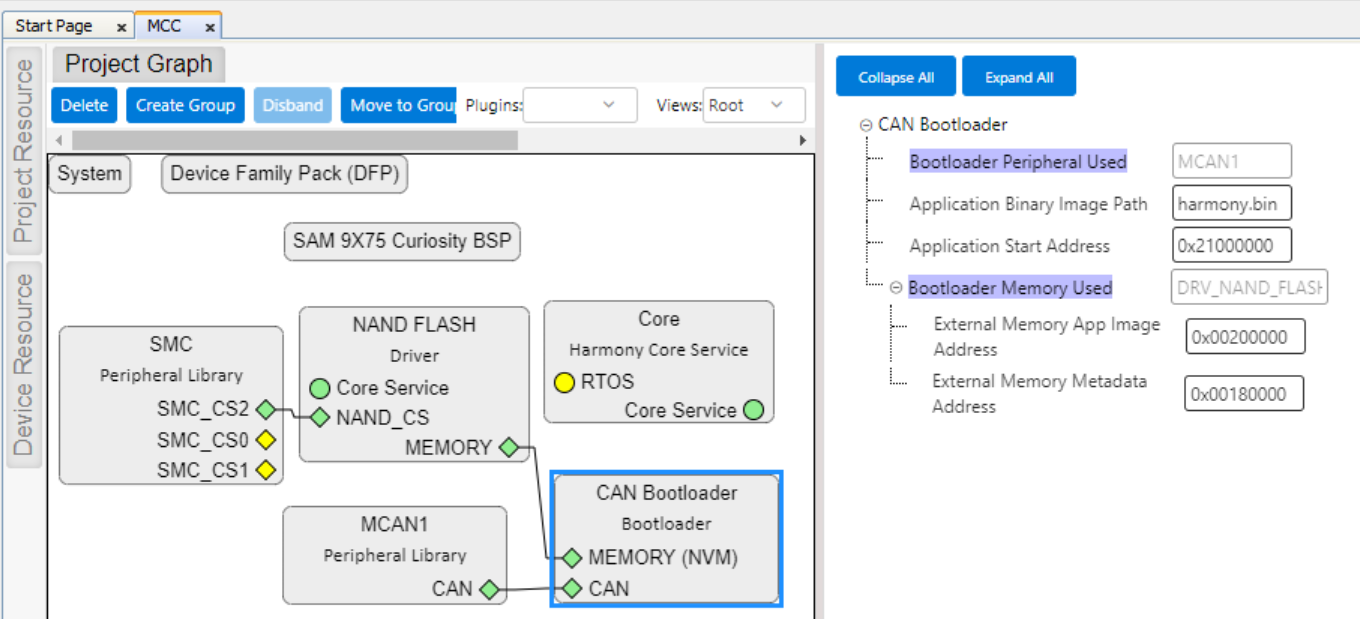
Bootloader with NAND Flash media
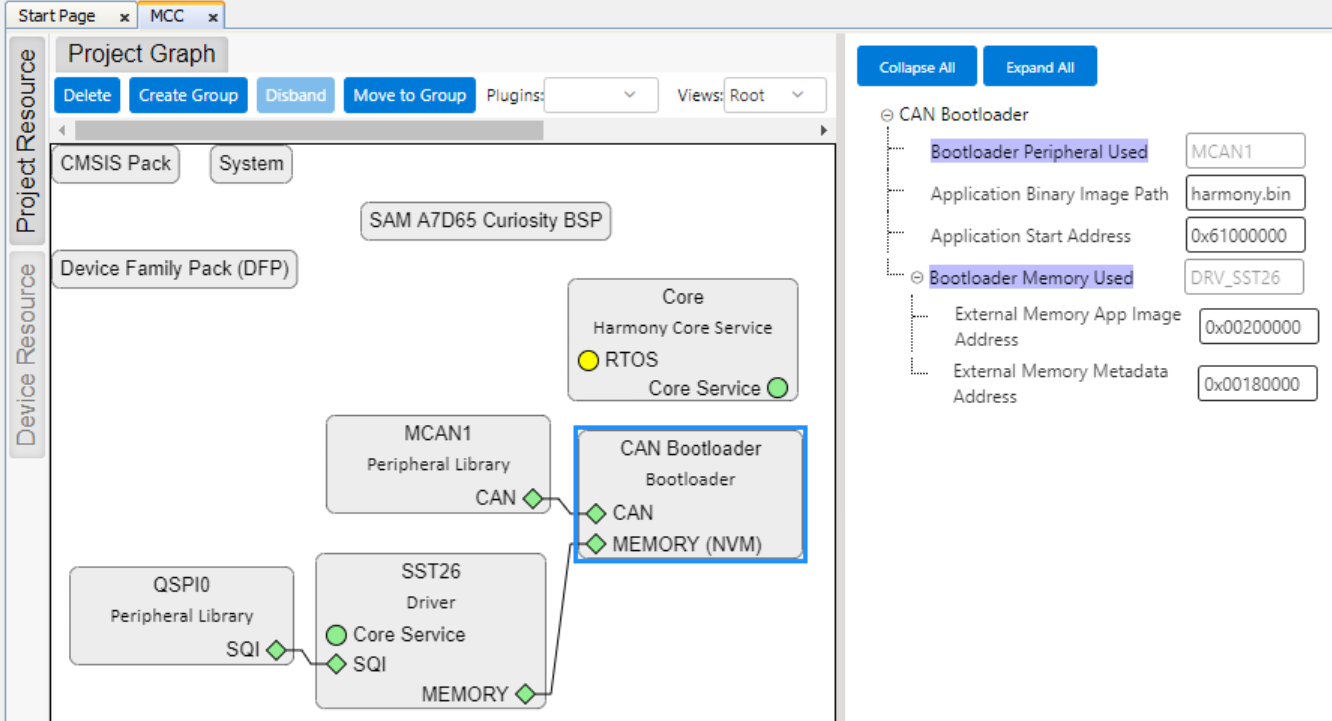
Bootloader with Serial Flash media
Bootloader Peripheral Used:
- Specifies the communication peripheral used by bootloader to receive the application
- The name of the peripheral will vary from device to device
Application Binary Image Path:
- Application binary image name harmony.bin (by default)
Application Start Address (Hex):
- Start address of the application on which bootloader will load and execute application
- This value will be used by bootloader to load and jump to application at device reset
Bootloader Memory Used (For Serial/NAND Flash):
- Specifies the Flash Driver used by bootloader to receive the application
- The name of the Flash Driver will vary from device to device
External Memory App Image Address (Hex)(For Serial/NAND Flash):
- External Memory App Image Address (0x00200000) on which bootloader will program the application image
- This value will also be used by bootloader to load the application from external memory to the DDR memory and execute it
External Memory Metadata Address (Hex)(For Serial/NAND Flash):
- External Memory Metadata Address (0x00180000) on which bootloader will program the size of application binary
- This value will be used by bootloader to read the application image from external memory
MPLAB X Settings (For MPUs)
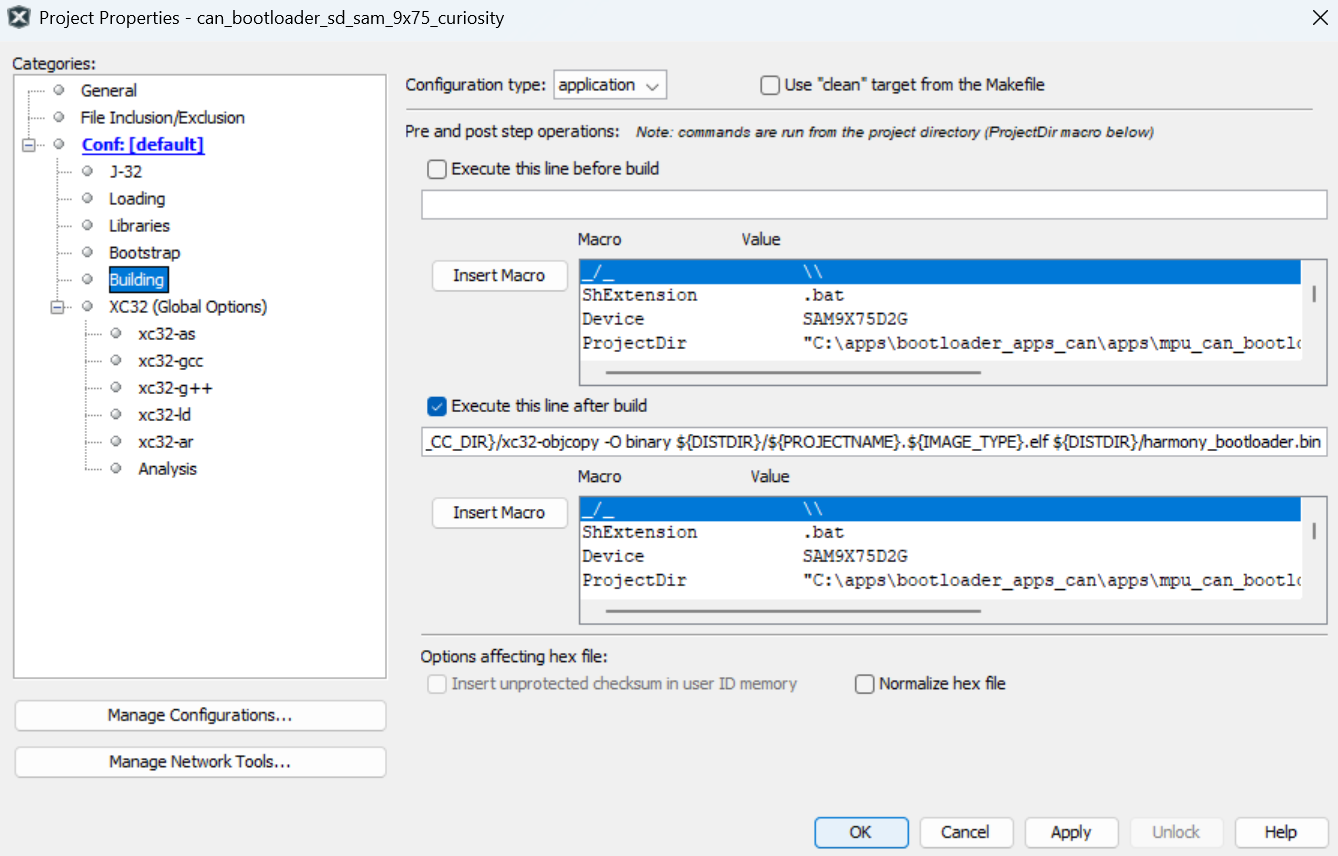
- Specifying post build option to automatically generate the Harmony 3 bootloader binary file from ELF file once the build is complete
${MP_CC_DIR}/xc32-objcopy -Obinary ${ImageDir}/${ConfName}.X.${IMAGE_TYPE}.elf ${ImageDir}/harmony_bootloader.bin