
Introduction
Microchip Technology continues to enhance the development experience for embedded engineers by providing comprehensive support for the PIC32CM-PL family of microcontrollers. In this release, both CMSIS drivers and the Device Peripheral Library (PLIB) are included, offering a versatile and robust software foundation for application development.
The CMSIS (Common Microcontroller Software Interface Standard) drivers provide a standardized, vendor-independent API for accessing key peripherals on ARM Cortex-M based devices. This enables developers to write portable, maintainable code and easily integrate third-party middleware. The inclusion of CMSIS drivers ensures compatibility with industry-standard development tools and streamlines the migration process between different ARM-based microcontrollers.
Complementing the CMSIS drivers, the Device PLIB provides direct, low-level access to all on-chip peripherals specific to PIC32CM-PL devices. This allows for fine-grained control and optimization, catering to advanced use cases and performance-critical applications. With both high-level abstraction (CMSIS drivers) and low-level control (PLIB) available, developers have the flexibility to choose the best approach for their project requirements.
By bundling CMSIS drivers and the Device PLIB in this release, Microchip empowers engineers to accelerate development, improve code quality, and maximize the capabilities of Microchip microcontrollers across a wide range of embedded applications.
1 Included in this Release
This release introduces comprehensive support for both CMSIS drivers and the Device Peripheral Library (PLIB), providing developers with a robust foundation for embedded application development. The following components are included:
-
CMSIS Drivers
- Standardized APIs for key peripherals such as USART, SPI, I2C, GPIO, and Flash
- Abstraction layers that enable seamless integration with middleware
- Source code and documentation for easy adoption and customization
- Example projects demonstrating the usage of CMSIS drivers with PIC32CM-PL hardware
-
Device Peripheral Library (PLIB)
- Low-level access routines for all on-chip peripherals specific to PIC32CM-PL devices
- Direct register-level control for advanced configuration and optimization
-
Template Project
- Blank MCHP Driver Solution
-
Example Projects
- CNANO MCHP Blinky Example
- CNANO MCHP Driver Example
2 Installation Instructions
| # | Tools | Version |
|---|---|---|
| 1 | VS Code IDE | 1.108 or later |
| 2 | Arm Keil Studio Pack (MDK v6) | 1.20.0 or later |
| 3 | Arm CMSIS-Toolbox | 2.12.0 or later |
| 4 | Keil µVision IDE | 5.43.1.0 or later |
| 5 | AC6 Compiler/MDK Toolbox | 1.1.0 or later |
| 6 | GCC Compiler | 14.3.1 or later |
| 7 | IAR Compiler | 9.70.2 or later |
| 8 | CLANG Compiler | 6.24.0 or later |
Dependencies:
| # | Packs | Version |
|---|---|---|
| 1 | CMSIS | 6.3.0 or later |
| 2 | CMSIS-Driver | 2.10.0 or later |
| 3 | PIC32CM-PL DFP | 1.0.313 |
Installation steps:
VS Code: CMSIS Toolbox
-
Step 1: Install VS Code and CMSIS-Toolbox Extension
- Download and install Visual Studio Code from the official website: VS Code Download
- Open VS Code
- Go to the Extensions view and install "Arm Keil Studio Pack (MDK v6)"
- Navigate and click on the
 CMSIS icon in the left pane to launch project settings
-
Step 2: Install Required Packs (via terminal)
-
Install CMSIS-Toolbox cli: To install CMSIS-Toolbox, follow the steps mentioned in the official documentation: https://open-cmsis-pack.github.io/cmsis-toolbox/installation/
-
Initialize the public pack index (this is only needed once, or if index is missing or outdated):
cpackget init https://www.keil.com/pack/index.pidx -
Update the index to fetch the latest version information (run this regularly, especially after new packs are released):
cpackget update-index -
Install the required Microchip DFP for your target device or family (for example, to install support for the PIC32CM-PL series):
cpackget add Microchip::PIC32CM-PL_DFP - Install the required
Microchip.CMSIS-Driver Packs (for example, to install support for the PIC32CM-PL
series):
cpackget add Microchip::CMSIS-Driver_PIC32CM-PL -
Tip: To update use:
cpackget update Microchip::PIC32CM-PL_DFP - Verify installation: Here is an example of what you should see in a Git Bash terminal after installing the packs above:
cpackget list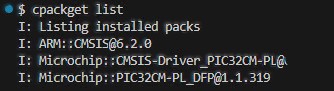 Tip: Browse all available Microchip packs at packs.download.microchip.com/ — search for your exact device or family to confirm the pack name
 -
Tip: ARM::CMSIS@6.3.0 (installed by the Arm Keil Studio Pack (MDK v6) extension)
-
Step 3: For Target Board/Device Selection
In the CMSIS extension UI, select the following parameters- Target board, e.g., "PIC32CM6408PL10048-CNANO"
- Target device, e.g., "PIC32CM6408PL10048"
- Select example application, e.g., "CNANO MCHP Blinky Example"
- Select solution folder and base folder in your file system
- Confirm your selection to proceed with the project setup by pressing Create
3 What is New?
3.1 In this Release
This release introduces several significant features for the PIC32CM-PL family, focusing on developer experience, expanded functionality, and flexibility. This release include:
-
Devices supported
- PIC32CM6408PL10028
- PIC32CM6408PL10032
- PIC32CM6408PL10048
- PIC32CM6408PL10064
-
Introduction of CMSIS Drivers
- Support for CMSIS-compliant drivers, enabling standardized access to core peripherals such as USART, SPI, I2C, Flash and GPIO
- Enhanced portability and middleware compatibility through vendor-independent APIs
- Ready-to-use example projects and documentation to accelerate adoption and integration
-
Device Peripheral Library (PLIB)
- Provides firmware APIs for most of the on-chip peripherals, enabling direct register-level access and advanced configuration options
-
Unified Software Package
- Both CMSIS drivers and the Device PLIB are bundled in a single release, allowing developers to choose between high-level abstraction and low-level control as needed
- Streamlined installation and setup process for development environments
These new features and improvements make it easier for developers to leverage the full capabilities of PIC32CM-PL devices, whether they prefer the portability of CMSIS drivers or the granular control offered by the Device PLIB
3.2 In Previous Releases
None.
4 Limitations and Restrictions
4.1 New
While this release brings robust CMSIS driver and Device PLIB support for PIC32CM-PL devices, there are important limitations and restrictions regarding development environment compatibility and toolchain support:
-
Supported Development Environments
-
VSCode: CMSIS-Toolbox
The CMSIS drivers and Device PLIB are fully supported in Visual Studio Code when using the Arm Keil Studio Pack (MDK v6) extension. This setup provides a streamlined workflow for ARM-based development and leverages the standardized CMSIS infrastructure.
-
Keil µVision IDE
Full support is provided for Keil µVision IDE, allowing developers to utilize CMSIS drivers and Device PLIB with Keil’s powerful debugging and project management features
-
-
General Restrictions
- Only the specified IDEs and toolchains are validated and supported for CMSIS driver and Device PLIB development with PIC32CM-PL devices
- Integration with unsupported environments may result in programming and build errors, a lack of debugging features, or incompatibility with project templates and middleware
Developers should carefully select their development environment based on these restrictions to ensure a smooth and productive experience with the new CMSIS drivers and Device PLIB for supported devices.
5 Revision History
| Version | Description |
|---|---|
| 1.0.0 | Initial Release |