
4.1 Switching to Secure Boot Mode
To switch a SAM9X60 MPU into Secure Boot mode, start it in Standard Monitor mode. This requires disabling any boot media on the board before performing a hard reset.
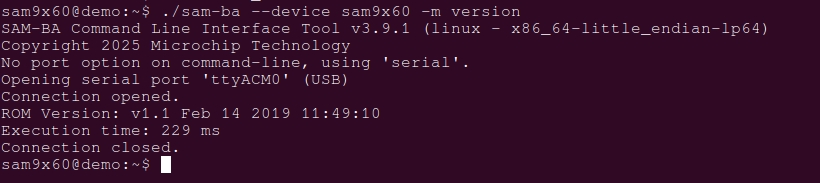
To verify if the ROM code is in Standard Monitor mode, use the SAM-BA® tool as follows:
sam-ba -p serial --device:sam9x60 -m versionThe ROM code response will look similar to this:
To configure OTPC to run in Emulation mode and switch the device to Secure Boot mode:
- Enable OTPC Emulation mode (the ROM
code will activate it at the next
reset):
sam-ba --device sam9x60:0:1 –a bootconfig –c writecfg:bscr:EMULATION_ENABLEDFigure 4-1. Host: Enable OTPC Emulation Mode Figure 4-2. Target: Enable OTPC Emulation Mode - Reset/clear internal SRAM1 used by
OTPC in Emulation
mode:
sam-ba --device sam9x60:0:1 –a bootconfig –c resetemulFigure 4-3. Host: Reset OTPC Emulation Memory (Internal SRAM1) Figure 4-4. Target: Reset OTPC Emulation Memory (Internal SRAM1) - (Optional, to activate OTPC Emulation
mode configured in step 1) Reset the
target:
sam-ba --device sam9x60:0:1 -a resetFigure 4-5. Host: Target Reset Figure 4-6. Target: Reset to OTPC Emulation Mode - Write the Secure Boot Configuration
Packet:
sam-ba --device sam9x60:0:1 -a bootconfig -c writecfg:sbcp-emul:Figure 4-7. Host: Write the Secure Configuration Packet Figure 4-8. Target: Write the Secure Configuration Packet - Reset the
target:
sam-ba –device sam9x60:0:1 -a resetFigure 4-9. Target: Reset in Secure Boot Mode - Read back the Secure Configuration
Packet:
sam-ba -p secure --device sam9x60:0:1 -a bootconfig -c readcfg:sbcp-emul:Figure 4-10. Host: Read Back the Secure Boot Configuration Packet
To switch the device to Secure Boot mode using OTPC Real mode (persistent mode), start with step 4 but use the “Write into OTP real memory” option as follows:
sam-ba -p secure --device sam9x60:0:1 -a bootconfig -c writecfg:sbcp-otp:At this point, the device can be provisioned with keying material using the write_customer_key and write_rsa_hash Secure Monitor commands if the RSA Signature mode is selected. Refer to the SAM-BA documentation for more details about these commands and how to use them. See References.
- If this is the first time switching the device into Secure Boot mode, it is recommended to switch the OTPC to Emulation mode. Refer to Appendix A: OTP Features for Secure Boot Mode for details about OTPC Emulation mode vs Real mode.
- In Secure Boot mode, SAM9X60 MPUs can only boot signed and ciphered applications.