
20.2.2.3.10 Misc
(Ask a Question)Use the Misc tab to enable the following options:
- Trace functionality
- JTAG (Debug) functionality
- Interrupts to/from MSS
- Configuring GPIO Interrupt Register
- Exposing Boot Status ports
- Exposing feedback ports to fabric
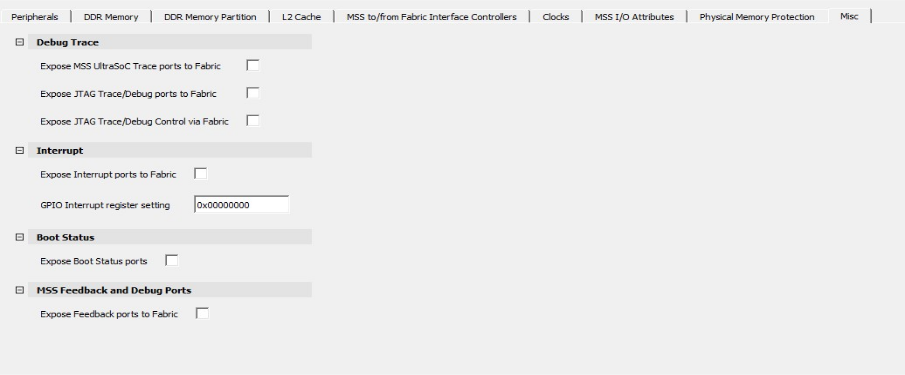
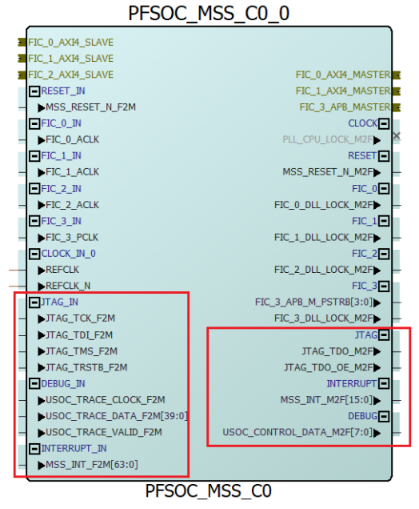
By default, these options are marked as Unused. When any of the options are enabled, the corresponding ports are exposed on the MSS block (see the following figure).
The Debug Trace options enable hardware trace support in the Microprocessor Subsystem (MSS). When you enable trace functionality option in the Misc tab, you are instructing the tool to expose the MSS trace-related I/O pins/ports in the generated MSS component. These ports can then be routed to FPGA fabric I/Os or dedicated pins so that external debug/trace tools or internal logic could use them.
- Expose MSS UltraSoC Trace Ports to Fabric enables the internal debug/trace infrastructure to present non-JTAG debug interfaces toward the fabric.
- Expose JTAG Trace/Debug Ports to Fabric enables the MSS internal debug and trace endpoints to be routable toward the FPGA fabric via a non-JTAG interface.
- Expose JTAG Trace/Debug Control via Fabric determines whether the FPGA fabric can control the MSS debug and trace logic. When you enable it, the FPGA fabric is allowed to act as a debug controller for the MSS, using internal control buses instead of an external JTAG probe.
- Expose Interrupt ports to Fabric makes UltraSoC trace outputs from the MSS available to the FPGA fabric via FIC, so the fabric can receive the trace data. It does not generate trace or provide a sink—just exposes the ports.
- GPIO Interrupt register setting instantiates the interrupt logic for GPIO pins inside the MSS. This option connects the GPIO interrupt outputs to the MSS interrupt controller and allows each GPIO pin to be configured for edge/level sensitivity via registers.
Boot Status: When Expose Boot Status ports option is selected, the ports BOOT_FAIL_CLEAR_F2M and BOOT_FAIL_ERROR_M2F are exposed as shown in the following figure. Both the signals typically represent binary states through voltage levels and are generally synchronous with the MSS clock.
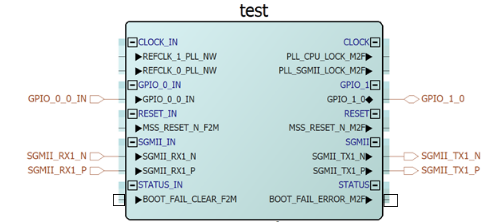
BOOT_FAIL_ERROR_M2F is a signal from the MSS to the FPGA fabric that indicates a boot failure has occurred. When the MSS detects the failure, it sets this signal high and informs the fabric to take action or log the issue.
BOOT_FAIL_CLEAR_F2M is a signal from the FPGA fabric to inform the MSS that the boot failure has been addressed. When the FPGA fabric handles the issue, it sets the signal high telling the MSS to clear the boot failure status.
MSS Feedback and Debug Ports: This option is only available for production devices. If selected, a group of MSS_FEEDBACK_DEBUG ports are exposed as shown in the following figure.
PFSOC_SCSM macro must be instantiated in the user design and the REBOOT_REQUESTED_M2F pin of MSS must be connected to the SC_WAKE pin of PFSOC_SCSM macro to wake up the system controller temporarily so it can reboot the MSS during normal operation.