
1.9.1 MCC Project Configuration
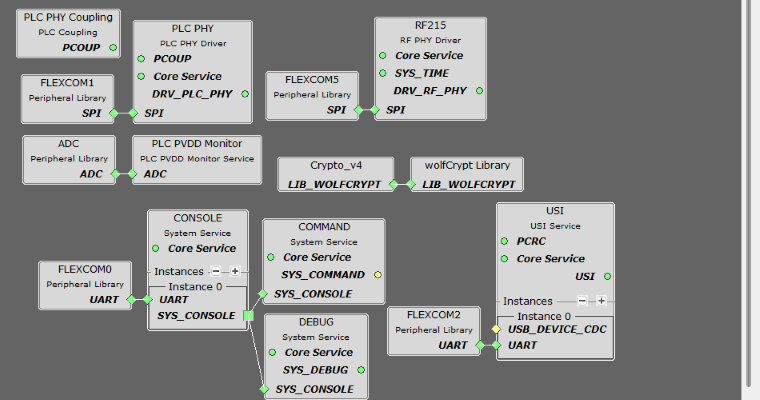
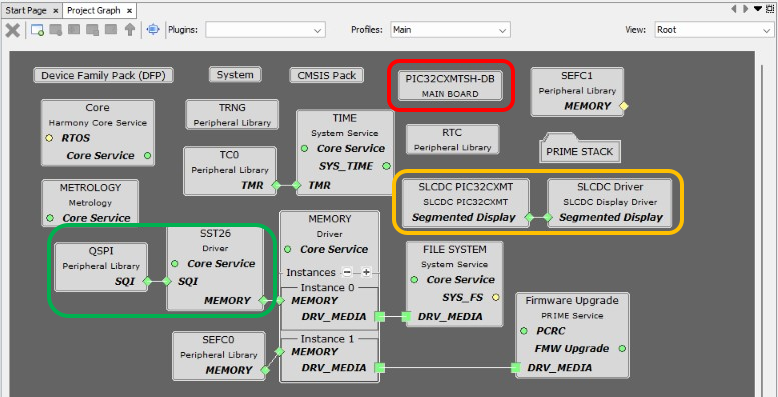
The following figure shows the MCC project graph of PRIME Service Dual Metering Demo application for PIC32CXMTSH-DB.

- The metrology driver is needed to manage the metrology library running on Core 1 of PIC32CXMTSH
- The RTC peripheral library is used by the Energy application in order to know the current time and date
- The SLCDC driver is needed to manage the display of PIC32CXMTSH-DB
- The File System service and Memory driver are used to store non-volatile data in QSPI Flash memory
- The Memory driver is used by the PRIME Firmware Upgrade service to manage the firmware images in the memory connected to the driver
- Since it is an hybrid project, both PLC PHY and RF215 drivers are present. For PLC-only or RF-only projects, only one of them is needed
- The PLC PVDD Monitor service is needed to monitor the PVDD voltage of PL460 in order to disable PLC transmission in case the voltage is not in the expected range, to avoid PL460 damage. If the PVDD voltage is in the expected range, the PLC transmission is enabled
- The PLC PHY Coupling service is needed to configure the PLC transmission parameters for the selected transmission coupling branch
- The USI service is needed to send/receive messages through serial interface (UART/USB) to/from external device
- The Console and Command system services are used to manage the console and process commands sent by the user
- The Console and Debug system services are used to output information messages from Log Report service
- The Time system service is required by both PLC PHY and RF215 drivers. It is used for timer control on PRIME Stack and to create timers in the application
- The TRNG peripheral library is used by the Random service to generate random numbers, which is needed by the PRIME Stack. It is not mandatory due to the Random service can generate random numbers without it. However, if the used MCU has a TRNG peripheral, it is recommended to use it
- Crypto_v4 and wolfCrypt libraries are used by the Security service to perform cryptographic operations needed by the PRIME Stack and the Firmware Upgrade Service
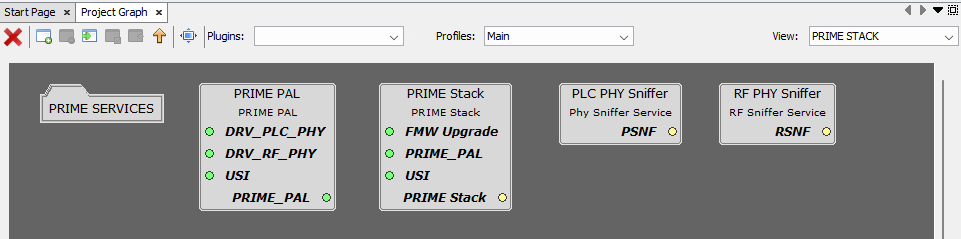
- The PRIME STACK folder contains all the components needed by the PRIME Stack
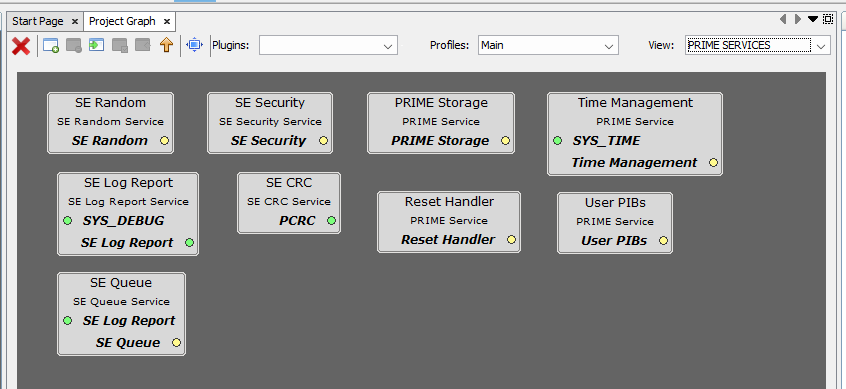
- The PRIME SERVICES folder inside contains all the services needed by the PRIME Stack, except the Firmware Upgrade service, which needs to be in the root view due to its connection to the Memory driver. These services are always needed by the PRIME Stack.
The following figure shows the MCC configuration of the PRIME Stack.
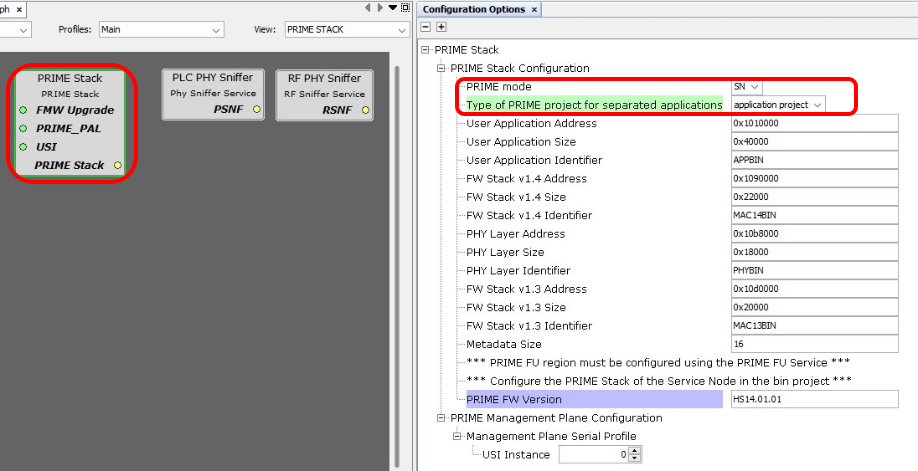
- PRIME mode: It must be set to SN
- Type of PRIME project: It must be set to application project
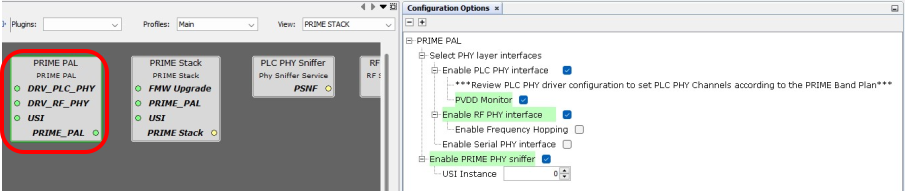
- Since it is an hybrid project, both PLC PHY and RF PHY interfaces are enabled. For PLC-only or RF-only projects, only one of them is needed. In a v1.3.6 project, it is possible to enable the Serial PHY interface, too.
For additional information about configuration of the PRIME Stack, the PRIME PAL and the PRIME Services, refer to the corresponding documentation.
PIC32CXMTSH-DB Board Component
This component defines the board capabilities.

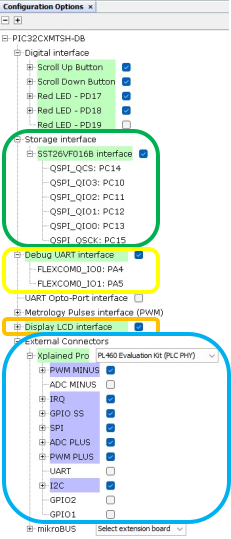
Digital Interface
Two red LEDs as well as the Scroll buttons are selected. So, the corresponding PIOs are named and configured accordingly.
Storage Interface
- SST26 Driver
- QSPI Peripheral Driver
For additional information about specific configurations, refer to the documentation of the metering demo in smartenergy_metrology repository.
Debug UART Interface
- Console System Service
- Flexcom0 Peripheral Library
For additional information about specific configurations, refer to the documentation of the metering demo in smartenergy_metrology repository.
Xplained Pro Interface
PL460-EK at PHY level is selected to be connected to the Xplained Connector.
- PLC PHY Driver
- Flexcom1 Peripheral Library: configured as Flexcom5 in the PRIME Service Dual Modem application (see Figure 10)
- ADC Peripheral Library:
configured as in the PRIME Service Dual Modem application, but in Channel 1
(see Figure 11)
Figure 1-117. PLC PHY Configuration 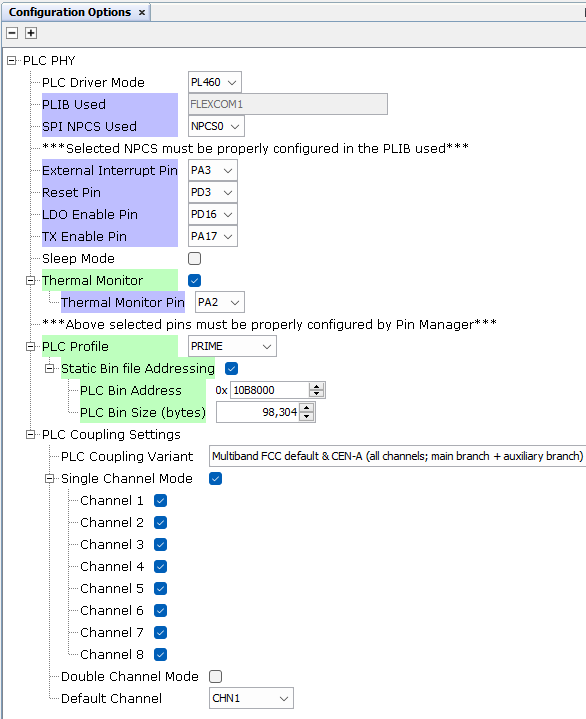
Note that Thermal Monitor is manually enabled, and PRIME profile selected for this application.
The PLC Coupling variant uses the default coupling stage of the evaluation kit (Multiband FCC + CENELEC-A for the PL460-EK). If other PLC band configuration is required, it can be easily modified.
All related PIOs are automatically configured.
Note that the PLC PHY Coupling component is not automatically added by the board component. It has been added to the project manually.
Additional Components
- Harmony Core Service
- TRNG Peripheral Library
- TIME System Service
- TC0 Peripheral Library connected to TIME Service and configured as in the PRIME Service Dual Modem application (see Figure 12)
- USI Service configured as in the PRIME Service Dual Modem application (see Figure 13)
- Flexcom2 Peripheral Library connected to USI Service and configured by default
- PLC PVDD Monitor Service connected to ADC Peripheral Library and configured as in the PRIME Service Dual Modem application, but in Channel 1 (see Figure 14)
- PLC PHY Coupling automatically configured by the PLC PHY Driver
- File System Service, refer to the documentation of the metering demo in smartenergy_metrology repository
- Memory Driver connected
to:
- SEFC0 and automatically configured by the Firmware Upgrade Service
- SST26 Driver and automatically configured by the File System Service
- RF215 Driver configured as
shown:
Figure 1-118. RF215 Configuration 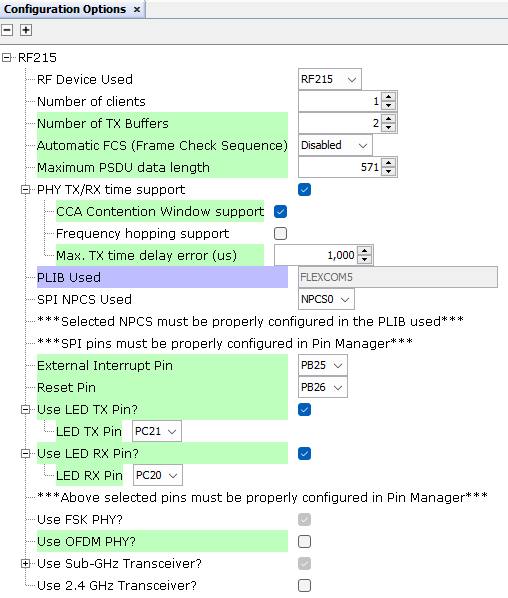 In the pin configuration, configure the RF pins (all other pins are auto-configured by the SHD component):
Figure 1-119. RF215 Pin Configuration 

- Flexcom5 Peripheral Library connected to RF215 Driver and automatically configured by it
- Crypto_v4 and wolfCrypt Library, configured as in the PRIME Service Dual Modem application (see Figure 17)
- Command System Service, refer to the documentation of the metering demo in smartenergy_metrology repository
- Debug System Service connected to the Console System Service and configured as in the PRIME Service Dual Modem application (Figure 18)