
1.6.3 Build and Program
The PRIME Service Dual Modem application project can be used to build the full PRIME Stack and PRIME Service Modem application and program them together with the PL460 firmware in a board.
- Open the Project Properties of the Dual
Modem application and in Building make sure that Execute this line before
build is clicked.
Figure 1-93. Pre-Build Command 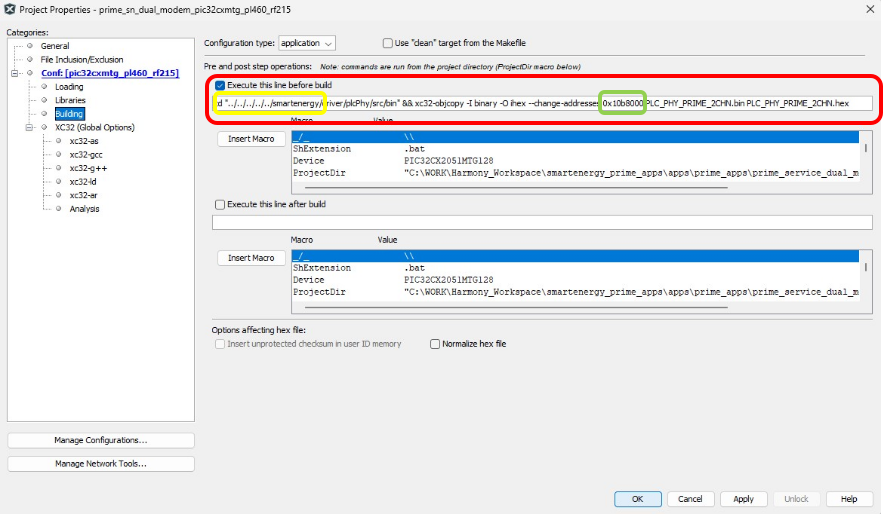
Before building the Dual Modem project, this command is executed in order to convert the PL460 firmware bin image into a hex file. The user might need to update the path to the smartenergy repository according to the file system structure. The hex file is created in the same folder. Additionally, the command is using the default allocated memory address for the PLC PHY layer. This address should match the PHY Layer Address configured in MCC (see Figure 4).
- Open the Project Properties of the Dual
Modem application and in Loading click Include to include the PRIME Service
Bin applications and the PRIME Service Bootloader. The PL460 hex file is always
loaded.
Figure 1-94. Include Service Hex Files 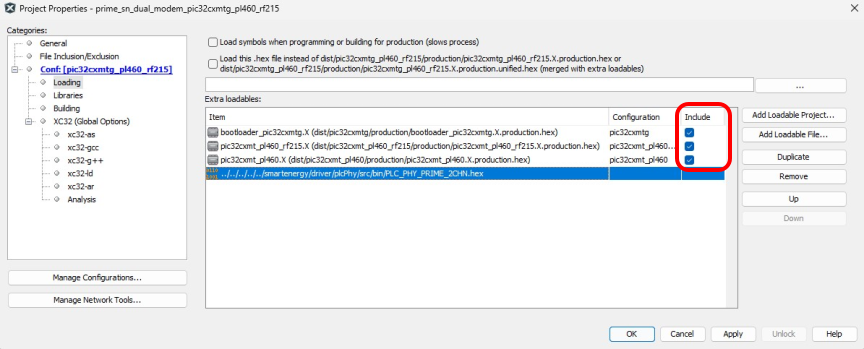 If the loadables do not appear by default, click Add Loadable Project button and add the applications following these paths:
Table 1-3. Loadable Service Projects Project Path to Hex File PRIME Service Bootloader \smartenergy_prime_apps\apps\prime_apps\prime_service_bootloader\bootloader_pic32cxmtg.X PRIME Service 1.4 Bin \smartenergy_prime_apps\apps\prime_apps\prime_service_1_4_bin\pic32cxmt_pl460_rf215.X PRIME Service 1.3 Bin \smartenergy_prime_apps\apps\prime_apps\prime_service_1_3_bin\pic32cxmt_pl460.X -
Build the application by clicking on the Build Main Project or Clean and Build Main Project command in the Production menu.
Figure 1-95. Clean Project 
- In the Output window, the user can see that the four applications are cleaned and built
- The pre-build command is run and the hex file for the PL460 firmware is created
- Verify the build is SUCCESSFUL in
Output window and that unified hex file containing the four applications has been
generated.
Figure 1-96. Successful Build 
To program the unified application, the user needs to connect a micro-USB cable from computer to the USB port on the PIC32CXMTG-EK board and use the Make and Program Device Main Project menu command.
At this point, a complete PRIME Service Node is running on the PIC32CXMTG-EK board. It can be tested against the PRIME Base Node examples available in smartenergy_prime_apps repository.