
4 Appendix 1: Installing SAM-BA® ISPP on a Windows Host
To install SAM-BA ISPP on a Windows host:
- Download the latest version of SAM-BA for Windows from the Microchip SAM-BA Tools web page. See References.
- Unzip the file into a working directory.
- (Optional) Add the SAM-BA directory path to the
system environment variables.
- Select Edit the system
environment variables from the pull-down menu.
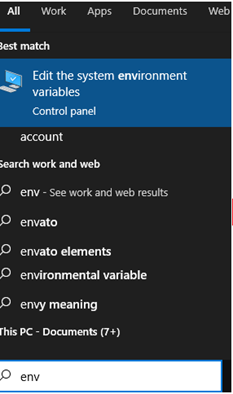
- Select Edit the system
environment variables from the pull-down menu.
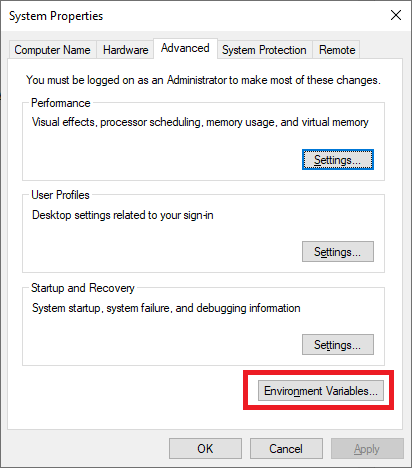
- In the System Properties window, on the
Advanced tab, click on Environment Variables.
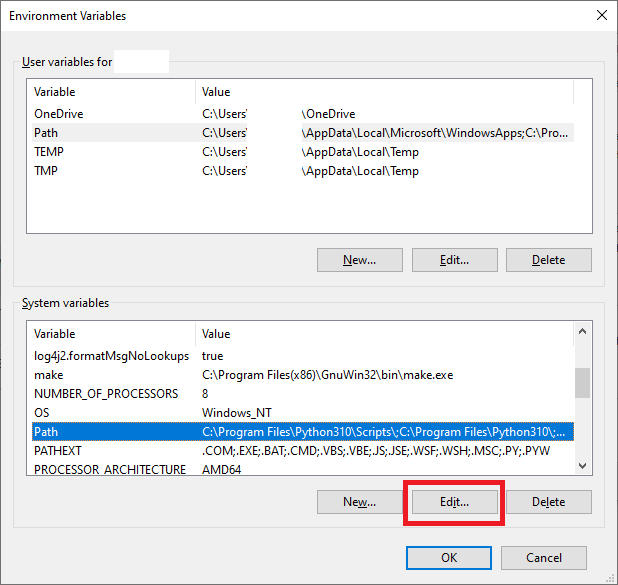
- In the Environment Variables
window, in the System Variables section, double-click on Path.
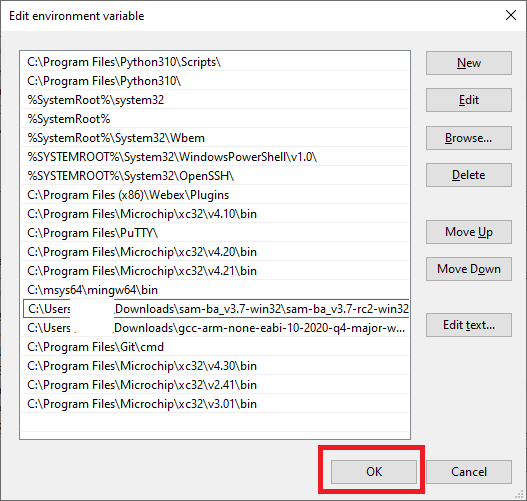
- Add the SAM-BA directory path to the
Path variables. See Appendix 3: Configuring the path
Variable on a Linux® Machine.
- Once the SAM-BA host program has been installed, the application can be executed from the Windows command prompt using SAM-BA commands.