
3 MPLAB X HUT Code Programming Process
In this demonstration, the user can program the PIC32CX-BZ2H to HUT firmware using a PC with the installed MPLAB Integrated Programming Environment (IPE).
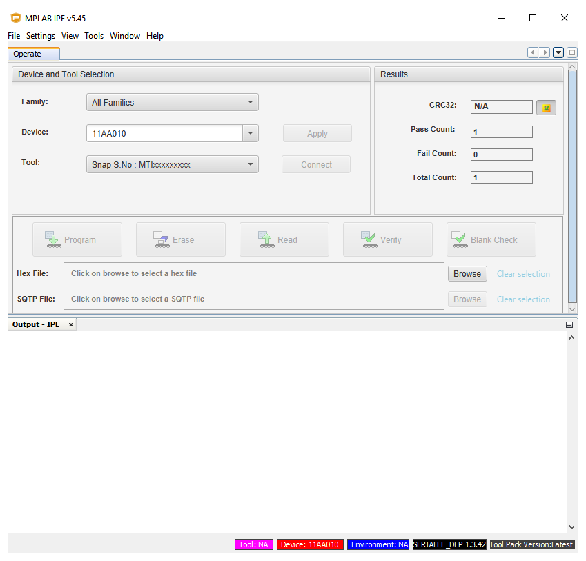
Perform the following steps for HUT firmware programming:
- Setup the connection between the PIC32 WBZ451HPE Curiosity Board and PC. For more
details, refer to Getting Started with MCHPRT3.
- Start “MPLAB X IPE” and check for PIC32CX1012BC5048 in the “Device” text box. If it is not there, check the USB connection (step 1).
- Click Apply.
- Click Browse to load the
HUT.Application.X.production.hex, which is the PIC32CX-BZ2H HUT X.X firmware. - Click Program, then wait one minute for the programming to complete.
Figure 3-2. MPLAB X IPE (Programming Complete) 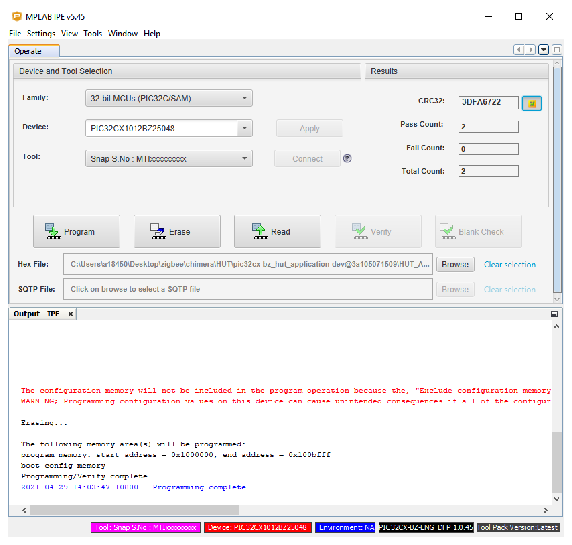
- The PIC32CX-BZ2H is programmed with HUT X.X firmware and ready for the test with using the MCHPRT3 PIC32CX-BZ2H GUI tool.