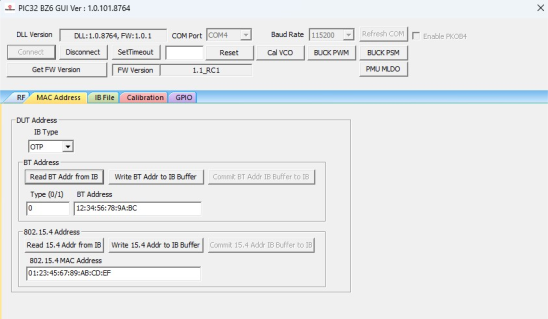
4.3.5 MAC Address Programming
In this demonstration, the user can set the Bluetooth address and 802.15.4 MAC address of the PIC32-BZ6 using a PC with the MCHPRT3 tool installed.
In the MAC Address tab, perform the following steps for MAC Address programming:
- From the IB Type drop-down list, select Flash (default value).
- To read the Bluetooth address from the IB, click Read BT Addr from IB.
- To write the Bluetooth address:
- Click Write BT Addr to IB Buffer.
- Click Commit BT Addr IB Buffer to IB.
- To read the 802.15.4 MAC address from IB, click Read 802.15.4 Addr from IB.
- To write 802.15.4 MC address:
- Click Write 802.15.4 Addr to IB Buffer.
- Click Commit 802.15.4 Addr IB Buffer to IB.