
4.1 Getting Started with MCHPRT3
MCHPRT3 Package Features
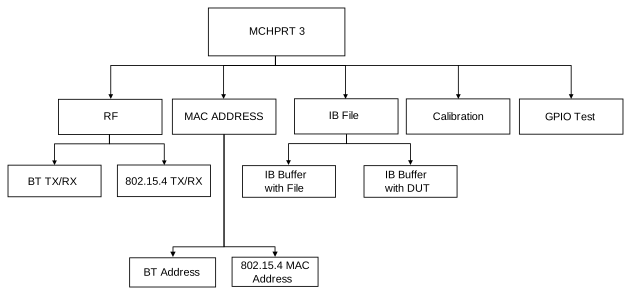
- RF – RF Test for Bluetooth and Zigbee TX/RX
- Calibration – TX Calibration and RX Calibration
- MAC Address – Read/Write Bluetooth Address and Zigbee MAC Address
- Information Block (IB) File – Read/Save IB File to/from Buffer and Read/Commit IB Buffer to/from DUT
- GPIO – GPIO Test Command
The following are the steps to launch the MCHPRT3 tool:
- Double click
MCHPRT3.exeunder directionC:\Microchip\MCHPRT3_Setup_v1.0.0.XXXX; the following screen appears.Figure 4-3. Start-Up Window of the MCHPRT3 Tool 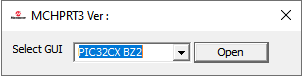
- From the “Select GUI” drop-down list, select PIC32CX-BZ2.
- Click Open to launch the PIC32CX-BZ2 window (see the following figure).
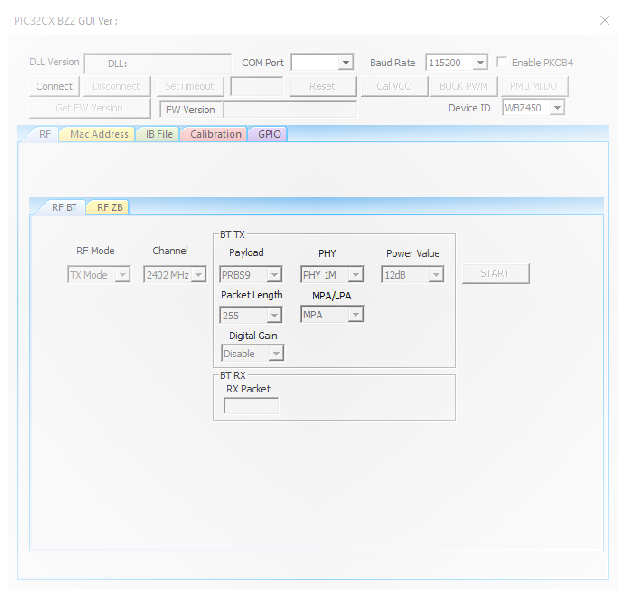
Description of each component:
- Buttons on the top
- Connect/Disconnect – Connects or disconnects the PIC32CX-BZ2
- Reset – Reset the PIC32CX-BZ2
- Cal. VCO – VCO calibration
- BUCK PWM – Switch the power mode into DC-DC (Buck) mode
- PMU MLDO – Switch the power mode into MLDO mode
- Get FW Version – Obtain the firmware version from the sample
- Device ID – Select the appropriate part number that is connecting to the tool
- For connecting the WBZ451 module/PIC32CX1012BZ25048, select WBZ451
- For connecting the WBZ450 module/PIC32CX1012BZ25032, select WBZ450
- Enable PKOB4 – Only needed to check if the user is using the WBZ450 Curiosity Board
- RF for Bluetooth and Zigbee – Settings of RF mode, channel and TX parameter for RF test
- BT – TX setting of payload, PHY (data rate), MPA/LPA (PA setting), packet length and MPA/LPA power step (power level). RX – number of RX packet.
- Zigbee – TX settings of packet type, MPA/LPA (PA setting), power level, delay time between each packet and packet number. RX – setting of RX data rate and number of RX packet.
- Calibration – Complete TX and RX calibration flow. The user can save calibration info to file or commit to NVM type Flash or OTP.
- TX Calibration – Perform TX calibration flow to adjust transmitted power and output frequency to target.
- RX Calibration – Perform RX calibration flow to obtain IRR, RSSI to corresponding received power and so on.
- MAC Address – Read/write address
- BT address and Zigbee MAC address
- Information Block (IB) File
- Read IB file to IB buffer/save IB buffer to IB file
- Read DUT to IB buffer/commit IB buffer to DUT
- GPIO – Test GPIO for selected port, pin, in/out and level
- Start GPIO – Initialize GPIO for test
- GPIO Command – Execute GPIO test command for selected port, pin, in/out and level
- Stop GPIO – Stop GPIO test