
10.2 SED Based Encryption Settings
This tab provides the options to perform SED-based encryption operations. Only one operation can be performed at a time.
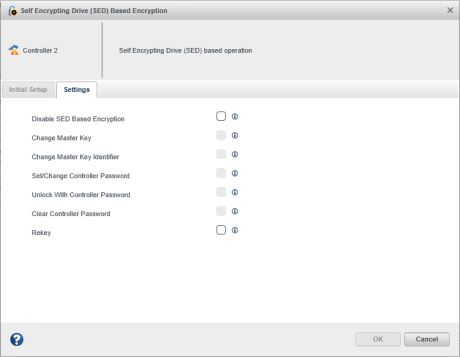
Following is the list of operations:
- Disable SED Based Encryption: This operation disables the Self Encrypting Drive (SED) based encryption configuration.
- Change Master Key: Update the existing master key with a new master key.
- Change Master Key Identifier: Change the hint to remember the master key.
- Set/Change Controller Password: This operation provides the option to set/change the controller password.
- Unlock With Controller Password: This operation provides the option to unlock the SED locked offline logical device, which may occur when the controller password was not entered or an invalid controller password was entered at boot time. This option is only applicable when a controller password is configured, and SED Encryption status is “Waiting on Controller Password”.
- Clear Controller Password: This operation removes the configured controller password.
- Rekey: Generates a new set of encryption keys for the controller. This operation is applicable only when SED encryption is configured in Remote Key Management mode and the controller supports the Remote Key Management Rekey feature.
Note: The Change Master Key, Change Master Key
Identifier, Set/Change Controller Password, Unlock With Controller
Password and Clear Controller Password fields are applicable only for
Local Mode and are disabled in Remote Mode. The Rekey field is applicable only
for Remote Key Management Mode and is not displayed in Local Mode.