
10.2.6 Rekey
The Rekey operation generates a new set of encryption keys for the controller. It is applicable only when SED-based encryption is configured in Remote Key Management mode and the controller supports the Remote Key Management Rekey feature. No master key or controller password input is required. The controller rotates its keys against the configured Key Management Server (KMS).
- In Enterprise View, select a system, then select a controller on that system.
- On the ribbon, in the Controller group, click Security Settings.
- In the Self Encrypting
Drive (SED) Based Encryption dialog box, click the
Settings tab.
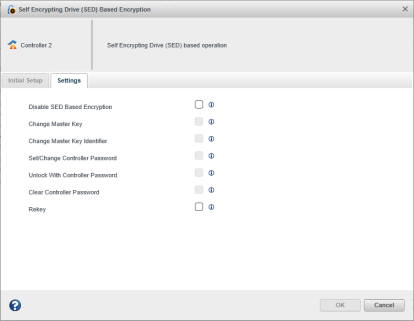
- Select the Rekey check box.
- Click OK.
After the operation is successful, the status dialog box displays the Controller details and the Rekey operation result.
Note:
- When Rekey is selected, all other operations on the Settings tab (Disable SED Based Encryption, Change Master Key, Change Master Key Identifier, Set/Change Controller Password, Unlock With Controller Password and Clear Controller Password) are disabled, as only one operation can be performed at a time.
- The Rekey check box is disabled when the controller SED Encryption status is “Waiting on Rekey”, “Waiting on Create Key”, “Waiting on Master Key” or “Waiting on Adapter Password”.
- The Rekey check box is not displayed when SED encryption is configured in Local Key Management mode.