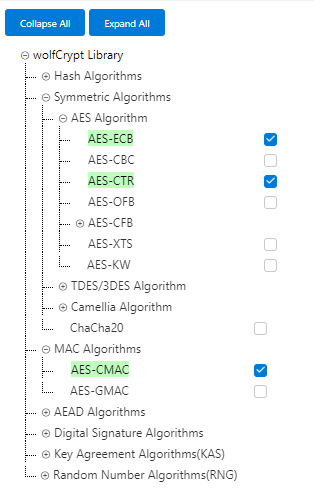
The following figure shows the MCC project graph of DCU App for PIC32CXMTG-EK.
Figure 1-84. MCC Project Graph of DCU App for
PIC32CXMTG-EK
The PLC PHY driver is needed to
manage the PLC device and transmit PLC frames
The PLC PVDD Monitor service is
needed to monitor the PVDD voltage of PL460 in order to disable PLC transmission in
case the voltage is not in the expected range, to avoid PL460 damage. If the PVDD
voltage is in the expected range the PLC transmission is enabled.
The PLC PHY Coupling service is
needed to configure the PLC transmission parameters for the selected transmission
coupling branch
The Meters And More Stack contains all code and libraries for Communications
Stack
The Console system service used
output information messages from Application
The Time system service is required
by the PLC PHY driver. It is also used for timer control on Meters And More Stack
and Application.
Crypto_v4 and wolfCrypt provide
cryptography services used by Meters And More Stack
The TRNG Peripheral Library is used to generate random data for frame
transmission
The CRC Service is used for CRC
generation and validation in Meters And More Stack
The following sections describe how Components are added and
configured for this application.
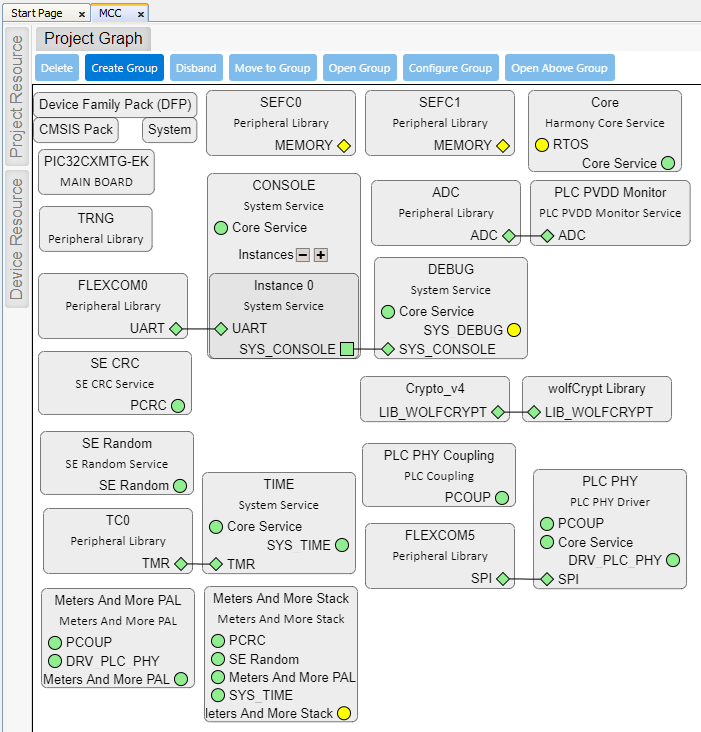
PIC32CXMTG-EK Board Component
This Component defines the board capabilities.
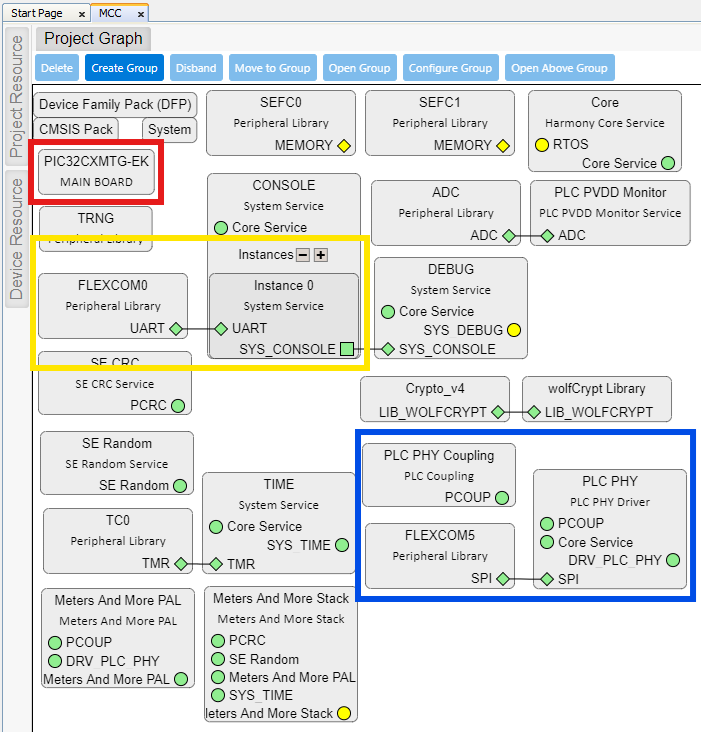
For this application, the following configuration is selected:Figure 1-85. PIC32CXMTG-EK Component
Configuration
Digital Interface
Green and blue leds are selected, so corresponding PIOs are named and configured
accordingly.
USB Debugger Interface
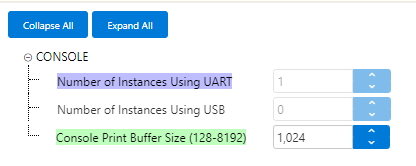
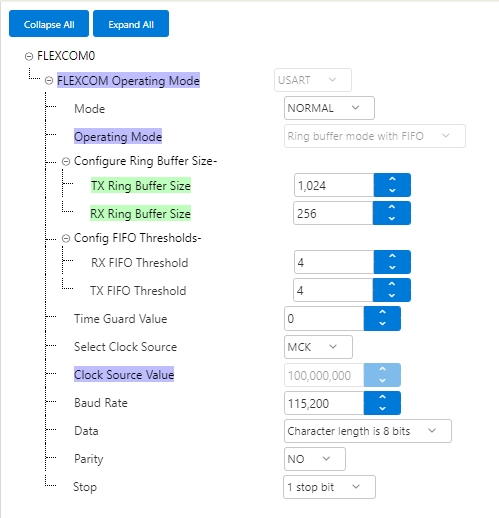
Virtual COM Port interface is selected. This selection triggers:
Console System Service is added to Project Graph
Flexcom0 Peripheral Library is added to Project Graph
These components are linked
and automatically configuredFigure 1-86. Console
Automatically ConfiguredFigure 1-87. Flexcom0
Automatically Configured
Note: Buffer sizes are increased manually for
this application.
All related PIOs are automatically configured
Xplained Pro Interface
PL460 Evaluation Kit at PHY level is selected to be connected to the Xplained
Connector.
This selection automatically configures which pins of connector will be used, and in
addition triggers:
PLC PHY driver is added to
Project Graph
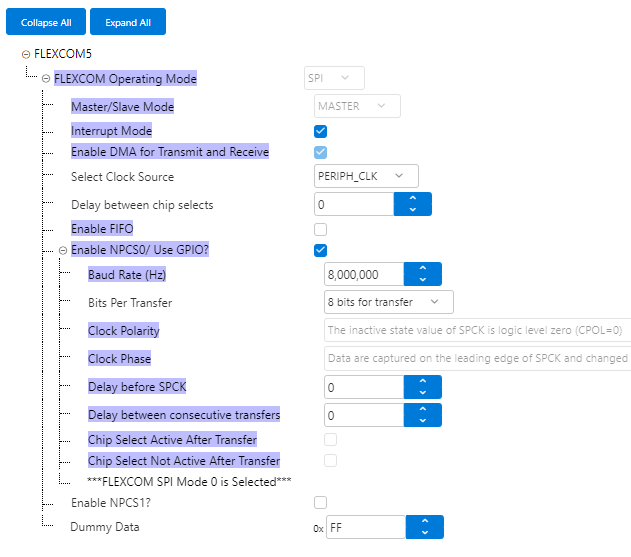
Flexcom5 Peripheral Library is added to Project Graph
These components are linked
and automatically configuredFigure 1-88. PLC PHY
Automatically ConfiguredFigure 1-89. Flexcom5
Automatically Configured
Note: Thermal Monitor is manually enabled, and
Meters And More profile selected for this application.
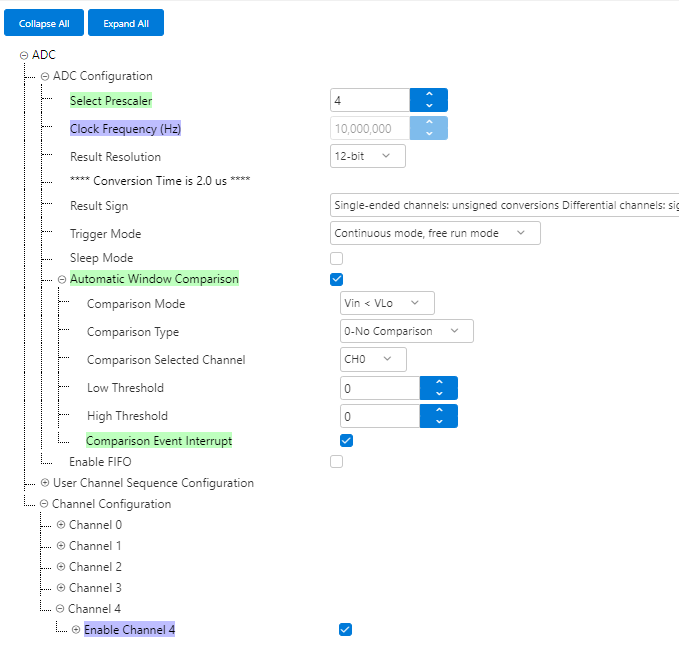
PLC PVDD Monitor Service is added to Project Graph
ADC Peripheral Library is added to Project Graph
These components are linked
and partially configuredFigure 1-90. PVDD Monitor
Partially ConfiguredFigure 1-91. ADC Manually
Configured
Note: Prescaler and Automatic Window Comparison
are manually Configured. For Comparison, only the Event Interrupt has to
be enabled, the rest of parameters will be overwritten by the PVDD
Monitor after initialization, so provided values in this configurator
are not used.
All related PIOs are automatically configured
Note: PLC PHY Coupling Component is not automatically added, it is
manually added to the project.
Additional Components
Apart from the previous components managed by PIC32CXMTG-EK component, others are
required and manually added for this application:
Harmony Core Service
TRNG Peripheral Library
TIME System Service
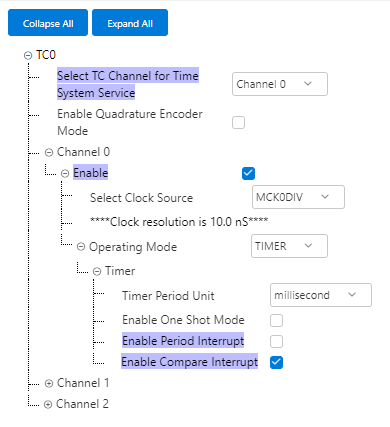
TC0 Peripheral Library
connected to TIME Service and configured as shown:Figure 1-92. TC0
Configuration
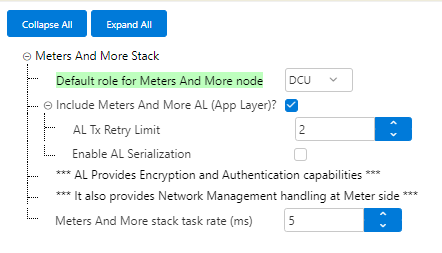
Meters And More Stack has to
be added and configured as shown (DCU Role):Figure 1-93. Meters And More
Stack Configuration
For Cryptographic services,
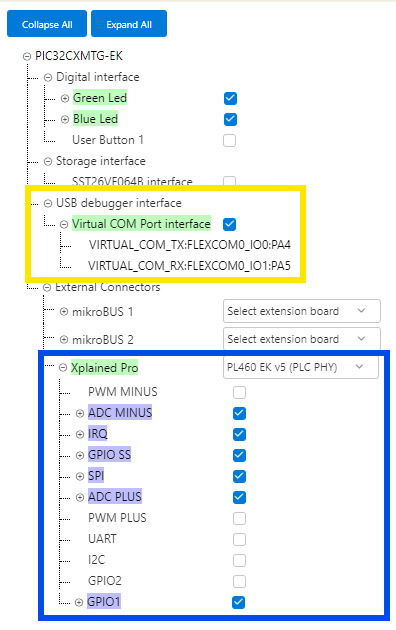
Crypto_v4 and wolfCrypt Library are added. These modules are configured
differently if AES algorithms are computed by hardware or by software:
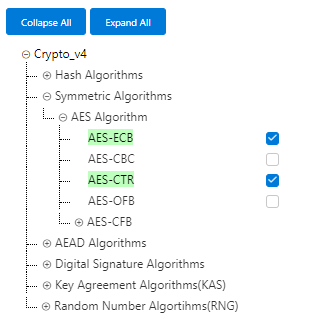
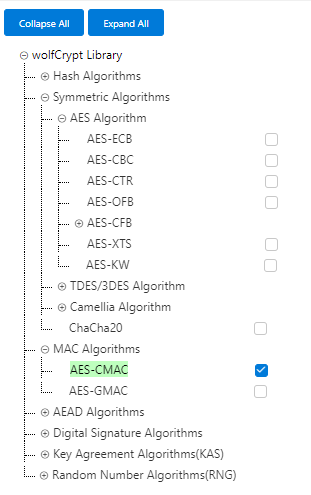
AES by Hardware: If
the MCU supports AES by Hardware (e.g., PIC32CXMT), AES-ECB and
AES-CTR can be enabled in Crypto_v4 configuration. AES-CMAC has to
be enabled in wolfCrypt Library.Figure 1-94. Crypto_v4
Configuration (AES by Hardware)Figure 1-95. wolfCrypt
Library Configuration (AES by Hardware)
AES by Software: If
the MCU does not support AES by Hardware (e.g., SAMD20), AES-ECB and
AES-CTR has to be enabled in wolfCrypt Library configuration.
AES-CMAC has to be enabled also in wolfCrypt Library.Figure 1-96. wolfCrypt
Library Configuration (AES by Software)
SE CRC Service has to be added to provide CRC capabilities

 Note: Buffer sizes are increased manually for this application.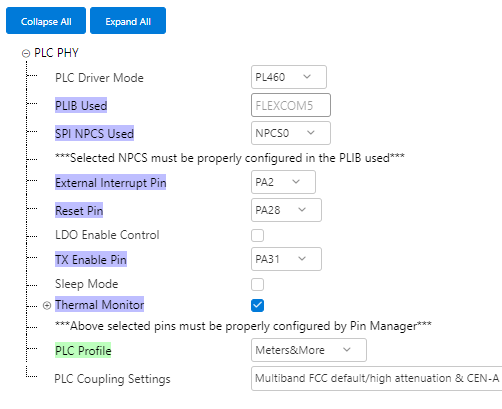
 Note: Thermal Monitor is manually enabled, and Meters And More profile selected for this application.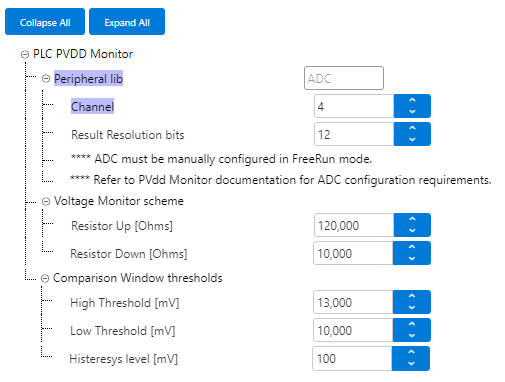
 Note: Prescaler and Automatic Window Comparison are manually Configured. For Comparison, only the Event Interrupt has to be enabled, the rest of parameters will be overwritten by the PVDD Monitor after initialization, so provided values in this configurator are not used.