1.12 FLEXCOM ISO7816 SmartCard
This example application shows how to use the FLEXCOM module in ISO7816 mode.
Description
This application configures the FLEXCOM peripheral in ISO7816 mode and performs operation on a SmartCard AT88SC0808C.
Downloading and Building the Application
To clone or download this application from Github, go to the main page of this repository and then click Clone button to clone this repository or download as zip file. This content can also be downloaded using content manager by following these instructions.
Path of the application within the repository is apps/flexcom/flexcom_iso7816_smartcard/firmware.
To build the application, refer to the following table and open the project using its IDE.
| Project Name | Description |
|---|---|
| sam_9x60_curiosity.X | MPLABX project for SAM9X60 Curiosity Development Board |
Setting Up AT91Bootstrap Loader
To load the application binary onto the target device, we need to use at91bootstrap loader. Refer to the at91bootstrap loader documentation for details on how to configure, build and run bootstrap loader project and use it to bootstrap the application binaries.
Setting Up the Hardware
The following table shows the target hardware for the application projects.
| Project Name | Description |
|---|---|
| sam_9x60_curiosity.X | SAM9X60 Curiosity Development Board |
Setting Up SAM9X60 Curiosity Development Board
- Connect SmartCard Xplained Pro to EXT3 header
- Insert AT88SC1616C SmartCard into SmartCard Xplained Pro socket
- Connect the Debug USB port on the board to the computer using a micro USB cable
- Connect a programming cable from JTAG connector J12 on board to programmer(J-32 Debugger)
- Connect programmer(J-32 Debugger) to computer using a micro USB cable
- Connect the USB port J1
on board to the computer using a micro USB cable (to power the
board)
Pin SmartCard Xplained PRO MIKRO 9x60 Curiosity Pins 2 (black) GND GND - 5 (yellow) CARD_DETECT CS PA8 9 (blue) RESET AN PB14 10 (grey) VCC_ENABLE MISO PA21 13 (brown) XCK SCK PA23 flexcom5_IO2 14 (purple) I/O MOSI PA22 flexcom5_IO0 20 (red) VCC_TARGET +3.3V -
Running the Application
- Open the Terminal application (Ex.:Tera term) on the computer.
- Connect to the USB Serial COM port and configure the serial settings as
follows:
- Baud: 115200
- Data: 8 Bits
- Parity: None
- Stop: 1 Bit
- Flow Control: None
- Build and Program the application using its IDE.
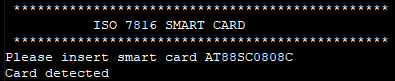
- The console displays the
following message: