
4.1 IPE Main Window
The following figure shows the main window of the IPE. The IPE Menu bar contains the following menus, with commands:
Commands are available based on several factors, such as the device selected or the settings selected in Advanced Mode.
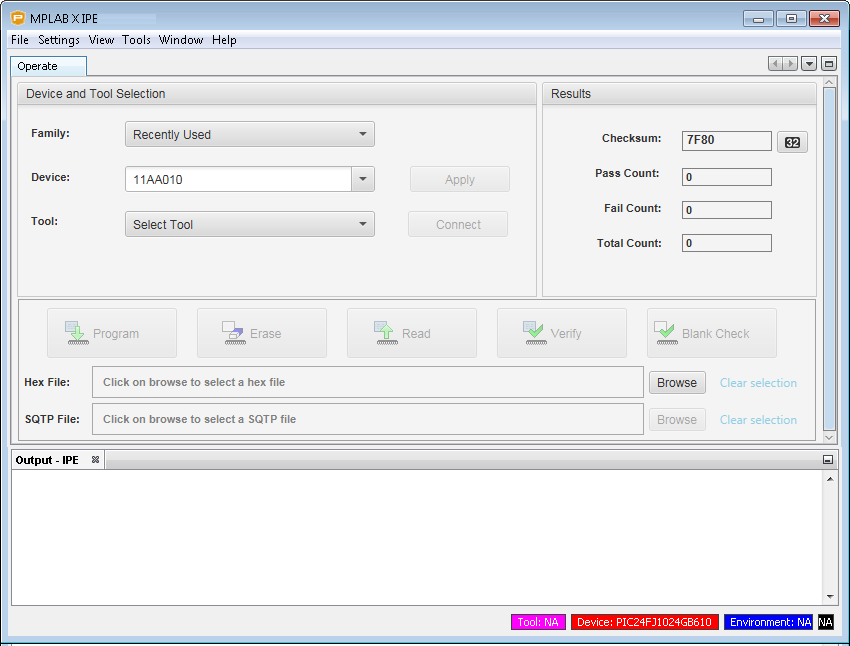
| Item | Description |
|---|---|
| Select Device and Tool: | |
| Family | Filters devices by family or recently used. |
| Device | Specifies the device; click Apply to select. |
| Tool | Specifies the tool; click Connect or Disconnect as appropriate. |
| Results: | |
| CP=OFF Checksum | This field displays only if enabled in
Advanced Mode. Displays the imported hex checksum as if code protect is off for the device with current memory contents; value can be copied using CTRL+C. |
| Checksum | Checksum value for the device with current memory contents; value can be copied using CTRL+C. |
| Pass Count | Details the number of programming operations that passed. |
| Fail Count | Details the number of programming operations that failed. |
| Total Count | The total number of programming operations. |
| Command Buttons: | |
| Program | Programs the device. |
| Erase | Erases the device. |
| Read | Reads the device. |
| Verify | Performs a verify operation on the device. |
| Blank Check | Checks whether the device is blank. |
| Other: | |
| Hex File | The Hex file location, Browse to locate the file. |
| SQTP | The SQTP file location, Browse to locate the file. |
| Output Tab | Display of output data. Right-click in the Output window to access additional options. |
| Tool Tab | Display of specific tool data, for example, PM3, ICD 4, PICkit 4. |