
1.5 OTA Bootloader Host Script Help
The following python scripts are used in order to update the application binary image:
- ota_host_mcu_header.py: This script will add the OTA Host MCU Header to the application binary and image.bin will be generated as intermediate output binary image. Path of the tool within the bootloader application repository is tools/ota_host_mcu_header.py.
- ota_rnbd_header.py: This script will add the OTA RNBD Header to the image.bin intermediate binary and it generates RNBD_image.bin application binary as final output binary image. Path of the tool within the bootloader application repository is tools/ota_rnbd_header.py.
The following steps to be performed to update the application binary image:
- Run ota_host_mcu_header.py script. Below is the syntax to show help menu
for the
script:
python <harmony3_repo_path>/tools/ota_host_mcu_header.py --help
Below syntax and example: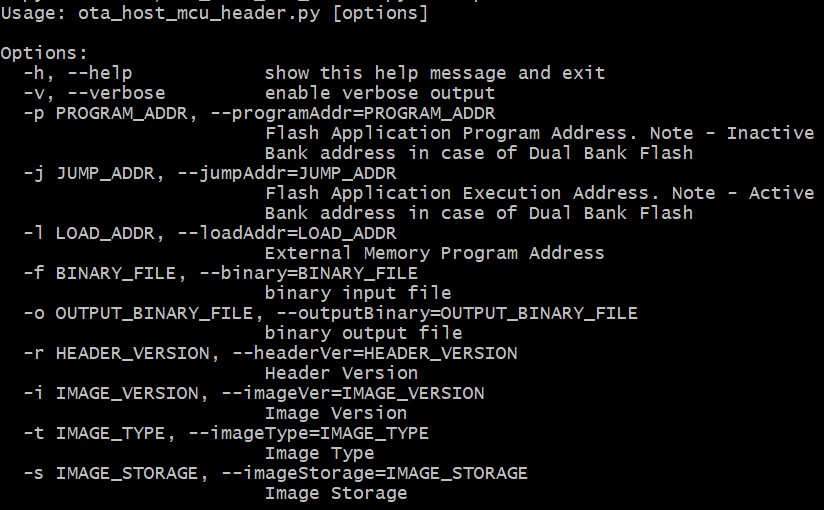 Description:
- It should be used with -p (--programAddr) option to specify Flash Application Program Address
- It should be used with -j (--jumpAddr) option to specify Flash Application Execution Address
- It should be used with -f (--binary) option to specify binary input file
- In case of external memory only, It should be used with -l (--loadAddr) option to specify External Memory Program Address
Dual Bankpython <harmony3_repo_path>/tools/ota_host_mcu_header.py -p 0x82000 -j 0x2000 -f sam_e54_xpro.X.production.bin
External Memorypython <harmony3_repo_path>/tools/ota_host_mcu_header.py -p 0x402000 -j 0x402000 -l 0x0 -f sam_e70_xult.X.production.bin
- Run ota_rnbd_header.py script. Below is the syntax to show help menu for
the
script:
python <harmony3_path>/bootloader_apps_ota/tools/ota_rnbd_header.py --help
Below syntax and example: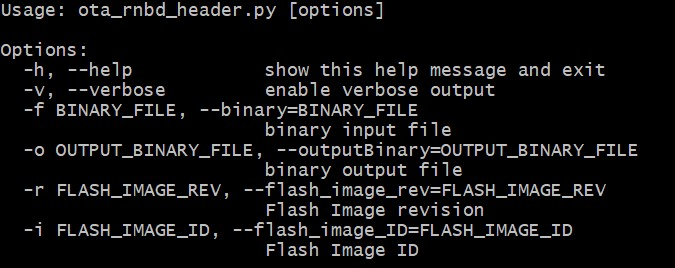 Description:
- It should be used with -f (--binary) option to specify binary input file
Dual Bank/External Memorypython <harmony3_path>/bootloader_apps_ota/tools/ota_rnbd_header.py -f image.bin
Once command is executed successfully then it generates RNBD_image.bin final application binary image.
For Cortex-M based Dual Bank Devices- User can generate an additional inactive bank bootloader hex file
through post build command in the OTA bootloader project. The hex_merge
python script can be used to combine unified HEX file (for Bootloader
and application in active bank) and bootloader inactive bank HEX file
(for Bootloader in inactive
bank).
python hex_merge.py --help
Below syntax and example: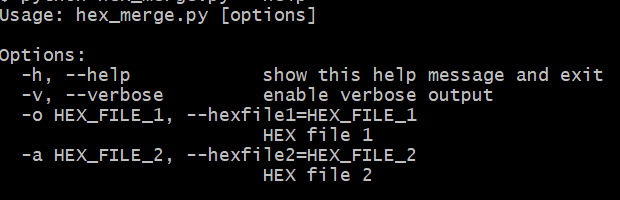 Description:
- It should be used with -o (--hexfile1) option to specify an unified HEX file (for Bootloader and application in active bank)
- It should be used with -a (--hexfile2) option to specify a bootloader inactive bank HEX file
python <harmony3_path>/bootloader_apps_ota/tools/hex_merge.py -o sam_e54_xpro.X.production.unified.hex -a sam_e54_xpro.X.production_inactive_bank.hex
Once command is executed successfully then sam_e54_xpro.X.production.unified.hex is updated and it contains bootloader inactive bank hex file along with active bank bootloader hex file and active bank application hex file.