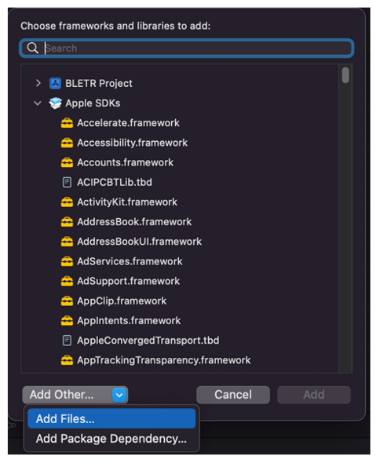
Copy the
framework file to the app project folder.
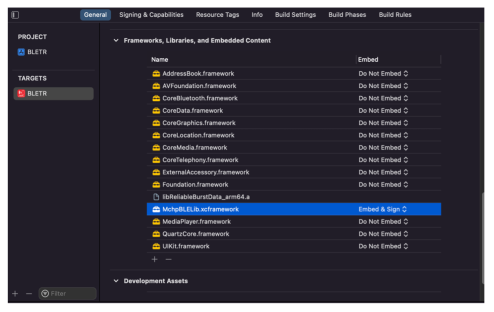
Find the
Project Setting>General>Framework,
Libraries, and Embedded Content
Add the copied
framework file in the folder by clicking on “+”>Add
Other…>Add Files…
MBD app uses the same
library for developing this feature.Figure 1-9. Adding
Framework
Figure 1-10. Framework
Added in Project Target
Initialize: Create the
Bluetooth Low Energy sensor
object.
var m_BleSensorPeripheral : BLESensorPeripheral?
m_BleSensorPeripheral = BLESensorPeripheral.initialize()
Features:
Connection:
Implement the
delegate.
//initialize the delegate
m_BleSensorPeripheral?.BleSensorConnectionDelegate = self

/// A protocol that provides the peripheral connection related information.
public protocol BLESensorConnectionDelegate {
    /// Tells the delegate that discovered a peripheral while scanning for devices.
    /// - Parameters:
    ///   - peripheral: The discovered peripheral.
    ///   - deviceName: The name of peripheral.
    ///   - rssi: The current received signal strength indicator (RSSI) of the peripheral, in decibels.
    ///   - lightStatus: The light status of peripheral.
    ///   - temp: The temperature of peripheral.
    ///   - isConnectable: To indicates the peripheral is connectable or not.
    func didDiscoverPeripheral(peripheral: CBPeripheral,deviceName: String,rssi:NSNumber,lightStatus:UInt8,temp:Float, isConnectable:Bool, isMRML: Bool)

    /// Tells the delegate that  connected to a peripheral.
    func didConnected()

    /// Tells the delegate that  disconnected from a peripheral.
    func didDisconnected()
}

//start scan
m_BleSensorPeripheral?.startScan()

//stop scan
m_BleSensorPeripheral?.stopScan()

//connect peripheral
m_BleSensorPeripheral?.connectPeripheral(peripheral)

//disconnect already connected peripheral
m_BleSensorPeripheral?.disconnectPeripheral()
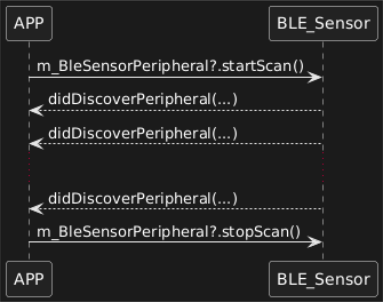
Scan: to
discover the nearby Bluetooth Low Energy Sensor devices.Figure 1-11. Scan
Process
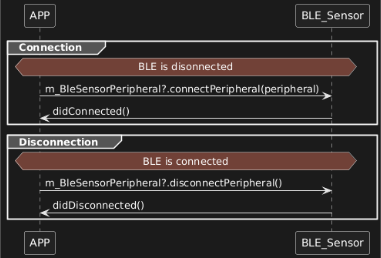
Connection: to connect/disconnect the Bluetooth Low
Energy sensor.Figure 1-12. Connection Process
Device
Information:
Implement the
delegate.
//initialize the delegate
m_BleSensorPeripheral?.BleSensorDisDelegate = self

//read peripheral information
m_BleSensorPeripheral?.readDeviceInformation()

/// A protocol that provides updates for the device information.
public protocol BLESensorDeviceInformationDelegate {
    /// Tells the delegate that retrieving the system ID.
    /// - Parameter id: System ID.
    func updateSystemId(id:Data)

    /// Tells the delegate that retrieving the model number.
    /// - Parameter string: The model number of peripheral.
    func updateModelNumberString(string:String)

    /// Tells the delegate that retrieving the serial number.
    /// - Parameter string: The serial number of peripheral.
    func updateSerialNumberString(string:String)

    /// Tells the delegate that retrieving the firmware revision.
    /// - Parameter revision: The firmware revision of peripheral.
    func updateFirmwareRevision(revision:String)

    /// Tells the delegate that retrieving the hardware revision.
    /// - Parameter revision: The hardware revision of peripheral.
    func updateHardwareRevision(revision:String)

    /// Tells the delegate that retrieving the software revision.
    /// - Parameter revision: The software revision of peripheral.
    func updateSoftwareRevision(revision:String)

    /// Tells the delegate that retrieving the manufacture data.
    /// - Parameter string: The string of manufacture data of peripheral.
    func updateManufactureNameString(string:String)

    /// Tells the delegate that retrieving the IEEE_11073_20601 regulatory certification data.
    /// - Parameter data: The IEEE_11073_20601 regulatory certification data of peripheral.
    func updateIEEE_11073_20601_Regulatory_Certification_Data_List(data:Data)
}
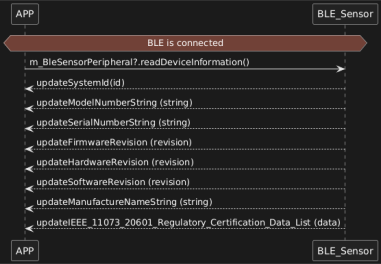
Get device
information.Figure 1-13. Device
Information Process
Sensor Control:
Implement the
delegate.
//initialize sensor delegate
m_BleSensorPeripheral?.BleSensorDelegate = self

/// A protocol that provides updates for the BLE Sensor information.
public protocol BLESensorDelegate {
    /// Tells the delegate that disconnected from a peripheral.
    func didDisconnected()

    /// Tells the delegate that retrieving the light status.
    /// - Parameter isLightOn: To indicate the light is on or not.
    func updateLightStatus(isLightOn:Bool)

    /// Tells the delegate that retrieving the temperature data.
    /// - Parameter tempData: The temperature of peripheral.
    func updateTempratureData(tempData:Float)

    /// Tells the delegate that retrieving the light color.
    /// - Parameters:
    ///   - HUE: The HUE of light color.
    ///   - Saturation: The saturation of light.
    ///   - Brightness: The brightness of light.
    func updateLightColor(HUE:CGFloat,Saturation:CGFloat,Brightness:CGFloat)

    /// Tells the delegate that the color wheel is disable or not.
    /// - Parameter disable: The peripheral will indicate disabled if the light change is not support.
    func disableColorWheel(disable:Bool)
}
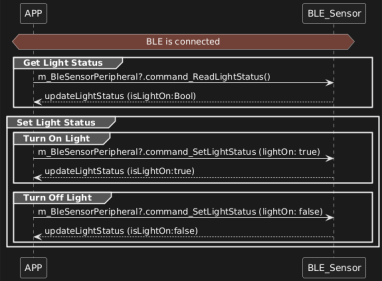
Light Status
Control: To read or set the light
ON/OFF
//read current light status
m_BleSensorPeripheral?.command_ReadLightStatus()

//turn on rgb light
m_BleSensorPeripheral?.command_SetLightStatus(lightOn:true)

//turn off rgb light
m_BleSensorPeripheral?.command_SetLightStatus(lightOn:false)
Figure 1-14. Light
Status Control
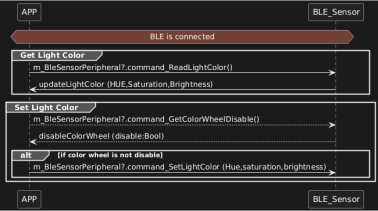
Light Color
Control: To read or set the light color, check if the
Bluetooth Low Energy sensor supports the light change by sending
the command before setting the
color.
//read current light color
m_BleSensorPeripheral?.command_ReadLightColor()

//read color wheel disable feature
m_BleSensorPeripheral?.command_GetColorWheelDisable()

//set rgb light color if color wheel is not disabled.
m_BleSensorPeripheral?.command_SetLightColor(hue, saturation, brightness)
Figure 1-15. RGB
Light Control
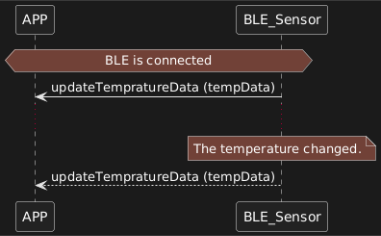
Temperature
Data Update: The temperature data updates from the
Bluetooth Low Energy sensor to the application when the
Bluetooth Low Energy connection is established and each time the
temperature changes.Figure 1-16. Temperature Update
The online versions of the documents are provided as a courtesy. Verify all content and data in the device’s PDF documentation found on the device product page.