
1.1 I2C EEPROM Bootloader
This example application shows how to use the Serial Memory Bootloader Library to bootload an application from I2C EEPROM (AT24) to Internal Flash.
Serial Memory Bootloader Applications Block Diagram
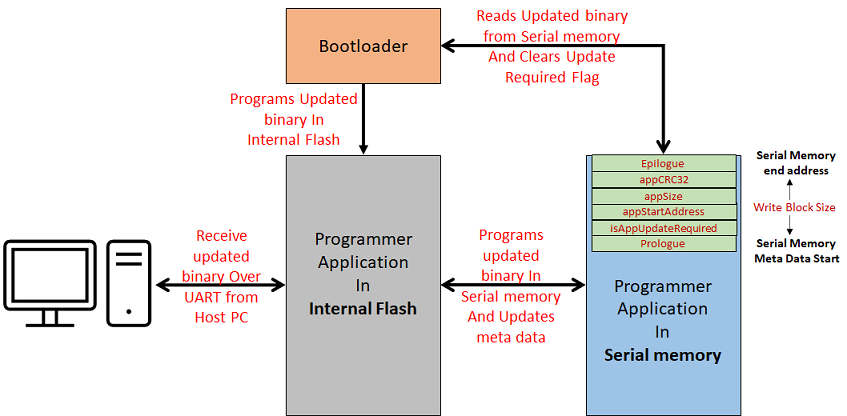
Bootloader Application
- This is a bootloader application which resides from
- The starting location of the Flash memory region for SAM devices
Performs Below Operation
- Sets up the I2C EEPROM (AT24) using the AT24 Driver.
- Checks if a firmware update is required by
reading the MetaData stored in the last sector of I2C EEPROM.
- If Firmware update is required then it jumps to Step 4
- If there was no firmware update request through
MetaData, then it checks for any trigger implemented in application main().
- Here, the On-board Switch is used to force trigger firmware update
- If no trigger is found then it jumps to Step 7
- If firmware update is required then it.
- Reads the programmer application binary stored from start of I2C EEPROM (0x0)
- Programs the read binary to application space in Internal Flash
- Once programming is done, it generates a CRC32
value over programmed space and verifies it against the CRC32 stored in
I2C EEPROM MetaData.
- If CRC32 verification fails it goes into Error State
- If CRC32 verification is successful, it clears
the firmware update required flag in the I2C EEPROM MetaData and triggers
a Soft Reset.
- After reset, bootloader starts from Step 1 through Step 3 to do firmware update check and then jump to Step 7
- If there was no firmware update required then it.
- Calls the SYS_Deinitialize() function which releases the resources used. This Function is device specific and has to be implemented based on application requirement.
- Jumps to application space to run the programmer application
Programmer Application
- This is a I2C EEPROM programmer
application which resides from
- The end of bootloader size in device Flash memory for SAM devices
- It will be loaded into Internal Flash memory from I2C EEPROM by bootloader application
- It blinks an LED every 500 ms and has capability to program I2C EEPROM (AT24) using AT24 Driver
- It uses the Virtual COM port of the device (EDBG
port or External USB to UART converters) to receive the binary to be programmed in
I2C EEPROM from host PC
- As the application running in Internal Flash should have capability to program I2C EEPROM, the programmer application binary itself is sent via UART to be programmed in I2C EEPROM
- It calls the APP_INPUT_Tasks() function which
receives the binary to be programmed into I2C EEPROM over UART channel
- It uses the UART bootloader protocol but is updated to run along with other tasks
- Once the binary is received and programmed from
start location of I2C EEPROM, it generates a CRC32 value over programmed
I2C EEPROM space and verifies it against the CRC32 sent from host PC
- It updates the CRC32 value received in the I2C EEPROM MetaData used by bootloader
- If CRC32 verification fails it goes into Error State then resets the APP_INPUT_Tasks() state to receive new binary
- If verification is successful then it
- Waits for one of below user
event to update the MetaData and trigger bootloader via soft reset to
program new binary in Internal Flash OR
- A Switch press OR
- A Reboot command from Host PC
- Waits for a new binary to be programmed in I2C EEPROM
- Waits for one of below user
event to update the MetaData and trigger bootloader via soft reset to
program new binary in Internal Flash OR