2.1 Installing the UHF Transceiver Z Wave Library (Z-Wave) Release Package
To download UHFTransceiverZWaveLibrary_REL_Vxx.exe, go to ATA8510.
The following are the steps to install the Z-Wave library:
- Run the
UHFTransceiverZWaveLibrary_REL_Vxx.exeexecutable file to start the installation procedure. Click I Agree to continue.Note: ‘xx’ in the release package executable file name specifies the version of the release package, and it varies according to the library updates. For example, in this scenario, it is 1.0.Figure 2-1. Z-Wave Library Installation 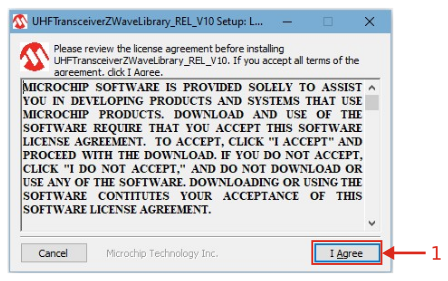
- Click Next to continue.
Figure 2-2. Z-Wave Library Installation 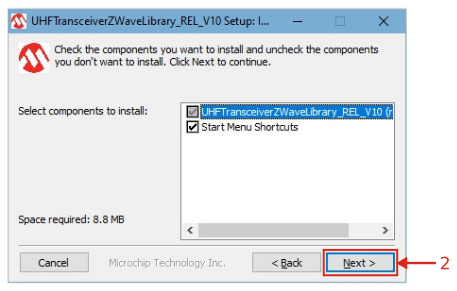
- The tool creates Z-Wave project folder
under C:\Microchip\UHFTransceiverZWaveLibrary_REL_V10 (default path). Click
Install to continue with the installation procedure.
Figure 2-3. Z-Wave Library Installation 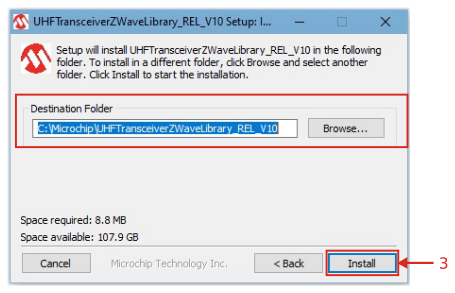
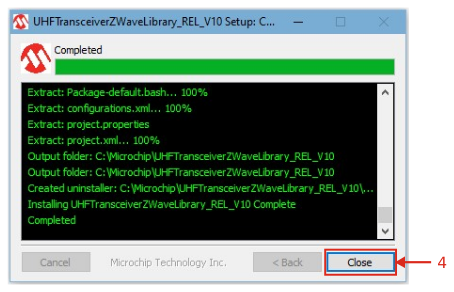
- Click Close to complete the
installation procedure.
Figure 2-4. Z-Wave Library Installation