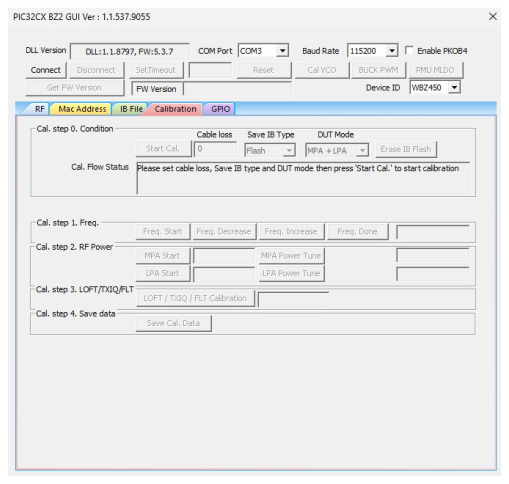
4.3.3 Calibration Flow Demonstration
In this demonstration, the user can calibrate TX parameters and RX parameters of the PIC32CX-BZ2 using a PC with the installed MCHPRT3 tool.
Perform the following steps for the demonstration of the calibration flow (see the following figure):
- Set up the connection between the PIC32 WBZ451 Curiosity Board and PC. For more details, refer to Getting Started with MCHPRT3.
- Connect the U.FL connecter on the PIC32CX-BZ2 to Bluetooth/Zigbee tester (IQxel or others) to measure the RF power from the PIC32CX-BZ2.
- Check the cable loss between the PIC32CX-BZ2 U.FL connecter to the Bluetooth/Zigbee tester.
- MLDO is the preferred mode of calibration. Click PMU MLDO to use the MLDO mode to perform calibration.
- Enter Cable loss, and select Save IB type (Flash/OTP) and DUT Mode (MPA+LPA/LPA only). CAUTION: OTP is limited in memory of 4k, and it can only be calibrated for 10 to 15 times.
- Click Start Cal. to start the new calibration.
- Click Freq. Start in Cal. step 1. Freq., the DUT transmits the Bluetooth Low Energy packet at 2440 MHz.
- Check the carrier frequency at the tester and click Freq. decrease or Freq. increase to change the carrier frequency.
- Once the carrier frequency is close to 2440 MHz, click Freq. Done.
- Click MPA Start in Cal. step 2. RF Power; read the power level in the tester, then enter it in the tool.
- Click MPA Power Tune in Cal. step 2. RF Power; repeat steps 10 and 11 until the power level reaches the target power, 8 dBm ±0.5 dB.
- Click LPA Start in Cal. step 2. RF Power; read the power level in the tester, then enter it in the tool.
- Click LPA Power Tune in Cal. step 2. RF Power; repeat steps 12 and 13 until the power level reaches the target power, 4 dBm ±0.5 dB.
- If it is LPA only in the DUT Mode, the LPA target power would be 5.5 dBm ±0.5 dB.
- Click LOFT/TXIQ/FLT Calibration in Cal. step 3. LOFT/TXIQ/FLT, then wait for done.
- Click Save Cal. Data in Cal. step 4. Save data to save the calibration data into the file and the DUT.