
1.1.1 SAM9X75-Curiosity Board: Building and Running the USB Bootloader With NAND Flash Media Applications
Downloading and Building the Application
To clone or download this application from Github, go to the main page of this repository and then click Clone button to clone this repo or download as zip file.
Path of the application within the repository is apps/mpu_usb_bootloader/.
To build the application, refer to the following table and open the project using its IDE.
Bootloader Application
| Project Name | Description |
|---|---|
| bootloader_nand_flash/sam9x75/sam_9x75_curiosity.X | MPLABX Project for SAM9X75-Curiosity Board |
Test Application
| Project Name | Description |
|---|---|
| test_app/sam9x75/sam_9x75_curiosity.X | MPLABX Project for SAM9X75-Curiosity Board |
Setting Up SAM9X75-Curiosity Board
- Connect the USART DBGU J35 on curiosity board to the computer using a UART-FTDI cable (to enable debug com port)
- Connect the USB port J2 on curiosity board to the computer using a micro USB cable (to power the board)
- Close jumper NAND BOOT on the Curiosity board
Running the Application
Open the test application project test_app/sam_9x75_curiosity.X in the IDE.
Build the project to generate the binary (Do not program the binary).
Open the bootloader project usb_device_hid_bootloader/bootloader_nand_flash/sam_9x75_curiosity.X in the IDE.
Build the project to generate the harmony_bootloader.bin binary (Do not program the binary).
Download and unzip SAM-BA.
Open the command prompt and change the current directory to <harmony3_path>/bootloader_apps_usb/deps/at91bootstrap_binaries_sam_9x75_curiosity/bootloader/nand_flash/ and run the below command:
<sam-ba_path>/sam-ba.exe -p usb -b sam9x75-curiosity -a nandflash -c erase::0x40000 -c writeboot:boot.binChange the current directory to <harmony3_path>/bootloader_apps_usb/apps/mpu_usb_bootloader/usb_device_hid_bootloader/bootloader_nand_flash/sam_9x75_curiosity.X/dist/sam_9x75_curiosity/production/ and run the below command:
<sam-ba_path>/sam-ba.exe -p usb -b sam9x75-curiosity -a nandflash -c erase:0x40000:0x80000 -c write:harmony_bootloader.bin:0x40000Reset or Power cycle the device. Green LED will be turned-on to indicate that harmony bootloader code is running on the target.
Once programming is completed and bootloader starts running.
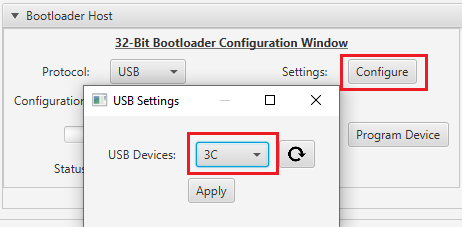
- HID Custom device with product ID 3C will be enumerated on Host PC
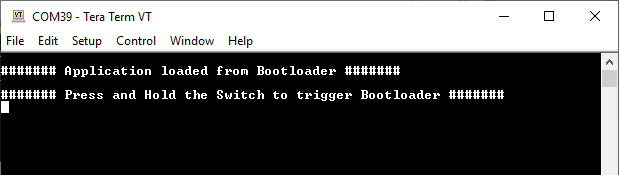
Open the Terminal application (Ex.:Tera Term) on the computer to get test application messages through UART once bootloaded.
Configure the serial port settings as follows:
- Baud: 115200
- Data: 8 Bits
- Parity: None
- Stop: 1 Bit
- Flow Control: None
Launch the Unified Host application from below path:
- <harmony3_path>/bootloader/tools/UnifiedHost-*/UnifiedHost-*.jar
Configure the Unified host application:
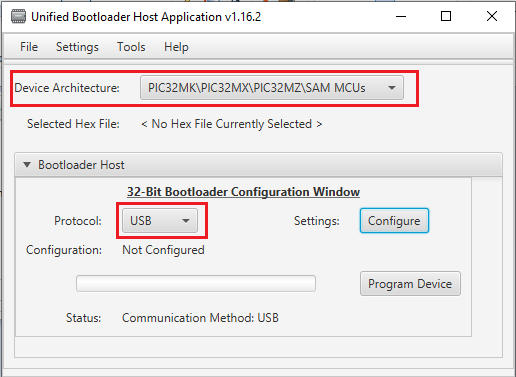
Select the Device architecture and Protocol as shown below
Click the Configure button and select the USB Device as 3C
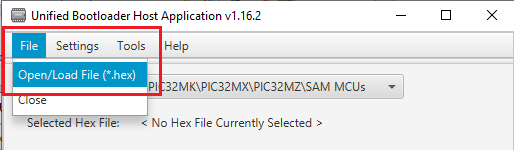
Load the test application hex file to be programmed using below option
- <harmony3_path>/bootloader_apps_usb/apps/mpu_usb_bootloader/test_app/sam_9x75_curiosity.X/dist/sam_9x75_curiosity/production/sam_9x75_curiosity.X.production.hex
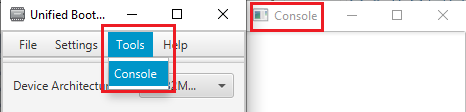
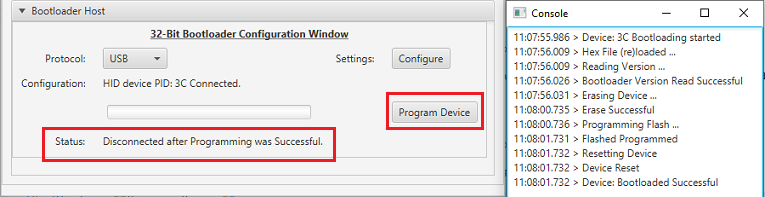
Open the Console window of the host application to view application bootloading sequence
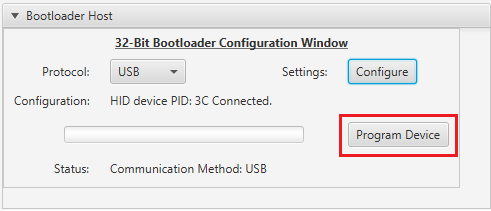
Click the Program Device button to program the loaded test application hex file on to the device.
Following figure shows output of successfully programming the test application.
If above step is successful then Green LED should start blinking and the user should see below output on the console.
Press and hold the Switch USER and then press Reset button or Power cycle the device to force trigger bootloader at startup.
Repeat Steps 14-16 once.
- This step is to verify whether bootloader is triggered by switch press at reset
Additional Steps (Optional)
To bootload any other application refer to the Application Configurations
Once done repeat the applicable steps mentioned in Running The Application