
10.6.1 Initializing/Uninitializing a Physical Drive
You can initialize or uninitialize any NVMe SSD containing Smart Controller configuration metadata. Initializing a physical device enables the erase completed drive to the ready state. Uninitializing a physical drive clears the meta-data and reserved space from the drive and removes any OS partitions; existing data on the drive is destroyed.
To initialize or uninitialize a physical drive:
- In the Enterprise View, select a controller; then, in Physical Devices tree, select the physical drive you want to initialize or uninitialize.
- On the ribbon, in the Physical Device group, click
Initialize/Uninitialize.
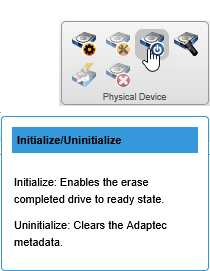 The Initialize/Uninitialize Physical Device window opens.
 - Click the Initialize or Uninitialize button, then
click OK.
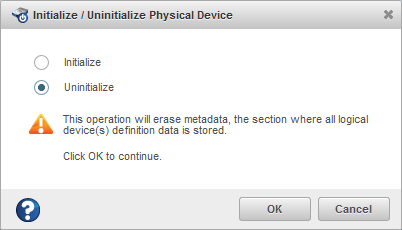
- When prompted, click OK to close the Initialize/Uninitialize Device window.