
20.2.2.3.5 Training Overview
(Ask a Question)The following figure shows the training flow of the MSS DDR Controller.
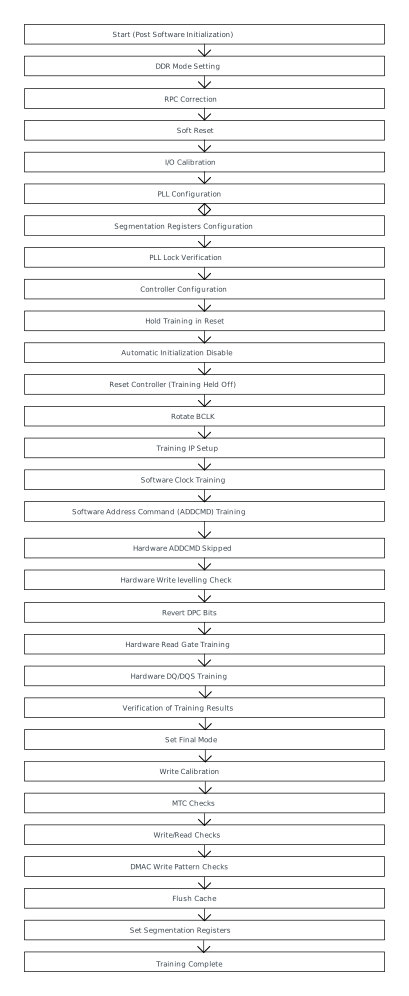
DDR Mode Setting
This step sets the DDR mode register. The value comes from the user-configured DDR parameters in the MSS Configurator (DDR type, bus width and so on).
RPC Correction
This step sets the RPC registers. Most RPC registers are automatically set with the correct value depending on the DDR type, but some of these register values are required to be set by the software.
Soft Reset
This step loads the RPC values to the PHY registers.
I/O Calibration
Internal I/O calibration takes place.
PLL Configuration
DDR PLL is configured.
Segmentation Registers Configuration
In this step, the Segmentation registers are configured to default values, so that the full DDR memory map is available.
PLL Lock Verification
DDR PLL lock is verified.
Controller Configuration
This step sets the DDR Controller configuration. The values come from the user-configured DDR parameters in the MSS Configurator.
Hold Training in Reset
Training is held in reset so that the training does not take place at this point.
Disabling Automatic Initialization
Automatic DDR Controller Initialization of memory is disabled.
Controller Reset
Training is held off.
Rotate BCLK
Bank Clock (BCLK) is rotated by 90 degrees.
Training IP Setup
The initial BCLK and SCLK clock conifguration is set.
Software Clock Training
The Bank Clock (BCLK) is trained so that it is offset from the internal SCLK.
Software Address Command (ADDCMD) Training
The DDR CK phase and Address Command (ADDCMD) signal delays are trained.
Hardware ADDCMD Skipped
This is skipped as software calculated values are used.
Hardware Write Levelling
This step verifies if hardware write leveling has passed by reading the IP status bit.
Revert DPC Bits
Post Command Address (CMDADD) training I/O settings are reverted to user-configured settings from the MSS Configurator.
Hardware Read Gate Training
This step verifies if hardware read gate training has passed by reading the IP status bit.
Hardware DQ/DQS Training
This step verifies if hardware DQ/DQS training has passed by reading the IP status bit.
Verify Training Results
Sanity checks are peformed on training results before proceeding. If the check fails, training is repeated.
Set Final Mode
Set the user mode setting.
Write Calibration
Software write calibration of each lane is run.
Memory Test Core (MTC) Checks
The MTC is used to verify write and read patterns.
Write/Read Checks
Write and Read patterns are verified using the E51 monitor core.
DMAC Write Pattern Checks
The DMAC (DMA Controller) is used to write a pattern and read it back.
Flush Cache
Post checking, the cache is flushed.
Set Segmentation Registers
The segmentation registers are set to the final user configured values.
Training Complete
Training is now complete.