
1.10.5 Hardware Configuration SAMD20 Xplained Pro
The following figure shows the SAMD20 Xplained Pro board connected with the PL460-EK and the FLASH 2 Click expansion boards.
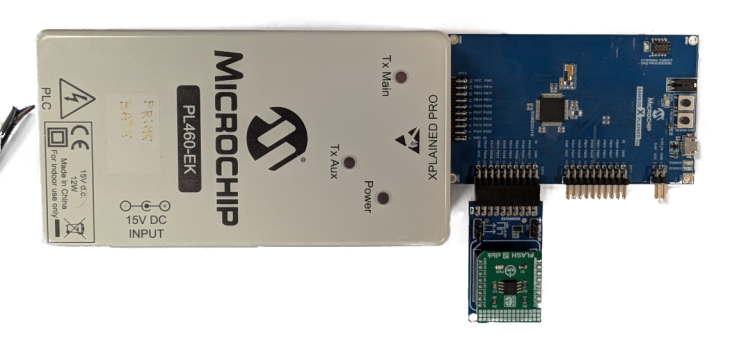
The PL460-EK is connected to the XPRO Interface connector (EXT3) of the SAMD20 Xplained Pro. A 15V DC jack must be plugged into the PL460-EK in order to supply the power for PLC transmission. For additional information about PL460-EK, refer to the user guide.
The FLASH 2 Click board carries the SST26 serial Flash memory used to store the PL460 binary and to stage the firmware-upgrade images. It is connected to the EXT2 connector of the SAMD20 Xplained Pro through SPI, which requires the ATMBUSADAPTER-XPRO adapter board.
The USB connector of the SAMD20 Xplained Pro provides the serial interface (USI), configured at 115200 bps (it cannot be higher due to hardware limitations on this board), and is used to flash and debug the SAMD20 device with the on-board debugger. For additional information about SAMD20 Xplained Pro, refer to the user guide.