
1.10.3 UART Recovery Mode
The bootloader provides a serial recovery mode to inspect the internal and external memory
and to install firmware images from a PC using the
PRIME_H3_SAMD20_Memory_Tool.
Entering Recovery Mode
In Serial Recovery mode, the device remains in the bootloader and does not run the
application. It communicates with the PRIME_H3_SAMD20_Memory_Tool
over the serial interface to inspect memory and install images. The bootloader stays
in this mode, waiting for the host, even if there is no install or revert pending,
and exits only when the host issues REQ_EXIT.
The bootloader enters recovery in two situations:
- The boot-mode record is
UART_PENDING. The application sets it and then resets when it cannot load a valid PL360 binary or application (invalid images), when the SW0 button is pressed while the application is running, or when the host writes the bootloader UART-mode USER PIB (ID0xF010). - SW0 held at start-up. Holding the SW0 button while the device is reset causes the bootloader to enter recovery mode directly, independently of the application and of any pending operation.
Recovery Protocol and Commands
The recovery protocol runs over the USI service (sub-protocol ID 0x32, CRC8, standard HDLC framing). The host exchanges the following commands with the bootloader:
| Command | Purpose |
|---|---|
| BOOT_HELLO | Announce that the bootloader is in Recovery mode (sent periodically until the host answers) |
| REQ_INFO / RSP_INFO | Query the bootloader version and the memory geometry |
| REQ_READ | Read back a range of the external SST26 serial Flash or of the internal Flash (memory inspection) |
| REQ_WRITE | Write a chunk of the bundle into the DOWNLOAD zone |
| REQ_INSTALL | Install the bundle staged in the DOWNLOAD zone |
| REQ_ERASE_ALL | Erase the external memory zones |
| REQ_EXIT | Clear the flag (NORMAL) and reset to start the application |
Inspecting the Memory
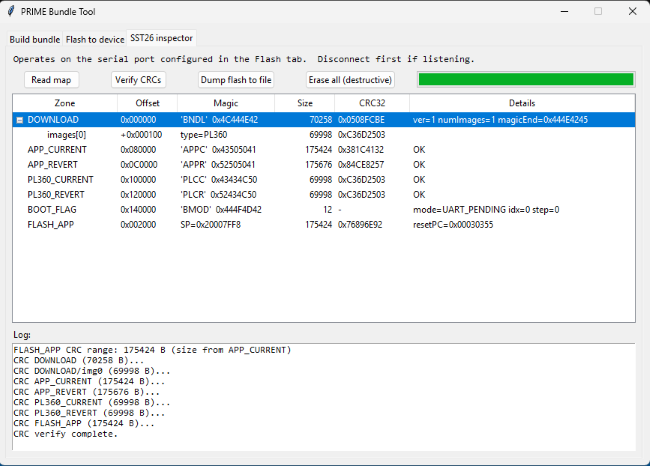
The test commands allow a host tool to diagnose the device without installing anything. REQ_INFO returns the bootloader version and the memory geometry, and REQ_READ reads back any range of the external SST26 serial Flash or of the internal Flash, which is useful to verify the staged bundle or the installed images. REQ_ERASE_ALL clears the external memory zones.
Transferring a Bundle from a PC
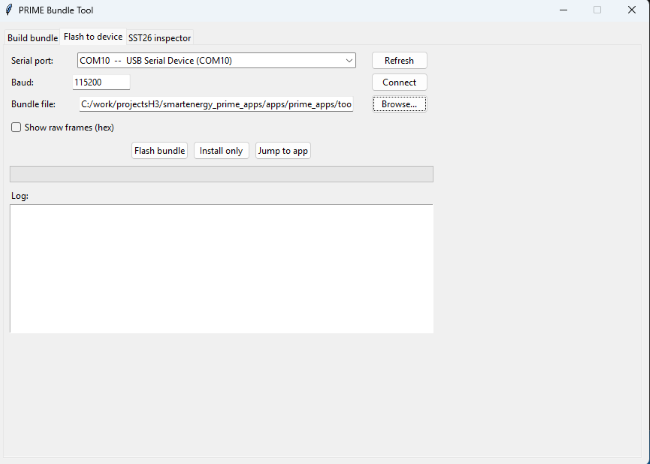
The PRIME_H3_SAMD20_Memory_Tool uploads a firmware bundle and
triggers its installation. It writes the bundle to the DOWNLOAD zone in chunks using
REQ_WRITE, issues REQ_INSTALL to install it, and finally sends REQ_EXIT to leave
Recovery mode and start the application.
Exiting Recovery Mode
To leave Recovery mode, the host sends REQ_EXIT. The bootloader clears the boot-mode record (sets it back to NORMAL) and resets the device. After the reset, the bootloader jumps to the application. Recovery mode is exited automatically after a REQ_INSTALL command successfully completes the installation.
Status LED
The bootloader signals its state through an LED: a fast blink (about 10 Hz) while waiting or during a fatal error, and a slow blink (about 1 Hz) while a serial session is active.