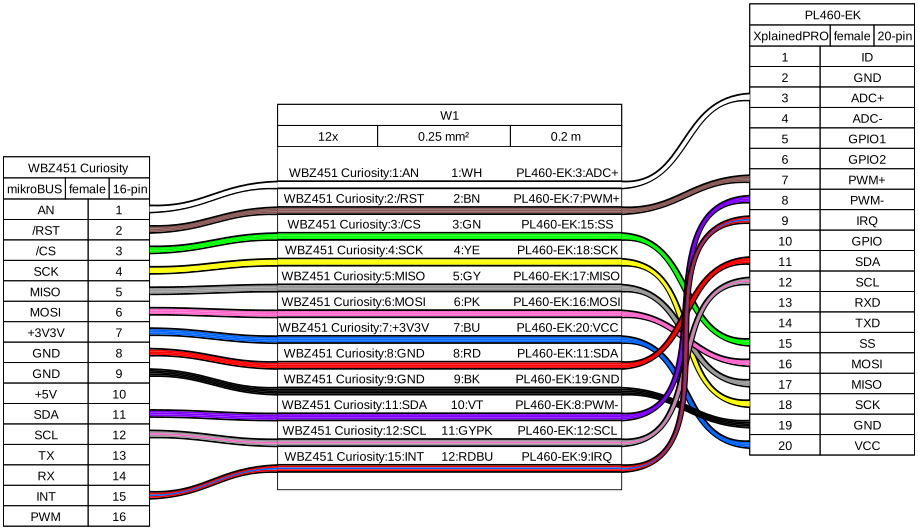
PL460-EK is connected to mikroBUS connector (J4) of WBZ451 Curiosity using a mikroBUS to
Xplained Pro adapter (connections shown in the table below). A 15V DC jack must be
plugged into PL460-EK in order to supply the power for PLC transmission. For additional
information about PL460-EK, refer to the user guide.
Table 1-3. WBZ451 Curiosity mikroBUS and PL460-EK Connections
WBZ451 Curiosity Board
PL460-EK Board
WBZ451 Pin
mikroBUS Signal
mikroBUS Pin Number
Xplain Pro Pin Number
Signal
PB1, AN5
AN
1
3
Supply Monitor
PB2
RST
2
7
NRST
PA9, SERCOM1_PAD2
CS
3
15
CS
PA8, SERCOM1_PAD1
SCK
4
18
SCK
PA10, SERCOM1_PAD3
MISO
5
17
MISO
PA7, SERCOM1_PAD0
MOSI
6
16
MOSI
+3.3V
+3.3V
7
20
VCC
GND
GND
8
11
STBY
GND
GND
9
19
GND
+5V
+5V
10
-
-
PA13, SERCOM2_PAD0
SDA
11
8
ENABLE
PA14, SERCOM2_PAD1
SCL
12
12
TXEN
PA7, SERCOM1_PAD0
TX
13
-
-
PA8, SERCOM1_PAD1
RX
14
-
-
PA2
INT
15
9
EXTINT
PA2
PWM
16
-
-
Figure 1-24. WBZ451 Curiosity to PL460-EK
Connection
Sleep mode and Thermal Monitor functionalities are not used in this platform, as there
are not enough GPIOs on mikroBUS connector to support them. Sleep mode pin is set to GND
in the adapter to avoid issues.Figure 1-25. Sleep Mode and Thermal Monitor
not Used
WBZ451 has an ADC peripheral which is not currently supported by PVDD Monitor service.
Therefore, this functionality is not added to this platform projects.
The micro-B USB connector (J7) of WBZ451 Curiosity can be used to:
Manage PLC PHY Tester Tool. UART
baud-rate is configured at 115200 bps.
Flash/debug the WBZ451 device
with the integrated programmer and debugger MPLAB PICkit On-Board 4
(PKOB4).
For additional information about WBZ451 Curiosity, refer to the user guide.
Note: WBZ451 radio is not compatible with currently supported modes on
projects for RF215, so nodes of those platforms cannot be mixed in the same
network.