1.1.3 SmartDebug Flow
(Ask a Question)SmartDebug debugs the design with respect to signal integrity related issues if the design is not working as expected. For more information on SmartDebug, see SmartDebug User Guide for PolarFire FPGAs.
For Tx, SmartDebug is used to change the settings such as amplitude, de-emphasis and driver termination settings live on the hardware. The following are the ways to debug the hardware:
Using existing design which sends data
Using in-built PRBS generator from SmartDebug
The following steps describe the debugging of the design with respect to Tx:
Program the bit file
(.stp)to the device.Open the corresponding Libero SoC Project option.
To generate array data, on the Libero SoC Software, double-click the Generate SmartDebug FPGA Array Data option. Once the array data is generated, a green tick mark appears.
Figure 1-4. SmartDebug FPGA Array Data 
- From the Libero SoC Design Flow, open the SmartDebug Design option.Important: The hardware must be connected with FlashPro programmer and turned on. If the SmartDebug is opened without turning on the hardware, it opens up in Demo mode.
Connect the hardware using FlashPro programmer and open the SmartDebug Design from the Libero SoC Design Flow. The SmartDebug window opens.
Figure 1-5. SmartDebug Design 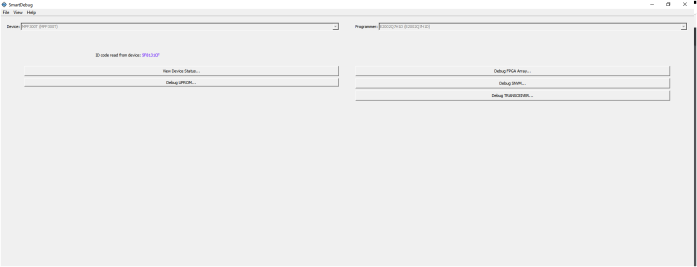
- Click Debug Transceiver menu.
Go to Smart BERT tab and select the required lane to assign the pattern and transmitter attributes as shown in the following figure.
Figure 1-6. Smart Bert 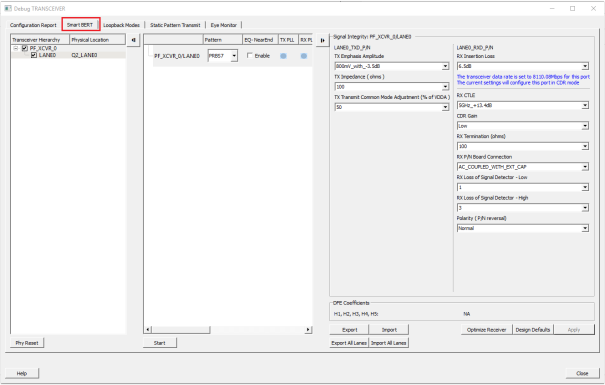
Select any data pattern or the existing design sends the data pattern.
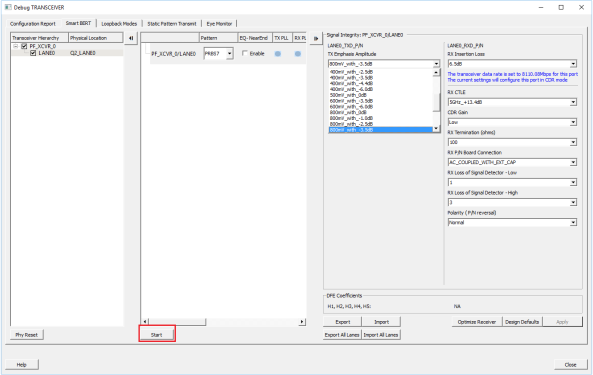
- From the drop down menu, select the Tx Emphasis amplitude option. Selected option sets the device registers to provide the desired de-emphasis for the particular signal amplitude. Tx impedance is also decided based on the signal amplitude.
Click Apply for new settings on the device.
The inbuilt PRBS generator option sends out the data pattern. To enable PRBS generator, on the Smart Bert window, select appropriate PRBS pattern and click Start.