
1.1.2 Libero Flow
(Ask a Question)The Tx and Rx settings obtained from IBIS-AMI simulation, directly applies to the device through Libero SoC. In this section, settings related to Tx are discussed. Following are the steps to apply Tx signal integrity settings.
To create the transceiver based design, perform the following steps:
To enable the Manage Constraints, run the Synthesize.
Go to .
Go to Edit as shown in the following figure.
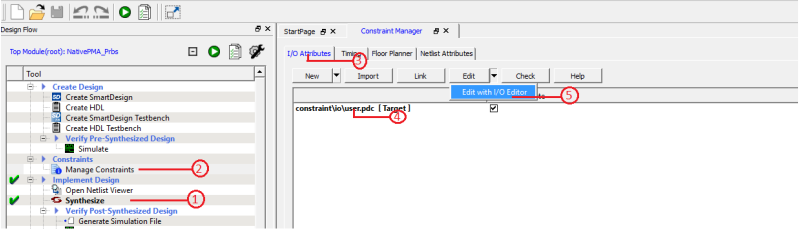
After the I/O Editor is opened, perform the following steps:
Select XCVR View tab.
Select the appropriate lane.
Go to Signal Integrity View present in the right bottom.
Select the Tx settings such as, TC Emphasis Amplitude with de-emphasis, Tx Impedance as shown in the following figure.
- Select the appropriate settings and apply.
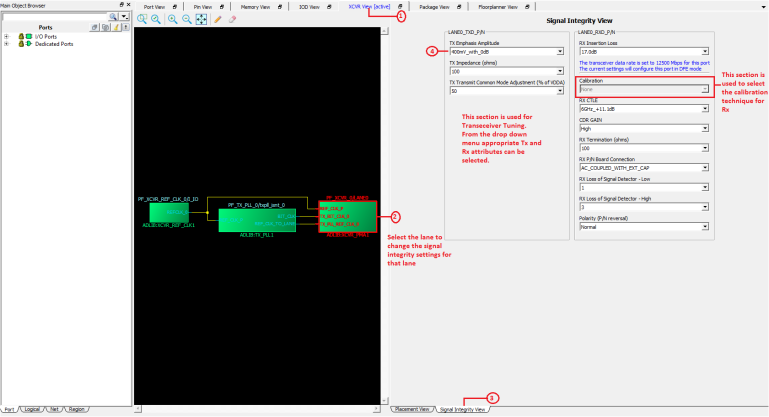
This fixes the Tx and Rx settings into staple file (bit file). To debug the design with respect to signal integrity, change the Tx and Rx settings through SmartDebug on the fly.