
4.1.8.5 OTA Service
The OTA (Over-The-Air) system service enables firmware updates for the WINCS02 module via its Wi-Fi interface. It establishes a secure TLS TCP client connection to the OTA server to download the firmware image directly to the WINCS02 device. Additionally, the OTA system service supports secure HTTPS file downloads, allowing any network-connected device—such as a PC—to initiate the firmware update process.
The MPLAB Code Configurator (MCC) allows Wi-Fi® service configuration as mentioned below
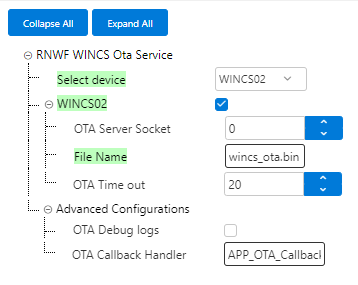
- WINCS02 Inbuilt Ota: Select to enable the WINCS02 Inbuilt OTA
Configurations.
- OTA Server Socket: Configure the OTA server socket as per net service socket number.
- File Name: Enter the file name to download from OTA server.
- OTA Time out: Timeout in seconds.
- Advanced Configurations:
- OTA Debug logs: Select to get interface debug logs.
- OTA Callback Handler: Configure callback function name to handle OTA service events.
SYS_WINCS_RESULT_t SYS_WINCS_OTA_SrvCtrl(SYS_WINCS_OTA_SERVICE_t request, SYS_WINCS_OTA_HANDLE_t otaHandle);It handles following services and reports the result to application over the return code or through the registered callback.
| Option/Command | Input | Description |
|---|---|---|
|
SYS_WINCS_OTA_OPTIONS_SET | Ota Time out Configuration | OTA options(Time out) |
|
SYS_WINCS_OTA_DOWNLOAD_START | Ota Configurations | Configure the URL, TLS Enable |
|
SYS_WINCS_OTA_IMG_ACTIVATE | NULL | Activates downloaded ota inage |
|
SYS_WINCS_OTA_IMG_VERIFY | NULL | Verify OTA Image. |
|
SYS_WINCS_OTA_IMG_INVALIDATE | NULL | Invalidate OTA image |
|
SYS_WINCS_OTA_SET_CALLBACK | Callback handler | Register callback function for the OTA service to report the status |
| Event | Response Components | Comments |
|---|---|---|
|
SYS_WINCS_OTA_DOWNLOAD_STARTED | Total size of the image file to be downloaded | Given image file download has started |
|
SYS_WINCS_OTA_DOWNLOAD_COMPLETE | Total size of downloaded Image file | Firmware download process completed |
|
SYS_WINCS_OTA_NEW_PARTITION_ACTIVE | New partition active. | Flashed the newly downloaded image in new partition and activate. |
|
SYS_WINCS_OTA_INVALID_URL | Invalid URL | The URL is invalid |
|
SYS_WINCS_OTA_INSUFFICIENT_FLASH | Insufficient flash memory | Insufficient flash memory |
|
SYS_WINCS_OTA_BUSY | OTA process busy | OTA process busy |
|
SYS_WINCS_OTA_ERROR | OTA error occurred ID | OTA error occurred |
|
SYS_WINCS_OTA_IMAGE_VERIFY | OTA image verifiy | OTA image verification status |
The following figure illustrates the OTA mode connection sequence

OTA mode :
/* ************************************************************************** */
/* Section: Included Files                                                    */
/* ************************************************************************** */
/* ************************************************************************** */
#include <stdio.h>

/* This section lists the other files that are included in this file.
 */
#include "app_ota.h"
#include "system/console/sys_console.h"
#include "system/net/sys_wincs_net_service.h"
#include "system/ota/sys_wincs_ota_service.h"
#include "system/wifi/sys_wincs_wifi_service.h"
#include "config/sam_e54_xpro_wincs02/configuration.h"


// Global data for OTA application
static APP_OTA_CONTEXT g_appOtaCtx;

static SYS_WINCS_OTA_TLS_CFG_t g_otaTlsCfg =
{
    // Specify the peer authentication method
    .tlsPeerAuth          = SYS_WINCS_OTA_SERV_SOCK_PEER_AUTH,
    // Set the CA certificate for TLS
    .tlsCACertificate     = SYS_WINCS_OTA_SERV_SOCK_ROOT_CERT,
    // Set the device certificate for TLS
    .tlsCertificate       = SYS_WINCS_OTA_SERV_SOCK_DEV_CERT,
    // Set the key name for the device
    .tlsKeyName           = SYS_WINCS_OTA_SERV_SOCK_DEV_KEY,
    // Set the password for the device key
    .tlsKeyPassword       = SYS_WINCS_OTA_SERV_SOCK_DEV_KEY_PWD,
    // Set the server name for TLS
    .tlsServerName        = SYS_WINCS_OTA_SERV_SOCK_SERVER_NAME,
    // Set the domain name for TLS
    .tlsDomainName        = SYS_WINCS_OTA_SERV_SOCK_DOMAIN_NAME,
    // Enable or disable domain name verification
    .tlsDomainNameVerify  = SYS_WINCS_OTA_SERV_SOCK_DOMAIN_NAME_VERIFY
};


static void APP_OTA_CmdPrintUsage (void)
{
    SYS_CONSOLE_PRINT(TERM_YELLOW"\r\n*********************** COMMAND HELP ************************************\r\n"TERM_RESET);
    SYS_CONSOLE_PRINT(">> Command     : ota \r\n");
    SYS_CONSOLE_PRINT(">> Description : Configure, start and stop OTA process \r\n");
    SYS_CONSOLE_PRINT(">> Options     : config     -> Configure the OTA properties\r\n"
                      "               : start      -> Start OTA process\r\n"
                      "               : stop       -> Stop OTA process\r\n"
                      "               : help       -> Help Command\r\n\r\n");
    SYS_CONSOLE_PRINT(">> Syntax      : ota config <URL> <TLS> \r\n"
            "\t\tURL : OTA FW binary URL \r\n "
            "\t\tTLS : 0- Non TLS Connection\r\n"
            "\t\t      1- TLS Connection\r\n");

    SYS_CONSOLE_PRINT(">> Syntax      : ota start  -> To Start download and switch \r\n");
    SYS_CONSOLE_PRINT(">> Syntax      : ota stop   -> To stop OTA process\r\n");
    SYS_CONSOLE_PRINT(TERM_YELLOW"\r\n**************************************************************************\r\n"TERM_RESET);
    return;
}

// *****************************************************************************
// *****************************************************************************
// Function: APP_OTA_CMDProcessing
//
// Summary:
//    Processes OTA commands received from the console.
//
// Description:
//    This function processes the OTA commands received from the console and
//    updates the OTA state accordingly.
//
// Parameters:
//    pCmdIO - Pointer to the command device node
//    argc - Argument count
//    argv - Argument vector
//
// Returns:
//    None
//
// Remarks:
//    None
// *****************************************************************************
void APP_OTA_CMDProcessing(SYS_CMD_DEVICE_NODE* pCmdIO, int argc, char** argv)
{
    SYS_CONSOLE_PRINT(TERM_RESET"Command Received : ota\r\n");
    if ((argc < 2) && (argc > 4)){
        SYS_CONSOLE_MESSAGE(TERM_RED "COMMAND ERROR : Invalid Number of parameters. Check \"ota help\" command\r\n" TERM_RESET);
        return;
    }

    if (strcmp(argv[1], "config") == 0){
        #ifdef OTA_EXTENDED_CONFIG_ENABLE
        if (argc == 5)
        {
            g_appOtaCtx.otaCfg.options.timeout = atoi(argv[4]);
        }
        else
        #endif
        {
            g_appOtaCtx.otaCfg.options.timeout = SYS_WINCS_OTA_TIMEOUT;
        }
            if (argc < 4){
            SYS_CONSOLE_MESSAGE(TERM_RED "COMMAND ERROR : Invalid Number of parameters. Check \"ota help\" command\r\n" TERM_RESET);
            return;
        }

        strncpy(g_appOtaCtx.otaCfg.url, argv[2], strlen(argv[2]));
        if (strcmp(argv[3], "1") == 0){
            g_appOtaCtx.otaCfg.tlsEnable = 1;
        }
        else if (strcmp(argv[3], "0") == 0){
            g_appOtaCtx.otaCfg.tlsEnable = 0;
        }
        else{
            SYS_CONSOLE_MESSAGE(TERM_RED"Wrong Command\r\n"TERM_RESET);
            SYS_CONSOLE_PRINT(TERM_RED "Invalid Command parameter <TLS_ENABLE>. "
                            "Check \"ota help\" command\r\n\r\n" TERM_RESET);
            return;
        }
        g_appOtaCtx.state = APP_OTA_STATE_CONFIG;
    }

    else if (strcmp(argv[1], "start") == 0){
        g_appOtaCtx.state = APP_OTA_STATE_DOWNLOAD_START;
    }

    else if (strcmp(argv[1], "stop") == 0){
        g_appOtaCtx.state = APP_OTA_STATE_STOP;
    }
    else if (strcmp(argv[1], "help") == 0){
        APP_OTA_CmdPrintUsage();
    }
    else{
        SYS_CONSOLE_MESSAGE(TERM_RED "COMMAND ERROR : Wrong Command Usage. Check \"ota help\" command\r\n" TERM_RESET);
    }
    return;
}

// *****************************************************************************
// *****************************************************************************
// OTA Command Table
//
// Summary:
//    Defines the command table for OTA commands.
//
// Description:
//    This static constant array defines the command table for OTA commands,
//    mapping the "ota" command to the APP_OTA_CMDProcessing function.
//
// Remarks:
//    None
// *****************************************************************************
static const SYS_CMD_DESCRIPTOR OTACmdTbl[] =
{
    {"ota", APP_OTA_CMDProcessing, ": ota commands processing"},
};


// *****************************************************************************
// *****************************************************************************
// Function: SYS_WINCS_OTA_CallbackHandler
//
// Summary:
//    Handles OTA events and updates the application state.
//
// Description:
//    This function handles the OTA events and updates the application state
//    based on the event received.
//
// Parameters:
//    event - OTA event
//    otaHandle - OTA handle
//
// Returns:
//    None
//
// Remarks:
//    None
// *****************************************************************************
static void SYS_WINCS_OTA_CallbackHandler
(
    SYS_WINCS_OTA_EVENT_t event,
    SYS_WINCS_OTA_HANDLE_t otaHandle
)
{
    switch(event)
    {
        case SYS_WINCS_OTA_DOWNLOAD_STARTED:
        {
            SYS_CONSOLE_PRINT("[APP_OTA] : OTA operation %d started\r\n", *(uint8_t *)otaHandle);
            SYS_CONSOLE_PRINT(TERM_YELLOW"[APP_OTA] : Downloading......\r\n"TERM_RESET);
            break;
        }

        case SYS_WINCS_OTA_DOWNLOAD_COMPLETE:
        {
            SYS_CONSOLE_PRINT("[APP_OTA] : OTA FW Download Completed\r\n");
            g_appOtaCtx.state = APP_OTA_STATE_DOWNLOAD_DONE;
            break;
        }

        case SYS_WINCS_OTA_IMAGE_VERIFY:
        {
            SYS_CONSOLE_PRINT("[APP_OTA] : Verification Completed\r\n");
            g_appOtaCtx.state = APP_OTA_STATE_IMG_ACTIVATE;
            break;
        }

        case SYS_WINCS_OTA_NEW_PARTITION_ACTIVE:
        {
            SYS_CONSOLE_PRINT("[APP_OTA] : New partition active\r\n");
            g_appOtaCtx.state = APP_OTA_STATE_SWITCH_DONE;
            break;
        }

        case SYS_WINCS_OTA_BUSY:
        {
            SYS_CONSOLE_PRINT("[APP_OTA] : OTA Busy\r\n");
            break;
        }

        case SYS_WINCS_OTA_INVALID_URL:
        {
            SYS_CONSOLE_PRINT("[APP_OTA] : OTA Error! Invalid URL\r\n");
            break;
        }

        case SYS_WINCS_OTA_INSUFFICIENT_FLASH:
        {
            SYS_CONSOLE_PRINT("[APP_OTA] : OTA Error! Insufficient Flash\r\n");
            break;
        }

        case SYS_WINCS_OTA_ERROR:
        {
            SYS_CONSOLE_PRINT("[APP_OTA] : OTA Error opId: %d\r\n",*(uint8_t *)otaHandle);
            break;
        }
    }
}

// *****************************************************************************
// *****************************************************************************
// Function: APP_OTA_Initialize
//
// Summary:
//    Initializes the OTA application.
//
// Description:
//    This function initializes the OTA application and registers the OTA command
//    group.
//
// Parameters:
//    None
//
// Returns:
//    None
//
// Remarks:
//    None
// *****************************************************************************
void APP_OTA_Initialize
(
    void
)
{
    if (!SYS_CMD_ADDGRP(OTACmdTbl, sizeof(OTACmdTbl)/sizeof(*OTACmdTbl), "ota", ": ota commands"))
    {
        SYS_ERROR(SYS_ERROR_ERROR, "Failed to create OTA Commands\r\n");
    }
    g_appOtaCtx.state = APP_OTA_STATE_INIT;
}

// *****************************************************************************
// *****************************************************************************
// Function: APP_OTA_Tasks
//
// Summary:
//    Manages the OTA application tasks.
//
// Description:
//    This function manages the OTA application tasks based on the current state.
//
// Parameters:
//    None
//
// Returns:
//    None
//
// Remarks:
//    None
// *****************************************************************************
void APP_OTA_Tasks
(
    void
)
{
    switch( g_appOtaCtx.state)
    {
        // Initialize the OTA process
        case APP_OTA_STATE_INIT:
        {

            break;
        }

        case APP_OTA_STATE_CONFIG:
        {
            SYS_WINCS_OTA_SrvCtrl(SYS_WINCS_OTA_SET_CALLBACK, SYS_WINCS_OTA_CallbackHandler);
            if(g_appOtaCtx.otaCfg.tlsEnable == 1 )
            {
                SYS_WINCS_NET_SockSrvCtrl(SYS_WINCS_NET_OPEN_TLS_CTX,NULL);
                SYS_WINCS_NET_SockSrvCtrl(SYS_WINCS_NET_GET_TLS_CTX_HANDLE,(SYS_WINCS_NET_HANDLE_t)&g_appOtaCtx.otaCfg.tlsCtxHandle);


                SYS_WINCS_NET_SockSrvCtrl(SYS_WINCS_NET_TLS_CONFIG,(SYS_WINCS_NET_HANDLE_t)&g_otaTlsCfg);
            }
            else
            {
                SYS_CONSOLE_PRINT("[APP_OTA] : g_appOtaCtx.otaCfg.tlsCtxHandle 0\r\n");
                g_appOtaCtx.otaCfg.tlsCtxHandle = 0;
            }


            if(SYS_WINCS_PASS != SYS_WINCS_OTA_SrvCtrl(SYS_WINCS_OTA_OPTIONS_SET, &g_appOtaCtx.otaCfg.options))
            {
                SYS_CONSOLE_PRINT("[APP_OTA] :ERROR OTA Setting Options \r\n");
                g_appOtaCtx.state = APP_OTA_STATE_ERROR;
            }
            SYS_CONSOLE_PRINT(TERM_GREEN"[APP_OTA] : OTA Configurations Set Successfully\r\n"TERM_RESET,g_appOtaCtx.otaCfg.options.timeout);
            g_appOtaCtx.state = APP_OTA_STATE_WAIT;
            break;
        }

        // Start the OTA download process
        case APP_OTA_STATE_DOWNLOAD_START:
        {
            if(NULL != g_appOtaCtx.otaCfg.url)
            {
                if(true == APP_WINCS02_GetWifiStatus())
                {
                    if(g_appOtaCtx.otaCfg.tlsEnable == 1 )
                    {
                        if(false == APP_WINCS02_GetSntpStatus())
                        {
                            SYS_CONSOLE_PRINT("[APP_OTA] :ERROR SNTP not UP. Please try again after SNTP is UP\r\n \r\n");
                            g_appOtaCtx.state = APP_OTA_STATE_ERROR;
                            break;
                        }

                    }
                    if(SYS_WINCS_PASS != SYS_WINCS_OTA_SrvCtrl(SYS_WINCS_OTA_DOWNLOAD_START, &g_appOtaCtx.otaCfg))
                    {
                        SYS_CONSOLE_PRINT("[APP_OTA] :ERROR OTA Download \r\n");
                    }
                }
                else
                {
                    SYS_CONSOLE_PRINT(TERM_RED"[APP_OTA] :ERROR - Wifi Not connected\r\n"TERM_RESET);
                    SYS_CONSOLE_PRINT(TERM_YELLOW"Connect to Wi-Fi using sta command and try again\r\n"TERM_RESET);
                    g_appOtaCtx.state = APP_OTA_STATE_ERROR;
                    break;
                }
            }
            else
            {
                SYS_CONSOLE_PRINT(TERM_RED"[APP_OTA] :ERROR - OTA configurations not set\r\n"TERM_RESET);
                SYS_CONSOLE_PRINT(TERM_YELLOW"Set OTA configuration and try again\r\n"TERM_RESET);
                g_appOtaCtx.state = APP_OTA_STATE_ERROR;
            }
            g_appOtaCtx.state = APP_OTA_STATE_WAIT;
            break;
        }

        // Handle the completion of the OTA download
        case APP_OTA_STATE_DOWNLOAD_DONE:
        {
            SYS_CONSOLE_PRINT("[APP_OTA] : Download Completed\r\n");
            SYS_CONSOLE_PRINT("[APP_OTA] : Now switching to active partition...\r\n");

            if(g_appOtaCtx.otaCfg.tlsEnable == 1 )
            {
                SYS_WINCS_NET_SockSrvCtrl(SYS_WINCS_NET_CLOSE_TLS_CTX,NULL);
            }

            if (SYS_WINCS_PASS != SYS_WINCS_OTA_SrvCtrl(SYS_WINCS_OTA_IMG_ACTIVATE, NULL))
            {
                SYS_CONSOLE_PRINT("[APP_OTA] : OTA Error\r\n");
                g_appOtaCtx.state = APP_OTA_STATE_ERROR;
                break;
            }

            g_appOtaCtx.state = APP_OTA_STATE_WAIT;
            break;
        }

        // Verify the downloaded image
        case APP_OTA_STATE_IMG_ACTIVATE:
        {
            if (SYS_WINCS_PASS != SYS_WINCS_OTA_SrvCtrl(SYS_WINCS_OTA_IMG_ACTIVATE, NULL))
            {
//                SYS_CONSOLE_PRINT("[APP_OTA] : OTA Error\r\n");
                g_appOtaCtx.state = APP_OTA_STATE_IMG_ACTIVATE;
                break;
            }
            g_appOtaCtx.state = APP_OTA_STATE_WAIT;
            break;
        }

        // Handle errors in the OTA process
        case APP_OTA_STATE_ERROR:
        {
            SYS_CONSOLE_PRINT(TERM_RED"[ERROR_OTA] :ERROR OTA Update \r\n"TERM_RESET);
            g_appOtaCtx.state = APP_OTA_STATE_WAIT;
            break;
        }

        // Wait state for the OTA process
        case APP_OTA_STATE_WAIT:
        {
            break;
        }

        // Handle the completion of the partition switch
        case APP_OTA_STATE_SWITCH_DONE:
        {
            SYS_CONSOLE_PRINT(TERM_GREEN"[APP_OTA] : OTA Successfully Completed\r\n"TERM_RESET);
            g_appOtaCtx.state = APP_OTA_STATE_STOP;
            break;
        }

        // Stop the OTA process
        case APP_OTA_STATE_STOP:
        {
            break;
        }
    }
    return;
}

/*******************************************************************************
 End of File
  */