
6.1.6 Flash Memory Programming
The Flash Controller (FC) works with single panel made from 4 KB pages with each page containing four rows of Flash data. A row is the largest selectable region for contiguous programming of write words.
The FC state machine accepts commands from the NVMCON register NVMOP commands (NVMCON.NVMOP).
A page of Flash is the smallest unit of memory that can be erased in a single operation. The whole program Flash memory region (PFM) can be erased in a single operation.
- Row Programming – Word-by-word programming until the whole row is programmed. The FC read the data from system SRAM
-
For PIC32CX-BZ3:
- Quad Word Programming – The FC performs four writes of word from holding registers
- Single Word Programming – The FC performs one write of word from holding registers
-
For PIC32CX-BZ6:
- Quad Double Word Programming – The FC performs eight writes of word from holding registers
- Single Double Word Programming – The FC performs two writes of word from holding registers
- Page Erase
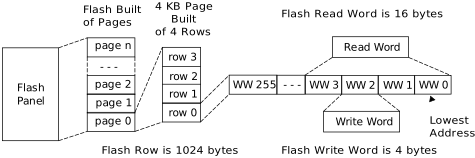
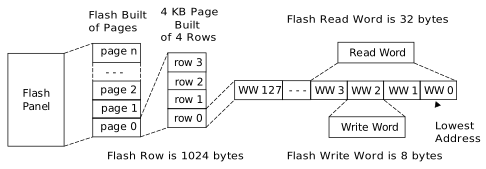
The following procedures must be used to program the device Flash using DSU. Programming the Flash is only possible when the device is not code protected. If the device is already code protected, issue a chip erase procedure to make the device unprotected and programming ready.
Programming Whole Flash (PFM and BFM Regions or Only PFM Regions)
- Issue cold plugging procedure to enter into DAP mode.
- Issue a chip erase procedure (only if device is code protected as described in Chip Erase).
- Reset the target device.
- Wait or poll on BOOT_STATUS[4:0] until the values becomes
0x1D, with a 100 ms expiry timer. - This step is needed only if
programming BFM memory region.
- Perform the system unlock sequence and write to the NVMLBWP register (0x440006F0)= 0x80000000.
- Clear LBWPn bits of
NVMLBWP to remove the write protect on the corresponding page. Note: At reset, all LBWPn bits of NVMLBWP are set to logic
1, write protecting all user accessible NVR pages (BFM).
-
The programming flow for PFM and BFM varies based on the DEBUG_LCK bit.
- If the debug
secure bit (DEBUG_LCK) is enabled:PFM Programming:
- Use Quad Double Word Programming.
BFM Programming:- Set
bit 3 of DSUEXT.TESTMODE (@0x410001FC) to
1. - Perform the system unlock sequence and write to the NVMLBWP register (0x440006F0)=0x80000000.
- Clear
the LBWPn bits of NVMLBWP to remove the write
protection on the corresponding page.Note: At reset, all LBWPn bits of NVMLBWP are set to logic
1, write protecting all user-accessible NVR pages (BFM). - Use Quad Double Word Programming.
- Clear bit 3 of DSUEXT.TESTMODE.
- If the debug
secure bit (DEBUG_LCK) is not enabled:PFM Programming:
- Use Row Programming.
BFM Programming:- Perform the system unlock sequence and write to the NVMLBWP register (0x440006F0)=0x80000000.
- Clear
the LBWPn bits of NVMLBWP to remove the write
protection on the corresponding page.Note: At reset, all LBWPn bits of NVMLBWP are set to logic
1, write protecting all user-accessible NVR pages (BFM). - Use Row Programming.
- If the debug
secure bit (DEBUG_LCK) is enabled:
Programming BCFG Single Boot Page for Configurations
- Issue cold plugging procedure to enter into the DAP mode.
- Perform the following steps
to disable write protection.
- Perform the system unlock sequence and write to the NVMLBWP register (0x440006F0)= 0x80000000.
-
Clear the corresponding bit of NVMLBWP to remove the write protect on the page:
- PIC32CX-BZ6: 16 in BCFG
- PIC32CX-BZ3: 5 in BCFG
- Set DSUEXT.TESTMODE
(@0x410001FC) bit 3 to
1.
- Issue a page erase procedure.
- Perform the procedures mentioned in Row Programming Sequence.