Open the Prepare Data section and click
CREATE QUERY.Figure 6-6. Create New Query
Button
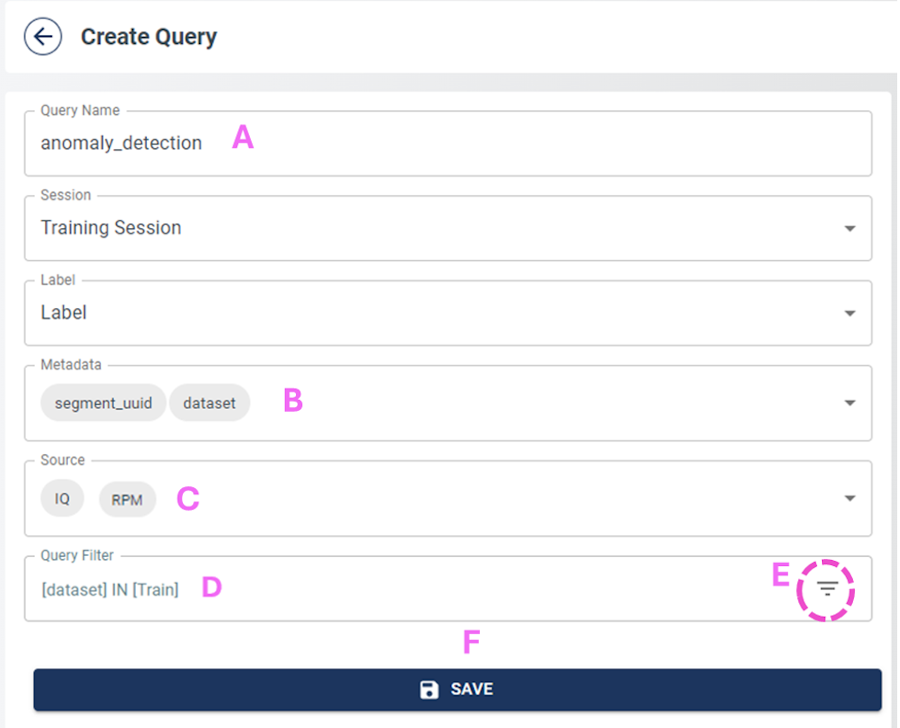
Fill out the new query selections. Figure 6-7. Data Query Recommended
Configuration
Add the Query Name
(A).
Add dataset Metadata
(B).
Add IQ and RPM
to Source (C).
Select Train data for
the Query Filter (D).
Save the query
(F).
Click the Rebuild icon. Figure 6-8. Rebuild Icon
Make sure the query is cached. Figure 6-9. Data Query Properly
Rebuilt
Verify the query behavior by clicking on the query name and review the provided charts.
The online versions of the documents are provided as a courtesy. Verify all content and data in the device’s PDF documentation found on the device product page.