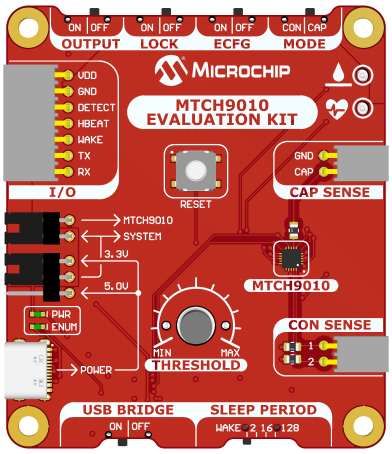
3.1 ECFG: OFF (Slide Switches)
When ECFG is set to OFF, the board is configured using the on-board slider switches and the manual tuning knob. This mode provides a simple, hardware-based setup method without requiring a computer or terminal connection.
| Switch/Label | Functionality |
|---|---|
| Operation Mode Selection (MODE) | Sets sensing mode (CAP: Capacitive, CON: Conductive) |
| ECFG | Sets configuration method (OFF: Slide switches, ON: UART mode) to ensure the LOCK switch is set to OFF before applying configuration changes |
| System Lock Enable (LOCK) | When ON, the device loads any saved configuration from Non-Volatile Memory (NVM); if no valid data is present, it enters an error state. When OFF, new configuration can be applied based on the selected method (ECFG setting) |
|
Sleep Period Selection (SLEEP PERIOD) Note: The available pre-configured values are 2,
16, 128 seconds, or external Wake-up (WAKE).
| Sets the amount of time the MTCH9010 stays in low-power mode between sensing cycles or enables WAKE on Request mode, where the host triggers acquisitions via the WAKE pin found on the External Control Interface header |
| Extended Output Enable (OUTPUT) | Enables the UART output when ECFG is set to ON. When ECFG is set to OFF, the slide has no effect, as output is controlled through the serial terminal. |
| Threshold | Manually adjusts the detection threshold (clockwise: Less sensitive) |
| USB Bridge | Disable the USB bridge by placing the USB bridge slide switch in the OFF position, preventing unwanted transmissions on the UART or USB interfaces |
Important: Slide switch changes that configure the
MTCH9010 take effect on power-up or after pressing the RESET button.