
1.6 Configuring the Harmony Core Library
Harmony Core library component provides common configurations to drivers, system services, and middlewares.
It also provides options to create application template files for the user to kick-start on developing the application.
Key points to be noted:
All the drivers, system services and middlewares are dependent on the
Harmony Corecomponent.If the user adds any of these modules in project graph and
Harmony Corecomponent is not already activated, a pop-up appears to activateHarmony Core.Failure to activate
Harmony Corecomponent may result in build failures as these modules are dependent on it.
As
Harmony Corecomponent is dependent onRTOS, a pop-up will appear the first timeHarmony Coreis activated to addFreeRTOSif it was cloned. As this is optional dependency user can choose to not activate it.If FreeRTOS is activated, all the existing modules will run in RTOS environment and each module may have its own RTOS settings.
If not activated, all the existing modules will run in Bare-Metal environment.
The following figures show the MCC configuration window for Harmony core component and brief description.
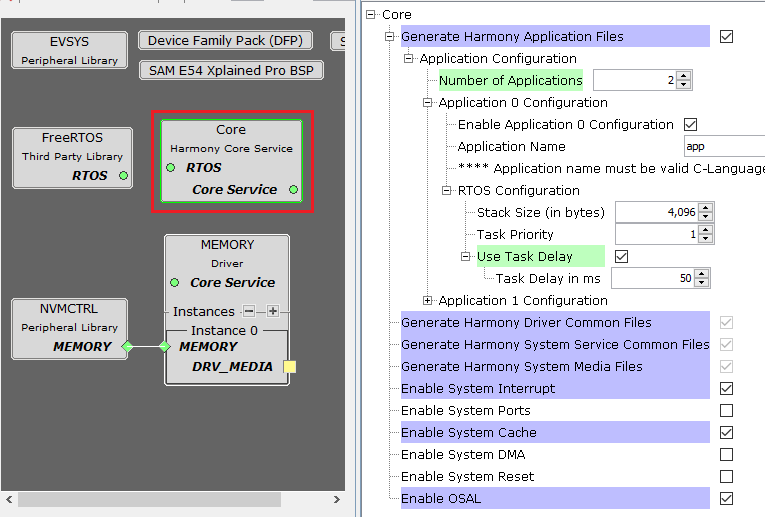
All of below mentioned options are enabled or disabled automatically based on the any driver, system service, or middleware components added into the project graph. Disabling any of these symbols may lead to build errors in the dependent module.
configuration.hheader file will be generated only when one of the below common symbols or application file option is selected.For Example, in above figure as Memory driver is added to project graph, few of the common symbols are enabled and made Read-only to avoid accidental disabling.
Refer to the Individual Library help for more details.
Configuration Options
Generate Harmony Application Files:
This option can be used to generate Harmony application template source and header files
These generated files can be used as starting point by the developer to develop his application
Application Configuration:
Number of Applications:
Specifies the number of application template source and header files to be generated
Application n Configuration:
Enable Application n Configuration:
This option can be used to disable or enable generation of current instance of application files
Application Name:
Specifies the name of the application source and header files to be generated. By default a number sequence will be prefixed based on instances. Below are the files generated if name is
app:app.c
app.h
User can update this field to provide custom names as required. The name must be valid C-language identifier, short and in lowercase.
An associated task routine
APP_Tasks()will be generated in application source file and will be called fromSYS_Tasks()routine.
RTOS Settings:
This configuration is displayed when any RTOS is added into project graph.
Stack Size (in bytes):
Specifies the number of bytes to be allocated on the stack for the current application task.
Task Priority:
Specifies priority for the application task thread. The value can vary based on RTOS used.
Use Task Delay:
When enabled the application task will be scheduled out voluntarily after every run based on the delay configured.
Task Delay:
Specifies the duration the task has to go to sleep after every run
Should be configured carefully based on the application need and number of task running along in the system
Generate Harmony Driver Common Files:
When enabled generates the driver common header files required by all Harmony Drivers
Generate Harmony System Service Common Files:
When enabled generates the system service common header files required by all Harmony System services and Drivers
Generate Harmony System Media Files:
When enabled generates the system media header file required by Media block drivers and File System Service
Enable System Interrupt:
This option can be used to enable System Interrupt library
Enable System Ports:
This option can be used to enable System Ports library
Enable System Cache:
This option can be used to enable System Cache library
Enable System DMA:
This option can be used to enable System DMA library
Enable System Reset:
This option can be used to enable System Reset library
Enable OSAL:
This option can be used to enable OSAL library.
OSAL will get auto enabled and set to "BareMetal" when Middleware or any Driver is instantiated. If any Third-Party Library, i.e., RTOS is added then the respective OSAL Layer code will get generated.
For instance, if user instantiates FreeRTOS, then OSAL is set to
FreeRTOSandosal_freertos.ccode will get generated during code generation.
RTOS Settings For Micrium OS-III RTOS
Below additional options are visible in Application instance RTOS settings when the Micrium OS-III is added into project graph.
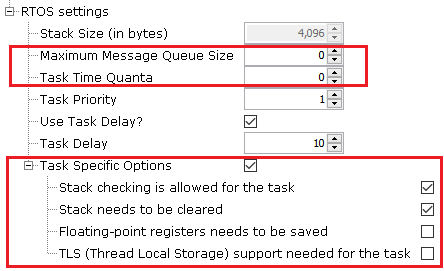
Maximum Message Queue Size:
This argument specifies the maximum number of messages that the task can receive through internal message queue
A Micrium OS-III task contains an optional internal message queue (if OS_CFG_TASK_Q_EN is set to DEF_ENABLED in os_cfg.h)
The user may specify that the task is unable to receive messages by setting this argument to 0
Task Time Quanta:
The amount of time (in clock ticks) for the time quanta when Round Robin is enabled
If the user specifies 0, then the default time quanta will be used which is the tick rate divided by 10
Task Specific Options:
Contains task-specific options. Each option consists of one bit. The option is selected when the bit is set.
The current version of Micrium OS-III supports the following options:
Stack checking is allowed for the task:
Specifies whether stack checking is allowed for the task
Stack needs to be cleared:
Specifies whether the stack needs to be cleared
Floating-point registers needs to be saved:
Specifies whether floating-point registers are saved
This option is only valid if the processor has floating-point hardware and the processor-specific code saves the floating-point registers
TLS (Thread Local Storage) support needed for the task:
If the caller does not want or need TLS support for the task being created.
If the user does not include this option, TLS will be supported by default. TLS support was added in V3.03.00.