7.1 Secure Copy Protocol (SCP) for File Transfer
to a Windows PC
Open the WinSCP software.
Connect the Ethernet cable to the
1 Gbps Ethernet (J5) port.
The PC and the Ethernet cable
connected to SAMA7G54-EK should be on the same network.
Find the IP address of the
SAMA5G54-EK board using the ifconfig command.
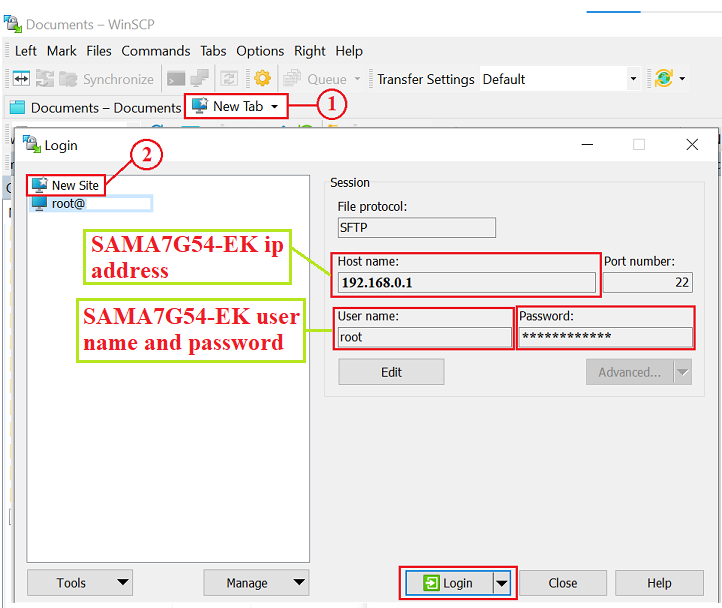
To initiate a new session and
establish a connection to the SAMA7G54-EK, enter the board's host name
(i.e., the IP address of the SAMA7G54-EK board), the username for the
SAMA7G54-EK board, and the corresponding password. Once all the information is
entered, click Login.
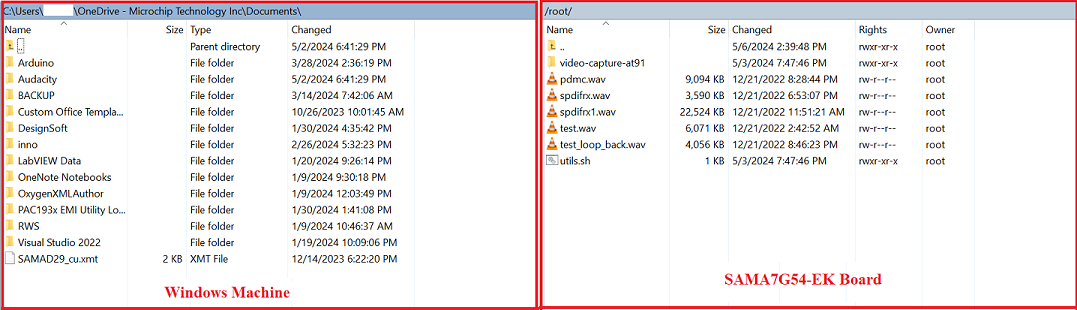
Transfer the file by dragging it
from the left side window to the right side window, or alternatively from the
right side window to the left side window.
The online versions of the documents are provided as a courtesy. Verify all content and data in the device’s PDF documentation found on the device product page.