
2.7 MCLV2 Development Board - Setup and Running the 'PMSM FOC using Encoder application PIC32MK MCM'
Setting Up the Hardware
The following table shows the target hardware for the application projects.
| Project Name | Description |
|---|---|
| mclv2_pic32mk_mcm_pim.X |
Setting Up MCLV2 Development Board
- Mount the PIC32MK MCM Motor
Control Plug In Module on U9 header

- Place the “External Opamp Configuration” Matrix board at J14.

- Motor Connections with MCLV2 Board:
Motor MCLV2 Board Phase U M1 Phase V M2 Phase W M3 +5V +5V -5V GND A HA B HB 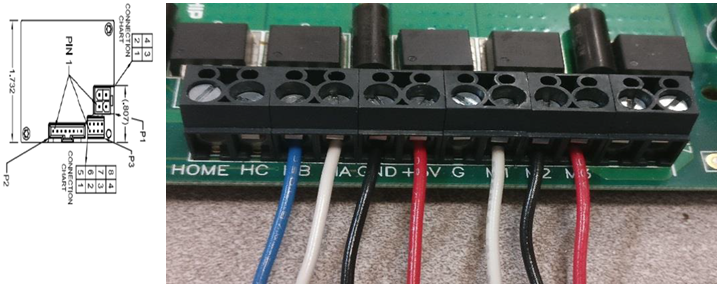
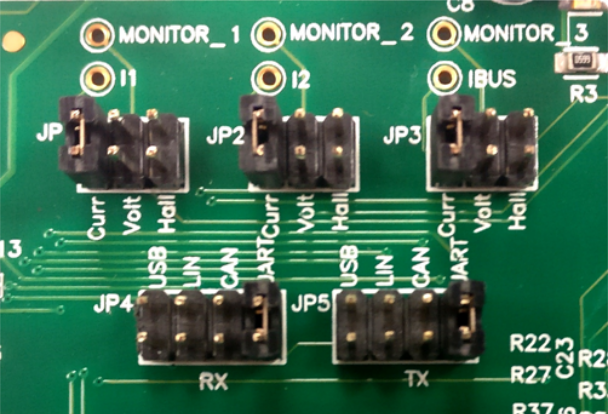
- Jumper Settings:
- JP1 - Curr, JP2 - Curr, JP3 - Curr
- In order to use RS232 port for X2CScope Communication JP4 - UART, JP5 - UART
- In order to use USB port for X2CScope Communication JP4 - USB, JP5 - USB
- Power the board with a 24V DC
supply using J2 or BP1-BP2. For additional safety, it is recommended to use
a current limited power supply while testing this software demonstration on
a non-default hardware and motor.
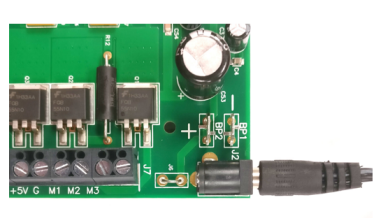
- Complete Setup

Running the Application
- Build and Program the application using its IDE
- Press switch S2 to start the motor
- Vary potentiometer to change the speed of the motor
- Press switch S2 to stop the motor
- Press switch S3 to change the direction of the motor
- Press switch S2 again to start the motor
- Monitor graphs on X2C Scope
Refer to the following tables for switch and LED details:
| Switch | Description |
|---|---|
| Switch S2 | To start or stop the motor |
| Switch S3 | To change the direction of
rotation. Direction toggle command is accepted only when motor is stationary. |
| LED D2 Status | Description |
|---|---|
| OFF | Motor spin direction is “positive” |
| ON | Motor spin direction is “negative” |
| LED D17 Status | Description |
|---|---|
| OFF | No fault |
| ON | Fault is detected |