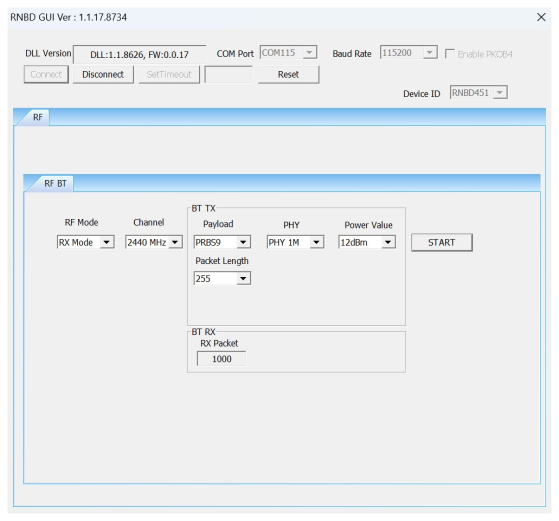
3.3.1 Bluetooth RF Test Demonstration
In this demonstration, the user can transmit Bluetooth Low Energy packets and enter RX mode and Test mode with the RNBD by using the MCHPRT3.
Perform the following steps for the demonstration of the Bluetooth RF TX modulation test:
- Set up the connection between the RNBD Family Add-on Board and PC. For more details, refer to Getting Started with MCHPRT3.
- In the RF BT tab, perform the
following steps:
- From the “RF Modes” drop-down list, select TX Mode.
- From the “Channel” drop-down list, select 2402 MHz for channel 37.
- From the “Payload” drop-down list, select PRBS9 (default value).
- From the “PHY” drop-down list, select the Data Rate (1M, 2M, S = 2 and S = 8), for example, select PHY 1M.
- From the “Power” drop-down list, select the Output Power, for example, select 11 dB.
- From the “Packet Length” drop-down list, select the Packet Length (0–255), for example, 255 (default value).
3. Click START to transmit the Bluetooth Low Energy packet.
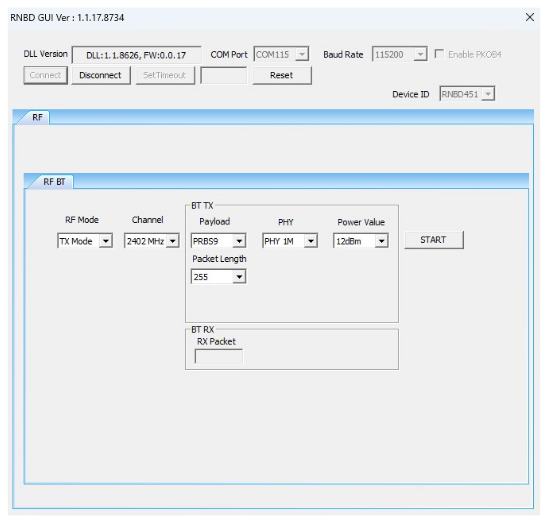
Perform the following steps for the demonstration of the Bluetooth RF RX mode:
- Set up the connection between the RNBD Family Add-on Board and PC. For more details, refer to Getting Started with MCHPRT3.
- In the RF BT tab, perform the
following steps:
- From the “RF mode” drop-down list, select RX Mode.
- From the “Channel” drop-down list, select 2402 MHz for channel 37.
- Click START to receive the Bluetooth Low Energy packet. The number of received packets is shown in the drop-down list, “RX Packet”.