1.1.4.4 Configuring an Application to Be Bootloaded for MPUs
Application settings in MCC system configuration
- Launch MCC for the application project to be configured
- Select System component from the project graph and configure the below highlighted
settings
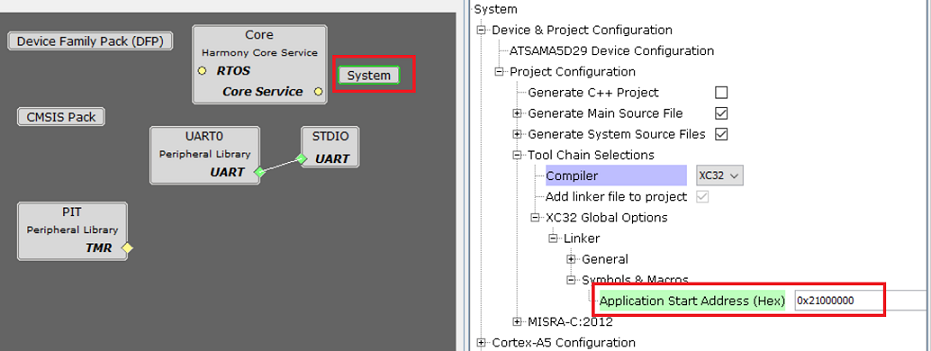
- Specify the Application Start Address:
-
Specify the Start address from where the application will run under the Application Start Address (Hex) option in System block in MCC
-
As this value will be used by harmony 3 bootloader to jump to application at device reset it should match the value provided to bootloader code. It should be start address of the cacheable DDR memory.
-
The Application Start Address (Hex) will be used in the linker script to place the code at intended address
-
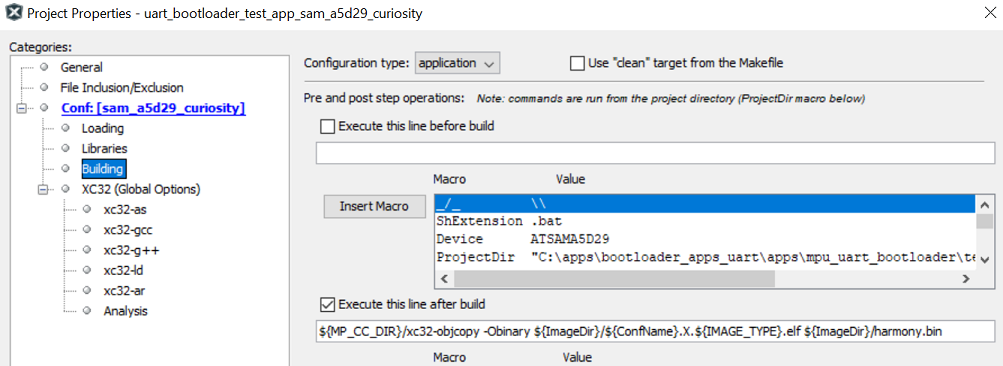
MPLAB X Settings
- Specifying post build option to automatically generate the binary file from ELF file
once the build is
complete
${MP_CC_DIR}/xc32-objcopy -Obinary ${ImageDir}/${ConfName}.X.${IMAGE_TYPE}.elf ${ImageDir}/harmony.bin