7 Building the Application in MPLAB® With the Source Code
This section explains how to generate the library sources and integrate them into the MPLAB X
project for compilation. Use the command explained below and refer to
pic32cmsg-psa-crypto-src-package/README.md for instructions as well. Build
script is available in the path scripts/microchip/create_src_package.py. The
description below details how to use the script.
# create_src_package.py: Creates a library source package containing all the necessary files for manual integration of files into MPLAB X IDE
  projects.
# Create source package for the chosen profile. The example below shows the source package
  creation for the Small profile. This can also be replicated for the Medium, Large or Full profiles, as provided in the scripts/microchip/config directory.
  pic32cmsg-psa-crypto-src-package generated in scripts/microchip/
python scripts/microchip/create_src_package.py create --config configs/microchip/crypto-config-small.h

### Output directory structure
pic32cmsg-psa-crypto-src-package/

├── README.md                         # Build instructions for MPLABX IDE

├── include/

│   ├── mbedtls/                      # Mbed TLS compatibility headers

│   ├── psa/                          # PSA Crypto API headers

│   └── tf-psa-crypto/                # TF-PSA-Crypto headers

├── src/

    ├── core/                         # PSA Crypto core implementation

    ├── dispatch/                     # PSA Crypto driver dispatch

    ├── extras/                       # Additional crypto utilities

    ├── platform/                     # Platform utilities

    ├── utilities/                    # Common utilities

    └── drivers/

        ├── builtin/

        │   ├── include/mbedtls/      # Builtin driver headers

        │   └── src/                  # Software crypto implementations

        └── hsmlite/

            ├── include/              # HSM-Lite headers (cam_*.h)

            ├── lib/                  # HSM-Lite library (libhsmlite*.a)

            └── src/                  # External RNG implementation
# The following command can be used to remove the generated pic32cmsg-psa-crypto-src-package
directory and clean the generated package.
python scripts/microchip/create_src_package.py clean
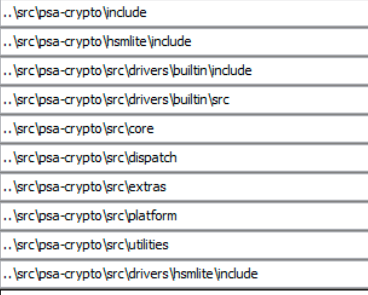
Create the psa-crypto directory inside the secure application project base folder and copy the pic32cmsg-psa-crypto-src-package source package folder contents, i.e., include, src and README into the psa-crypto directory. This has the HSM-Lite driver and all include files along with the source code. So, add the include path for the project so that compilation is successful. The image below shows an example of include paths addition to the project.