
6.1 Programming config.json
The config.json file in the OCTT server is a critical configuration file that defines the operational parameters and settings for the server.
You need to provide the URL and the port number required on the target/client side to establish a WebSocket connection with the OCTT server:
- If required, edit the
config.json file located in the
demo_ocpp_v16_harmony/apps/firmware/src/sdcard folder and perform the
following updates:
- Set the SecurityProfile variable to 0 (non-secured profile).
- Set the WS_URL variable using the URL and port number displayed on
the OCA interface as follows:

-
The WS URL can be found on the OCA interface:
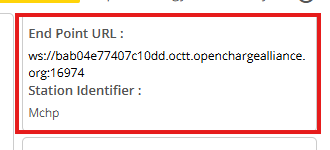 Note: The WS URL format is: URL + Port.
- Copy the config.json file to the root of your SD card.