
2.3 Programming MPLAB® Projects
Note: For more information on how to install the MHC and how to get started using MPLAB Harmony, refer to MPLAB Harmony.
Perform the following steps in MHC for programming the project:
- Open the MPLAB project.
- In the Projects Properties window, select the on-board PKOB from the “Connected Hardware Tool” drop-down menu as shown in the following image.
Figure 2-13. Selecting On-Board PKOB 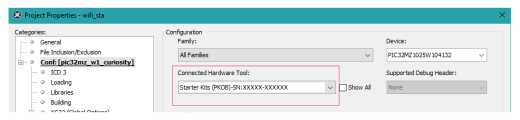
- Use the following steps to build the project:
- Go to Production > Build Main Project or press F11 to build a project.
- Go to Production > Set Main Project > Choose the project to program.
- Go to Debug > Debug Main Project.
Note: For more details on programming and debugging of the Curiosity board, refer to PIC32 WFI32E Curiosity Board User’s Guide (DS50003028).