
1.2.3.5 SAME54 Xplained Pro
The following figure shows the SAME54 Xplained Pro board connected with PL460-EK and REB215-XPRO expansion boards.
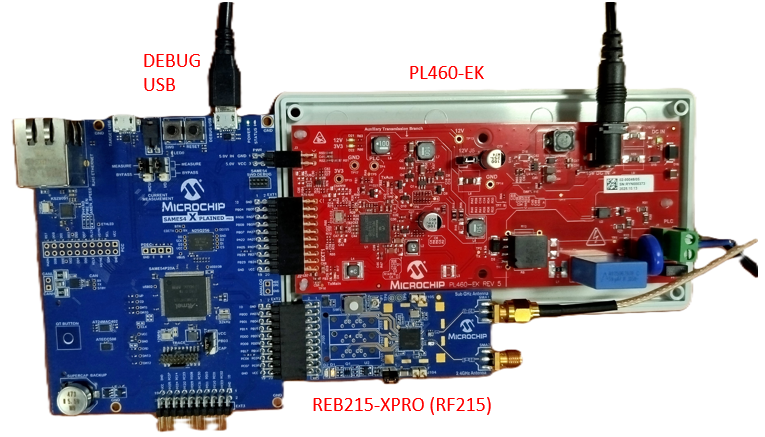
PL460-EK is connected to EXT1 connector of SAME54 Xplained Pro. A 15V DC jack must be plugged into PL460-EK in order to supply the power for PLC transmission. Since the enclosure of PL460-EK does not fit with SAME54 Xplained Pro, the user must be very careful if the PLC wire is connected to the mains due to not all the board is isolated from mains (PLC signal). For additional information about PL460-EK, refer to the user guide.
REB215-XPRO is connected to EXT2 connector of SAME54 Xplained Pro. For additional information about REB215-XPRO, refer to the user guide.
REB215-XPRO is only used in the PLC-RF Hybrid projects (see Table 1-2). In the PLC-RF Hybrid projects, it is possible to connect only one expansion board and the application runs correctly, with only PLC or RF PHY Tester tool available.
- Manage PLC and RF PHY Tester tool. UART baud-rate is configured at 115200 bps.
- Flash/debug the SAME54 device with the on-board Microchip Embedded Debugger (EDBG).
The serial interface used for PLC and RF PHY Tester tool is shared in the same USI instance, as can be seen in user.h file (only for PLC-RF Hybrid projects) and in the MCC configuration of USI service.
#define USER_PLC_USI_INSTANCE_INDEX   SRV_USI_INDEX_0
#define USER_RF_USI_INSTANCE_INDEX    SRV_USI_INDEX_0
For additional information about SAME54 Xplained Pro, refer to the user guide.