
1.2.2 Libero Flow
(Ask a Question)To open the Configurator dialog box, select the Transceiver Interface in the SmartDesign window, see the following figure.
The Transceiver supports Enhanced Receiver Management (ERM), which adds DFE/CDR calibration management and lock-to-data detection capabilities. The ERM is implemented in the FPGA logic inside the Transceiver (XCVR) component. For more information about ERM, see the Enhanced Receiver Management section in PolarFire Family Transceiver User Guide.

The following receiver calibration options are provided for the ERM operation:
- None (CDR): Select this option if the XCVR is configured as CDR and no CTLE auto calibration is performed. Static settings are configured by Libero SoC based on data rate and backplane model.
- On-Demand: Select this option to perform calibration on-demand. This option is available for both CDR and DFE configuration of the XCVR. Calibration can be triggered on-demand using
CALIB_REQport as shown in the following figure. The CALIBRATING signal is asserted uponCALIB_REQassertion and de-asserted when the calibration is completed.Figure 1-12. Transceiver Interface with On-Demand Calibration 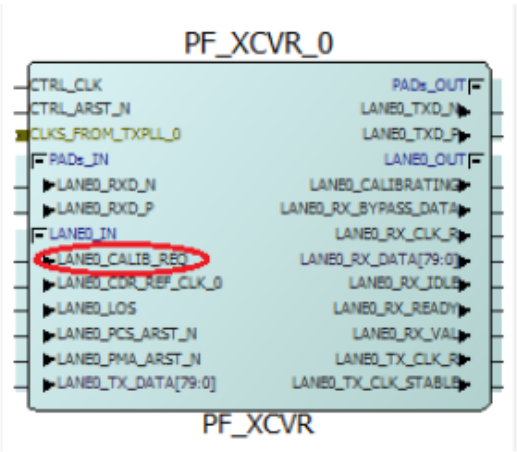
- On-Demand and First Lock: This method is an extension to On-Demand calibration option. This allows the customers to perform CDR/DFE calibration either by toggling the
CALIB_REQpin or after the power on reset. - None (Static_DFE): DC Offset Calibration of the CDR is performed, however, the DFE Coefficients are set through PDC commands used from the register rather than from automatic DFE calibration operation. To set the required registers with static values, users must enhance the
set_ioPDC command to add new attributes. The new attributes that must be added are highlighted in the following example.
set_io -port_name LANE0_RXD_N \
-RX_DFE_COEFFICIENT_H1 20 \
-RX_DFE_COEFFICIENT_H2 20 \
-RX_DFE_COEFFICIENT_H3 20 \
-RX_DFE_COEFFICIENT_H4 20 \
-RX_DFE_COEFFICIENT_H5 20 \
-DIRECTION INPUT
The RX_DFE_COEFFICIENT attributes are optional (applied only when Static calibration is selected). These attributes take integer values between 0 and 15. The corresponding register fields are 5 bits wide in all cases with the MSB bit reserved for sign bit. Static_DFE does not use the DFE calibration routine and requires the user to carefully select DFE coefficient values. These values are gathered by the SmartDebug tool or by simulation. When an initial calibration is completed, the performance of the DFE path is improved incrementally in the following ways:
- Incrementally Recalibrate Data Eye: This recalibration must improve the data eye for most gradients that typically occur from temperature or voltage changes within the system.
- Incrementally Recalibrate DFE Coefficient: This recalibration performs the DFE calibration in incremental method. The initially calculated DFE coefficient values are used as the starting values for this algorithm. This results in the reduction of the Calibration time by reducing the number of DFE coefficients that requires recalibration. Important: Full calibration is always done for DFE. You must select any one of the two options—On-Demand and First Lock or On-Demand, if the transceiver is configured in DFE mode.
In the Signal Integrity View window of I/O Editor shown in Figure 1-3, the following Rx settings are selected:
- Calibration: None(CDR)/On-Demand/On-Demand and First lock/None (Static DFE) options are provided.
- RX_CTLE: 63 CTLE settings are provided in Receiver section. You can select any value from IBIS-AMI simulations or recommended values from Table 1-4 or from Table 1-5.
- DFE Mode: DFE mode is enabled automatically based on the data rate and insertion loss of a channel. DFE values are either auto-tuned in On-demand/On-demand and First Lock mode or set to values recommended in Table 1-4 or set by PDC commands in static DFE mode described in the Receiver section.