1 MPLAB® Code Coverage Overview
MPLAB Code Coverage provides visibility as to what portions of your code are being executed. Run your test cases to completion for a visual display of coverage. See [AoU-09-COV].
Code Coverage features require the following tools:
- MPLAB X IDE v6.35 or later, which supports the display of code coverage data without a licenses from an MPLAB XC C compiler. See [AoU-04-COV].
- An MPLAB XC C compiler that supports code coverage output without a license. See [AoU-02-COV].
Note: This manual is written for MPLAB X IDE v6.35 or later. Use MPLAB X IDE
for the best code coverage experience.
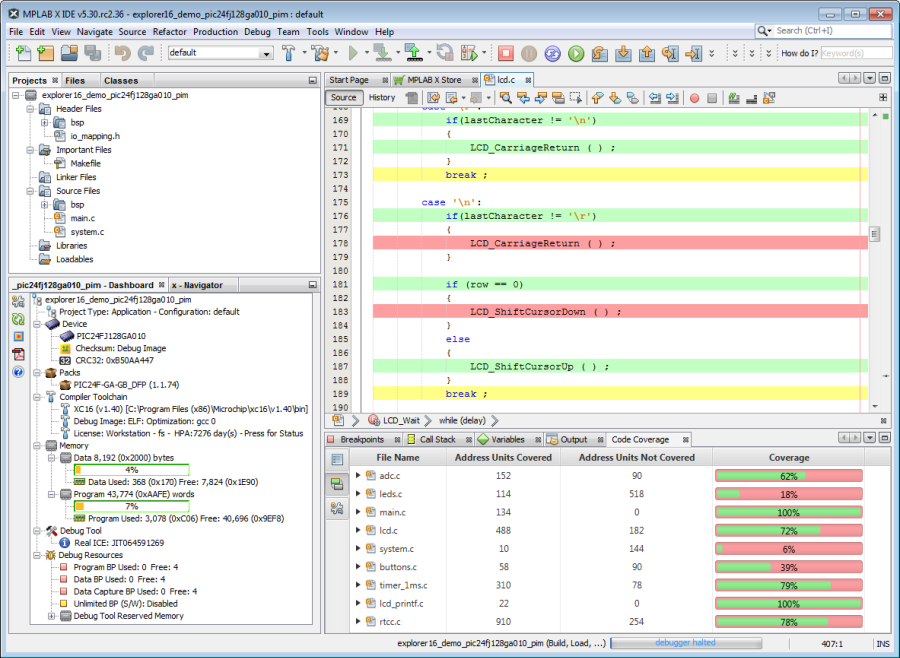
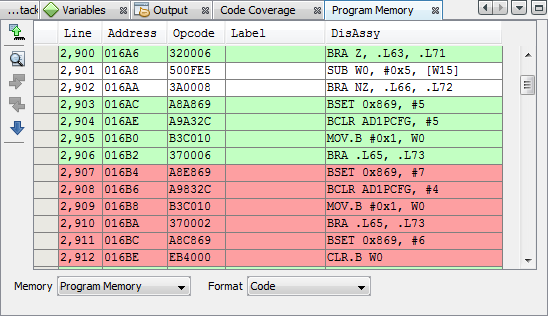
Code Coverage is displayed in the MPLAB X IDE as:
- Editor text highlighted by colors
representing coverage:
- Green = executed
- Yellow = partially executed
- Red = not executed
- Program memory highlighted by colors representing coverage.
- A Code Coverage tab with a report displaying color percentages of code covered. This information may be written to an HTML Report for later viewing.