
8 Power Supply
The USB port serves as the primary power source for the board. The power supply uses two LDO regulators: A fixed 3.3V regulator for the on-board debugger and an adjustable regulator for the target MCU and its peripherals.
When the USB is connected, there is a 1 ms start-up delay before power is applied, and a dedicated current-limiting IC restricts the supply current to approximately 500 mA to protect the board and connected devices. The figure below shows the full power supply design of the PIC32CM PL10 Curiosity Nano.
The maximum input voltage to the target MCU depends on both the USB input voltage and the on-board debugger's configuration. While the debugger can be set to allow up to 5.5V, the actual voltage will never exceed the USB input, which typically ranges from 4.4V to 5.25V. The lower of these two values determines the maximum voltage available to the target MCU.
8.1 Target Regulator
The MIC5353 variable output LDO supplies power to the target section. The on-board debugger controls the regulator’s output voltage by adjusting its feedback. The on-board debugger restricts the output voltage to the safe operating range of the PIC32CM6408PL10048 microcontroller (1.8–5.5V).
- Microchip IDE: Configure the voltage setting in the IDE. Voltage changes are applied when the debugger is accessed (e.g., during programming, reading memory, or refreshing tool status).
- Drag-and-drop command files: Set common voltages quickly using command files. For details, see Nano Debugger Manual.
- pymcuprog: Use the pymcuprog tool to set the board voltage
The MIC5353 can supply up to 500 mA, but the actual maximum current may be lower due to thermal shutdown, which depends on input voltage, output voltage, and ambient temperature. The figure below illustrates the maximum output current limits of the regulator at a 5.1V input and 23°C ambient temperature.
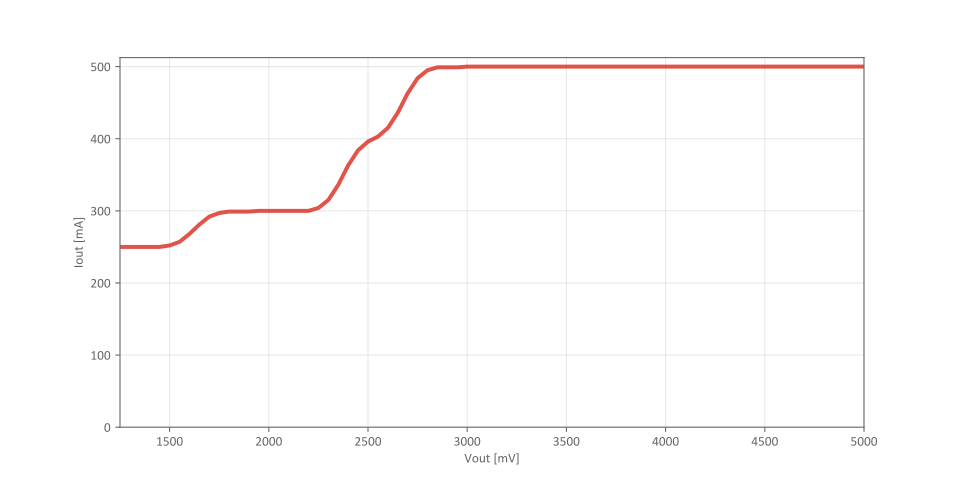
The on-board debugger monitors target voltage. If the voltage deviates by more than ±100 mV from the set target voltage, or if external voltage is applied to VTG without VOFF pulled low, the on-board debugger disables the regulator and blinks the status LED rapidly. See the Nano Debugger Manual for more details.
8.2 External Supply
The PIC32CM PL10 Curiosity Nano can be powered by an external voltage through the VTG pin, as an alternative to the on-board target regulator.
- Pull the VOFF pin to GND to disable the on-board regulator
- Apply external voltage to the VTG pin
- Never apply voltage to VOFF; leave it floating to enable the on-board supply
- Only apply external voltage to VTG after pulling VOFF to GND. Failing to do so may cause damage to the board
The on-board debugger monitors the supplied voltage. If VOFF is not pulled to ground and the external voltage differs by more than ±100 mV from the regulator setting, the debugger disables the regulator and begins blinking the status LED rapidly. When the voltage returns to within ±100 mV, normal operation resumes and the LED stops blinking.
Programming, debugging, and data streaming with external power are only supported when the USB cable is connected, as it supplies power to the debugger and level shifters. With the USB connected, about 100 μA is drawn from the external supply for level shifters and voltage monitoring. If the USB cable is disconnected, the level shifters may draw up to 5 μA (typically as little as 100 nA).
| Parameter | Value |
|---|---|
| PIC32CM6408PL10048 operating range | 1.8–5.5V |
| Absolute maximum external voltage | 5.5V |
8.3 VBUS Output Pin
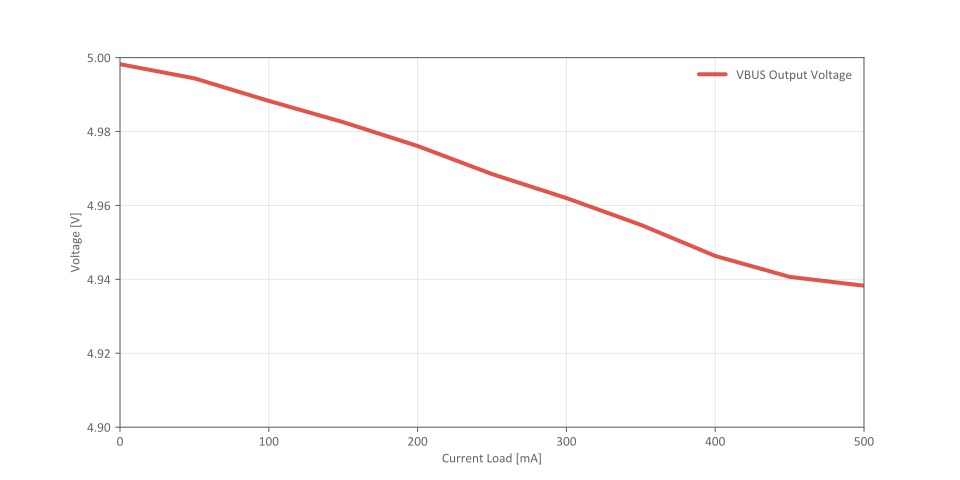
The PIC32CM PL10 Curiosity Nano provides a VBUS output pin that supplies 5V for powering external components. The VBUS voltage is not regulated and directly follows the USB input voltage, which may vary depending on the USB source. VBUS is protected by the same start-up delay and current limiting described in the Power Supply chapter. Be aware that as the current load on the VBUS output increases, the output voltage may decrease. The chart below illustrates how the VBUS output voltage varies with different current loads.
8.4 Cut Straps
Curiosity Nano boards feature two cut straps for power measurement and isolation:
J200 - Power Supply Strap:
J201 - Target Power Strap:
For current measurements using the on-board power supply, cut this strap to measure the current drawn by the target. A 100 mil pin header can be mounted to J201 for easier connection of a measuring instrument.
8.5 Low-Power Measurement
Power for the target MCU is supplied via the on-board regulator or the VTG pin, routed through the Target Power Strap J201. To accurately measure the current consumption of the target MCU and any connected peripherals, cut the Target Power Strap (J201) on the bottom side and connect an ammeter across it.
- Cut the Target Power Strap (J201) with a sharp tool.
- Solder a 1x2 100 mil pin header into the footprint.
- Connect an ammeter across the pin header.
- Write firmware that:
- Tri-states any I/O connected to the on-board debugger.
- Sets the microcontroller in its lowest power sleep mode.
- Program the firmware into the target MCU.
- Measure the current draw.
8.6 Power Supply Exceptions
This section summarizes most issues that can arise with the power supply.
Target Voltage Shuts Down
If the target draws too much current, the MIC5353 regulator may trigger thermal shutdown. Reduce the load to restore operation.
Target Voltage Setting is Not Reached
The MIC5353 output is limited by the USB input voltage (4.4–5.25V). If the set voltage isn’t reached, use a higher-quality USB source or supply external voltage via the VTG pin.
Target Voltage is Different From Setting
Applying external voltage to VTG without pulling VOFF low can cause voltage mismatch. If the voltage deviates by more than ±100 mV, the debugger disables the regulator and the PS LED blinks rapidly. Remove the external voltage to restore normal operation.
No or Very Low Target Voltage and PS LED is Blinking Rapidly
A full or partial short circuit can cause this and is a specific case of the issue above. Remove the short circuit, and the on-board debugger will re-enable the on-board target voltage regulator.
No Target Voltage and PS LED is Lit (Case 1)
This situation occurs if the target voltage is set to 0.0V. To fix this, set the target voltage to a value within the specified voltage range for the target device.
No Target Voltage and PS LED is Lit (Case 2)
This situation can occur when cutting the Power Supply Strap (J200) and/or the Target Power Strap (J201) and leaving them open. Restore the connection by bridging or adding a jumper.
VBUS Output Voltage is Low or Not Present
Excessive current on VBUS triggers the MIC2009 current limit, cutting off VBUS. Reduce the load to restore output.