
5.2 Options to Run Visualizer
(Ask a Question)To capture simulation data and review the waveforms in Visualizer's standalone mode, perform the following steps:
- In Libero SoC, open the Project menu and choose Project settings .
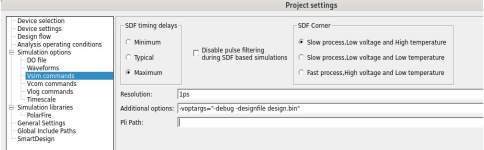
- In the Project settings window, under Simulation options select Vsim commands.
- In the Additional
options, add the following
switches:
-voptargs="-debug -designfile design.bin" - Run the simulation—this generates the design file (
design.bin) and the waveform database (qwave.db). - To review later, launch Visualizer in standalone mode and load the two files.
The following figure shows the options available to run Visualizer.
For detailed instructions, see the Visualizer documentation included with your QuestaSim installation.