5.1 Launching Visualizer
(Ask a Question)To enable Visualizer, perform the following steps:
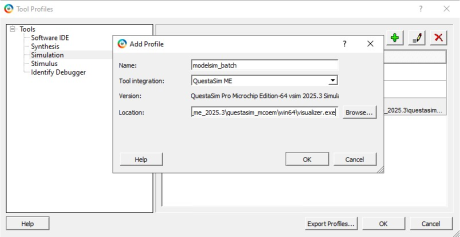
- In Libero® SoC, open the Project menu and choose Tool Profiles.
- In the Tool Profiles dialog box, select the Simulation tool type.
- Add or edit a profile and browse to
the Visualizer executable—on Windows®
visualizer.exe(located under…/QuestaSim_Pro/win64), on Linux®visualizer(located under<your_Libero_workspace>/QuestaSim_Pro/bin/visualizer). - Click OK to save the profile. Visualizer is now the selected debug environment.
The following figure shows the Tool Profiles dialog box.