
4.4.1.1 Public Keys
Security Objectives:
- Integrity
- Authenticity
- Authorization
- Access Control
NIST SP 800-193 Section 3.5.1 states, “The key store and the signature verification algorithm are stored in a protected fashion on the computer system and are modifiable only through use of an authenticated update mechanism or a secure local update mechanism.”
To protect the key store, the Flash protection regions can be used to block modification of the key store except when authorized. For more information on Flash protection regions, see Flash Protection Regions.
In the simplest configuration, a firmware region can be used for the key store and the permissions can be set by the IRT/boot code. The key store region should be locked until Reset with writes disabled as soon as possible, if there isn’t a valid update for the key store.
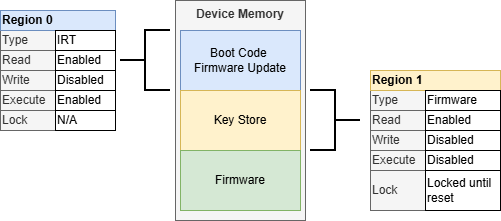
A firmware region can be used to lock permissions to the key store unless there is a valid update for the key store.
This approach could leave the key store open to modifications by firmware, if the region isn’t locked properly. If the key store is not needed in the application firmware section, an overlapping writable IRT section can be used to restrict the key store access to the IRT only.
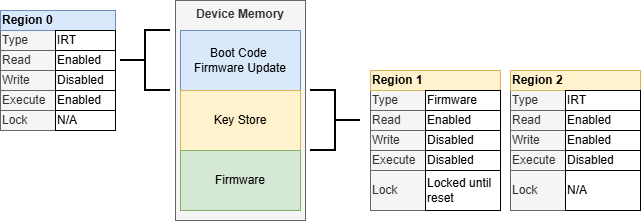
By overlapping an IRT region on the key store, the key store can be restricted to only access from the IRT code. The IRT region needs to have writes enabled. The overlapping firmware region (Region 1, in this example) provides the run-time write access to the IRT and can be locked until Reset when the IRT does not need to do a key store update.
A secure local update could be as simple as physical port with physical access protections that allow only authorized people access to the system to invoke the update.
For an authenticated key store update, a simple solution is to use a separate public key to authenticate the key store. Like certificate chains, the keys used to sign/authenticate the other keys are rarely used and require a higher level of protection. At this point, the key store can be updated in a similar way to the firmware described in Secure Firmware Update.
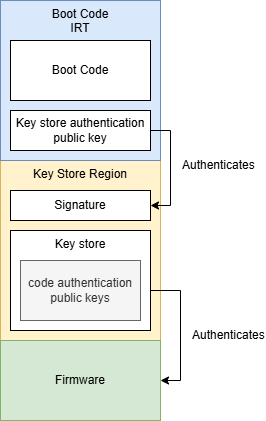
Using a second key to authenticate the key store allows updates to the key store. This approach uses a fixed key to authenticate the code signing keys but by further restricting access to the key store signing key, the security of the system is increased.
An alternative approach could be to include a key in the key store specifically allocated to verify the key store itself. This would allow the key store signature verification key to be updated as well in the case of a key compromise.
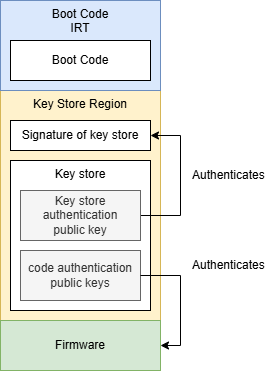
Including the key store authentication public key in the key store itself allows that key to be updated.
In both signature methods, regardless of where the public key used to sign the key store is stored in the device, it is critical to protect both the key from modification as well as the mechanism to issue a key store update.
Key Considerations:
- Use a Flash protection region to disable
execution of the key store area of memory and restrict writing to the area only
after authorization
- Use the lock until reset feature on the key store region to prevent modifications to the key store when there isn’t an authenticated, authorized key store update available
- Restrict access to the key store signing key with even tighter controls than the code signing keys
- Additional signatures will increase the boot time
- Use the Cryptographic Accelerator Module (CAM) to accelerate the authentication of signatures