
1.5.6 SAML10 Xplained Boost Mode Example using T10 Xplained Pro Mutual
Path of the application within the repository is apps/t10_mutualcap_xpro_board/sam_l10_xpro_boost_mode/
To build the application, refer to the following table and open the project using its IDE.
| Project Name | Description |
|---|---|
| sam_l10_xpro_boost_mode\firmware\sam_l10_xpro.X | MPLABX Project for SAML10 Xplained Pro Evaluation Kit |
Hardware Setup
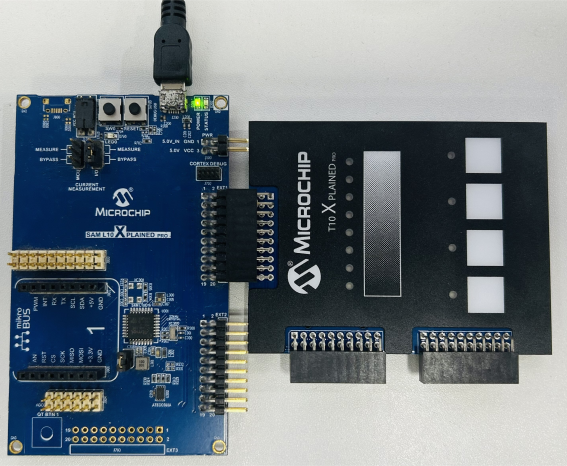
- Project uses SAML10 XPlained Pro Evaluation Kit and T10 Xplained Pro Extension Kit
- Connect EXT3 of T10 Xplained Pro to EXT1 of SAML10 Xplained Pro
- Connect the Debug USB port on the board to the computer using a micro USB Cable
Running the Application
- Open the application project sam_l10_xpro.X in the IDE
- Build the project and program the target board
- Configure COM Port
- Select Autoconfigure in Variable Streamers tab
- Select the correct COM port in source
- Configuration files are stored as part of the project source files
- In Auto Configure Options, browse the ../touch/datastreamer/ project folder and click on Select Folder
- Update the Baud Rate to 115200 in COM Settings
- Start Streaming for COM data
Detailed procedure can be found in Visualize Touch Data Using MPLAB® Data Visualizer page.